The VST-1818-R3 IP Camera is a comprehensive surveillance solution designed for both residential and business environments, offering quick and accurate monitoring. It provides live-stream videos through MJPG or H264 formats via a Local Area Network or remotely using port forwarding. The camera can also be integrated with Climax Security Control Panels to form a complete security system, capturing video when an alarm is activated.
Function Description:
The VST-1818-R3 IP Camera offers a variety of adjustable functions. It supports alarm-triggered video recording, pre-alarm recording, and 24-hour HD video recording. Users can access and control the camera via a web-enabled device through the Climax Home Portal Server or by using port forwarding. It can be learned into Climax Control Panels (HPGW series, VST-2735/2752, and M-series with IP compatibility) for enhanced functionality, including surveillance and setting adjustments.
Important Technical Specifications:
- Video Resolution: 1920 x 1080
- Wireless Connectivity: Wi-Fi (internal antenna) with 2.4GHz capacity
- Power Supply: 5V DC 1A adapter
- Storage: Supports Micro SD Card up to 32GB (not provided by factory default). If no MicroSD card is inserted, it utilizes RAM memory, which clears recorded videos upon power down.
- Motion Detection: Configurable with up to two customizable regions.
- System Requirements (for CD Wizard installation):
- Operating System: Microsoft Windows 98, ME, NT4.0, 2000, XP, Vista, 7, 8; Mac or Linux based machines are also compatible.
- Browser: DirectX 9.0 or later Internet Explorer 6.x or later
- Hardware: CD-ROM drive, Pentium III CPU 500 MHz or higher (or equivalent AMD), 128 MB RAM, Graphics card with 32 MB RAM.
- Network Environment: Requires a TCP/IP network.
- Default Username: admin
- Default Password: cX+HsA*7F1
- Contact ID Event Codes: 789 (Region 1 Detection), 788 (Region 2 Detection)
Usage Features:
- Hardware Installation: Involves removing plastic covers, connecting the adapter and Ethernet cable (for wired connection), and mounting the camera using the provided base.
- Angle Adjustment: The camera can be tilted forward/backward and rotated clockwise/counterclockwise.
- Software Installation (Finder): The "Finder" software (Finder_v2.x) is used to identify the IP Camera on the LAN, displaying its IP address, firmware version, and MAC address.
- Webpage Connection: The camera can be accessed via an internet browser by entering its IP address. Default login credentials are "admin" and "cX+HsA*7F1".
- Image Tuning: Allows adjustment of brightness, saturation, contrast, sharpness, denoise, and hue.
- Motion Detection: Users can enable motion detection, define up to two detection regions, and adjust their size, location (Left, Top, Width, Height), and sensitivity. Detected motion can trigger video recording and reporting.
- Time Stamp: Configurable position (None, Left-Top, Left-Bottom, Right-Top, Right-Bottom, Bottom-Center), date format (YYYY-MM-DD, DD-MM-YYYY, MM-DD-YYYY), and time format (24 Hour, AM/PM).
- Stream Setting: Adjusts video streaming quality (Fair, Standard) and Frames Per Second (FPS) for H264 and Motion JPEG streams. A port number can be set for H264 streaming.
- Recorded Files: Displays all recorded videos stored on the Micro SD card or RAM. Options include selecting/deselecting all, older half, or inverting selection, deleting, and downloading/playing videos.
- Alarm Setting: Configures video recording options, including Total Time (default 30 seconds) and Pre-Alarm Time (default 10 seconds). Motion Detection Upload can be enabled to upload triggered videos.
- Video Setting: Allows viewing of current video and offers a top/bottom flip image option.
- Network Setting: Configures network parameters, including obtaining an IP address automatically (DHCP) or manually (Static IP, Subnet Mask, Default Gateway, DNS 1, DNS 2). DNS Flush Period can be set to clear DNS resolution records.
- Wireless Setting: Configures Wi-Fi connection by searching for available networks, entering pre-shared key, encryption type, and using WPS for pairing.
- UPnP (Universal Plug and Play): Enables UPnP device discovery and port redirection for seamless network integration and remote access.
- Remote Access: Connects to the IP camera outside the local network via the Climax Home Portal Server or Port Forwarding. VLC media player is recommended for streaming.
- Network Video Recorder (NVR): The VST-1818-R3 supports NVR software (IPCamRecoder) to record HD video (1920x1080) to a local computer drive. Recordings are automatically divided into 1-hour segments.
- Integration with Control Panels: The camera can be learned into Climax Control Panels by pressing and holding the Privacy Button for 10 seconds to enter learning mode.
Maintenance Features:
- Factory Reset: Resets the IP Camera to its original settings by disconnecting power, holding the Privacy Button, and plugging in power for 30 seconds.
- Change Password: Allows users to edit the username and password for accessing the camera's webpage.
- Report: Programs report destinations for CID event codes triggered by motion detection.
- Media Upload: Configures FTP/HTTP/HTTPS/MMS/Email destinations for captured video uploads.
- XMPP: Connects to the Home Portal™ Server for remote control.
- Date & Time: Sets the camera's date and time, with options for automatic synchronization with an Internet time server.
- Firmware Upgrade: Allows updating the camera's firmware by uploading a file.
- Backup & Restore: Backs up current settings to a file and restores previously stored settings.
- System Log: Displays system operation history, which can be downloaded.
- Logout: Disconnects from the IP Camera webpage.
- Reboot: Restarts the IP Camera.
- Recycle Recorded Video: When enabled, the IP camera automatically deletes the oldest videos to clear space on the MicroSD card or RAM.
- SD Card Loop Recording Video: When enabled, the IP camera continuously records video and overwrites from the oldest footage.

 Need help?
 General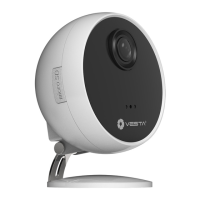

 To Next Page