EasyManua.ls Logo

Clinton Electronics CE-955-CAM-WD - User Manual

Clinton Electronics CE-955-CAM-WD
15 pages
Print Icon
To Next Page IconTo Next Page
Loading...
CE-955-CAM-WD
1
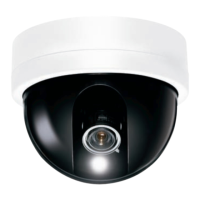
High Resolution Color Wide Dynamic Dome Camera
INFORMATION - This equipment has been tested and found to comply with
limits for a Class A digital device, pursuant to part 15 of the FCC Rules & CE Rules.
These limits are designed to provide reasonable protection against harmful
interference when the equipment is operated in a commercial environment.
This equipment generates, uses, and can radiate radio frequency energy and, if
not installed and used
in accordance with the instruction manual, may cause
harmful interference to radio communications.
Operation of this equipment in a residential area is likely to cause harmful
interference in which case the user will be required to correct the interference at
his own expense.
Do NOT use power sources other than class 2 power.
Do NOT expose this appliance to rain or moisture.
This installation should be made by a qualified service person and
should conform to all local codes.
The lightning flash with an arrowhead symbol, within an equilateral
triangle is intended to alert the user to the presence of uninsulated
dangerous voltage within the product's enclosure that may be of
sufficient magnitude to constitute a risk of electric shock to persons.
The exclamation point within a
n equilateral triangle is intended to alert
the user to the presence of important operating and maintenance
(servicing) instructions in the literature accompanying the appliance.
WARNING - Changes or modifications not expressly approved by the
manufacturer could void the user's authority to operate the equipment.
CAUTION : To prevent electric shock and risk of fire hazards:

Questions and Answers

  • D
    David RobertsAug 1, 2025
    What to do if nothing appears on my Clinton Electronics CE-955-CAM-WD screen?
    • H
      Helen RussellAug 1, 2025
      If nothing appears on the screen of your Clinton Electronics Security Camera, begin by checking the power connections to ensure they are secure. Also, verify the VIDEO signal line connection.
  • A
    Ashlee ClarkAug 6, 2025
    Why is the image on my Clinton Electronics Security Camera screen dim?
    • L
      Laura BoydAug 6, 2025
      If the image on your Clinton Electronics Security Camera screen is dim, there are a few things you can check: 1. Ensure the lens is clean. If it's dirty, gently clean it with a soft, clean, lint-free cloth. 2. Adjust the monitor's contrast and brightness controls. 3. If needed, re-position the camera.
  • J
    Jessica AndradeAug 13, 2025
    How to fix a dark image on Clinton Electronics CE-955-CAM-WD?
    • S
      Shawn GloverAug 13, 2025
      To fix a dark image on your Clinton Electronics Security Camera, first, adjust the contrast control of the monitor. If you are using an intermediate device, ensure that the 75?/ Hi-z is set properly.
  • H
    Heather SmithAug 20, 2025
    Why doesn't the SENS-UP function work on my Clinton Electronics Security Camera?
    • K
      Kristin RiveraAug 20, 2025
      If the SENS-UP function isn't working on your Clinton Electronics Security Camera, verify that AGC in the EXPOSURE menu is not set to 'OFF'. Also, check that SHUTTER in the EXPOSURE menu is not set to 'FLK' or 'MANUAL'.
  • R
    russochristinaAug 25, 2025
    How to fix DAY/NIGHT menu on Clinton Electronics Security Camera?
    • M
      Michelle SmithAug 25, 2025
      To fix the DAY/NIGHT menu on your Clinton Electronics Security Camera, check that AGC in the EXPOSURE menu is set to 'OFF'.

Summary

Product Features Overview

Safety Warnings and Precautions

General Safety Precautions

Covers periodic checks, handling malfunctions, surface support, and wet hands.

Electrical and Fire Hazards

Warns against disassembling the unit and operating near gas or oil leaks.

Environmental Precautions

Temperature and Humidity Limits

Advises on operating within specified temperature and humidity ranges.

Handling and Shocks

Guidance on avoiding physical shocks, drops, and touching the lens.

Light Exposure and Liquids

Precautions against strong light, rain, spills, and radioactivity.

Camera Installation

Dome Base Mounting

Steps for securely mounting the camera base.

Power and Monitor Setup

Details on power connection and monitor impedance settings.

Camera Module Adjustment

Instructions for adjusting the camera's direction and angle.

Troubleshooting Guide

No Image on Screen

Solutions for when the screen displays no image.

Unclear or Dark Image

Troubleshooting steps for poor image clarity or darkness.

Camera Malfunctions

Addresses issues like overheating, D/N not working, and motion detection.

Technical Specifications

Clinton Electronics CE-955-CAM-WD Specifications

General IconGeneral
BrandClinton Electronics
ModelCE-955-CAM-WD
CategorySecurity Camera
LanguageEnglish