24
8 - CONTROL
8.7 PARAMETERS
P02 Economic SetPoint in heat mode
P03 Economic SetPoint in cool mode
P04 Enable the set and the economical functions
P05 Enables the automatic setpoint
P06 Set CO2
P200
Enables buzzer in case of alarm : 0=disabled,
1=enabled
The setting parameters are protected by password to avoid
inadvertent changes that can affect the unit operating.
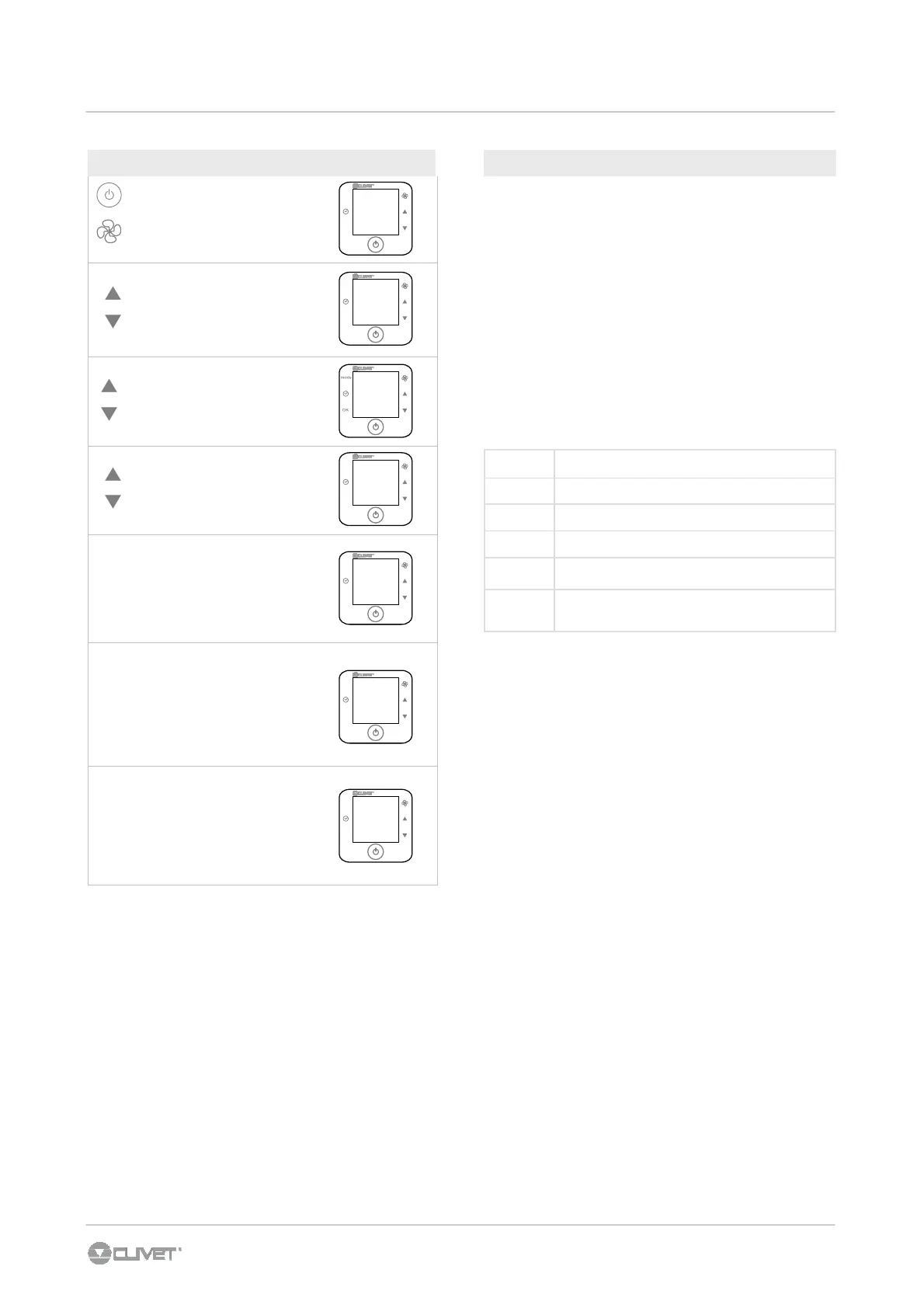
To access to the parameters
1. press On/Off + Fan button for 5 sec.
2. enter password : with the ▲ ▼ button set Code = 2
3. Confirm with OK
4. Select the PAr menu and confirm with OK
5. Scroll the list ▲ ▼
6. Select the parameter with OK
7. Modify the value ▲ ▼ and confirm with OK
8. To esc, scroll the lost, select ESC and confirm with OK
STORED ALARM (installer use only)
Press buttons for 5 sec
Enter password
Confirm with OK
Select S ALM
Confirm with OK
Scroll alarm list (AL1, AL2...)
and dysplay alarm detail
AL1
XX
1° alarm - 1°display
new alarm
alarm code
dA1
YY
1° alarm - 2°display
alarm day 1
day number after alarm
HA1
hhmm
1° alarm - 3°display
alarm hour 1
000
mode
OK
CODE
20.3
°c
mode
OK
10:00
Mon
21.0°
c
mode
OK
S001
21.0°
c
mode
OK
S001
HA1
hhmm
21.0°
c
mode
OK
S001
AL1
XX
21.0°
c
mode
OK
S001
dA1
YY
SALM



 To Next Page