5
M0CZ00007-03
DISPLAY
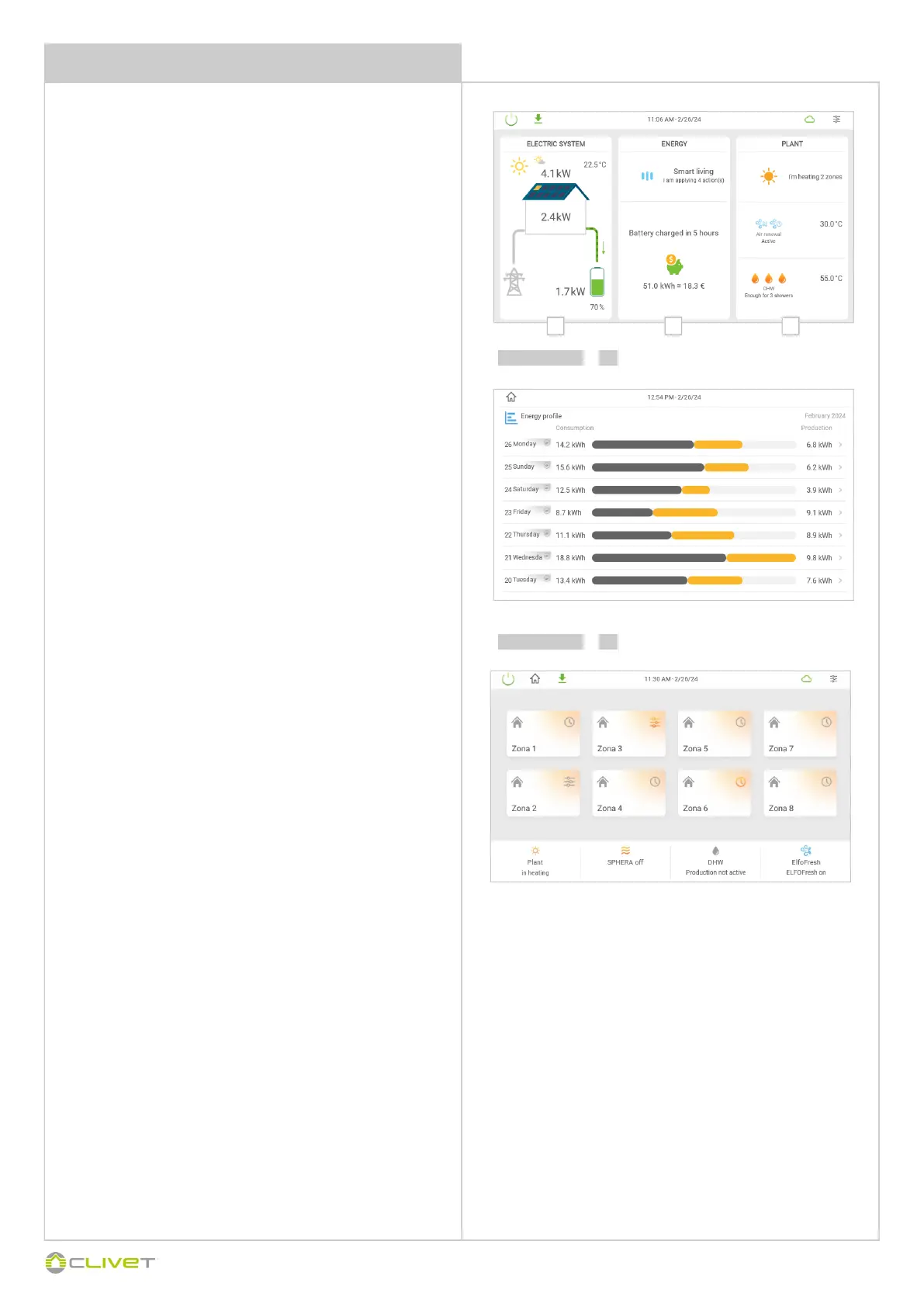
MAIN PAGE
CONTROL4 NRG comfort and energy assistant.
The new main screen is split into 3 separate sections that display all
the system information.
The sections are displayed according to the system configuration:
1 ELECTRICAL SYSTEM
This section can be found on the main screen if the SINERGY unit is
available in the system configuration.
The following information is displayed:
Photovoltaic system productiontaico
Energy consumption
Entry/withdrawal from the network
Sinergy battery level
Pressing anywhere in the section opens the “Energy report” page.
2 ENERGY
This section can be found on the main screen if at least one energy
measuring device is added to the system configuration.
The following information is displayed:
Heat pump unit efficiency
Targeted energy tips
Energy usage statistics of the Sinergy unit connected
3 SYSTEM
This section can always be found on the main screen.
The following information is displayed:
Heat pump and area status
Air renewal status
DHW production status
Pressing anywhere in the section opens the area page.
Caution: If the Sinergy unit and an energy measuring device are
not available in the configuration, the main screen is SYSTEM.
1 2 3
3
select 1
select



 To Next Page
 Loading...