6
M0CZ00007-03
DISPLAY
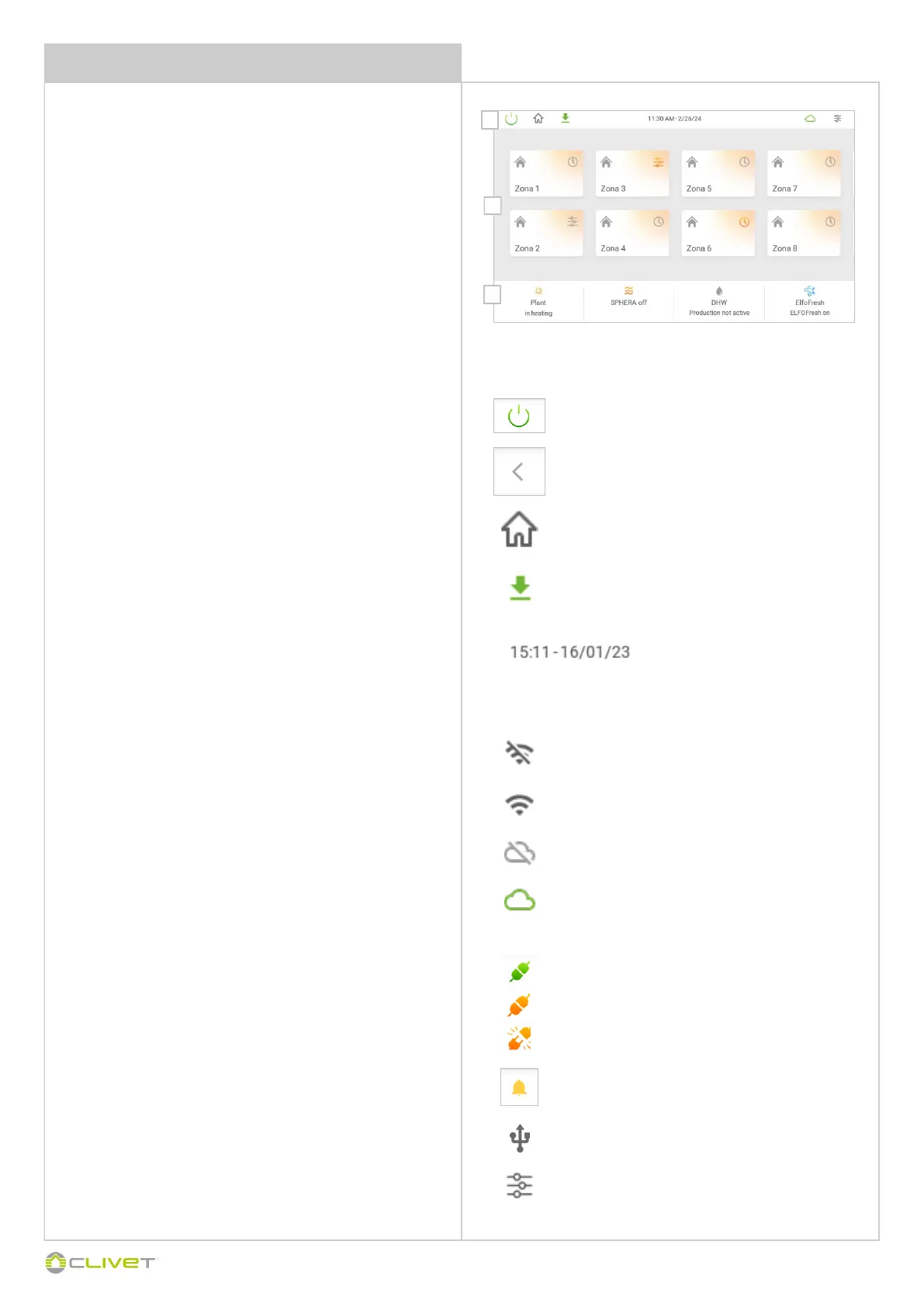
1 Main control
New software update availability notification
Return to the main display
(displayed in the subsequent menus)
Alarms
Reports an alarm
Information displayed:
1 Main control
2 System areas
3 System status
1
2
3
Switching on and off the system, away from home
Return to the main display
Domotic control
Green = connected domotics
Red = disconnected domotics
Connected domotics, but not in communication (disabled)
Date / Hour
Internet/Cloud connection status
Multi-status icon displays CONTROL4 NRG connectivity status
Not connected = There is no Internet, Wireless or wired connection
Connected = CONTROL4 NRG is connected to the Internet via Wi-Fi
or wired Ethernet
Not connected to the Cloud = CONTROL4 NRG is connected to the
Internet but not connected to the Cloud
Connected to the Cloud = CONTROL4 NRG is connected to the
Internet and to the Cloud
Settings
Provides access to the system/user settings panel
Press to access user settings
Press and hold for 2 seconds to access the system settings
USB inserted
Signals that a USB device is connected to the panel


 To Next Page
 Loading...