INFORMATION
SET. ECO MODE has two types of curves:
1. the high temperature setting curve for heating
2. the low temperature setting curve for heating
If the high temperature for heating is set:
it only has the high temperature setting curve for heating.
If the low temperature for heating is set:
it only has the low temperature setting curve for heating.
See the FOR SERVICEMAN > HEAT MODE SETTING
It is not possible to adjust the desired temperature T1S when
the ECO mode is activated (ON)
It is possible to select the low or high temperature setting for
heating: see table 1-2.
If ECO MODE is active (ON) and ECO TIMER is deactivated
(OFF), the unit always operates in ECO mode.
If ECO MODE is active (ON) and ECO TIMER is activated
(ON), the unit operates in ECO mode according to the start
and end times.
Il modo ACS include i seguenti elementi:
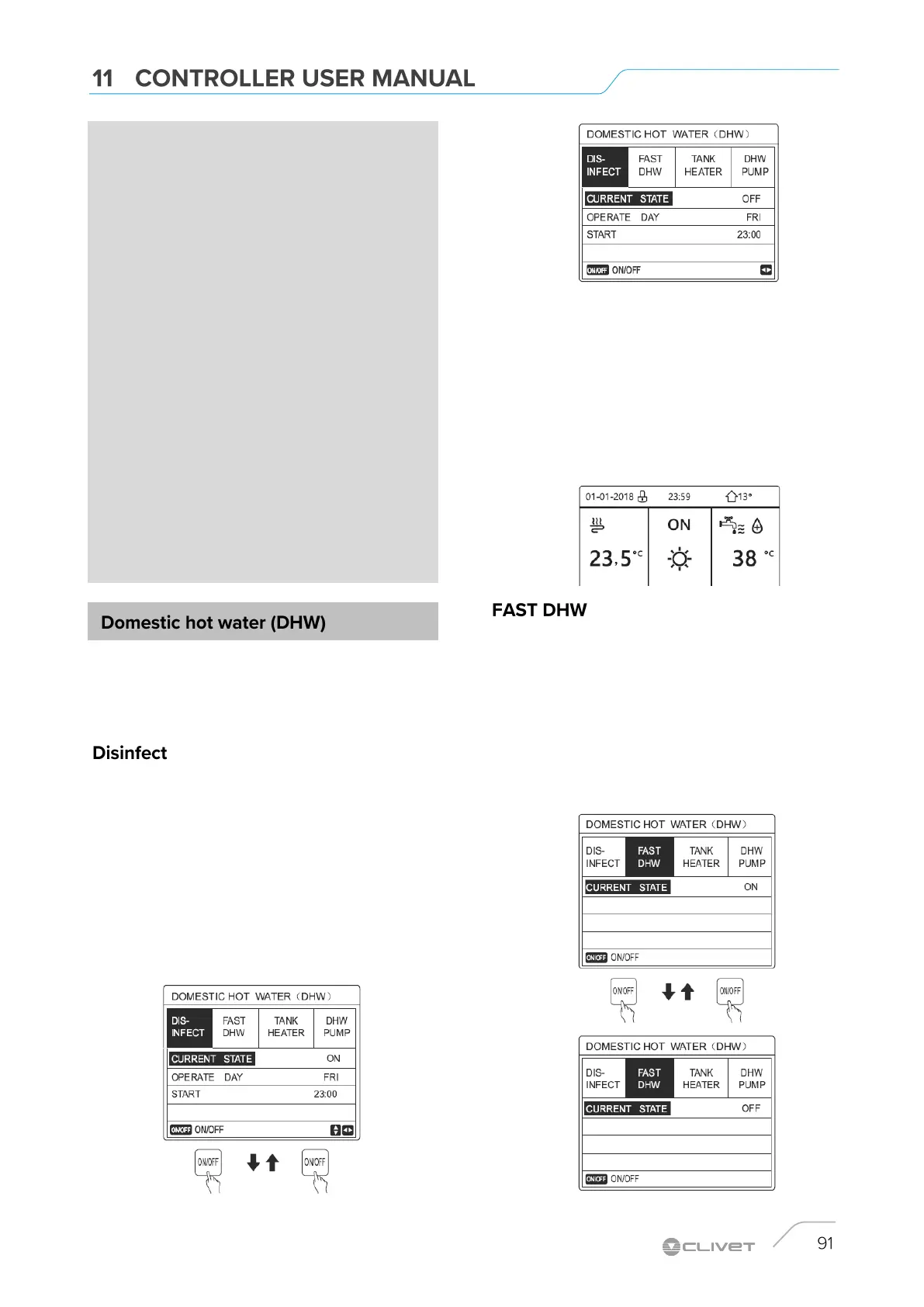
1. Disinfect
2. FAST DHW
3. Heated Tank
4. DHW pump
The DISINFECT function allows you to eliminate Legionella
bacteria.
In the disinfect function, the tank temperature reaches 65-70°C.
The disinfect temperature is set in DHW MODE.
See FOR SERVICEMAN. > DWH MODE > DISINFECT.
MENU > DOMESTIC HOT WATER > DISINFECT
Press OK. The following page is displayed:
Use LEFT RIGHT and UP DOWN to scroll and use UP
DOWN to adjust the parameters when setting OPERATION
DAY and START.
If the OPERATION DAY is set to FRIDAY AND START is set
to 23:00, the disinfect function is activated on Friday, at
23:00.
If the disinfect function is active, the following page is
displayed:
The function allows you to force the system to activate DHW
MODE.
The heat pump and the auxiliary or additional heater are
activated together for the DHW MODE and the desired DHW
temperature goes to 60 ° C.
Select MENU> DOMESTIC HOT WATER> FAST DHW and
press OK.
Use ON-OFF to select active (ON) or deactivated (OFF)


 To Next Page
 Loading...