The setting is the following:
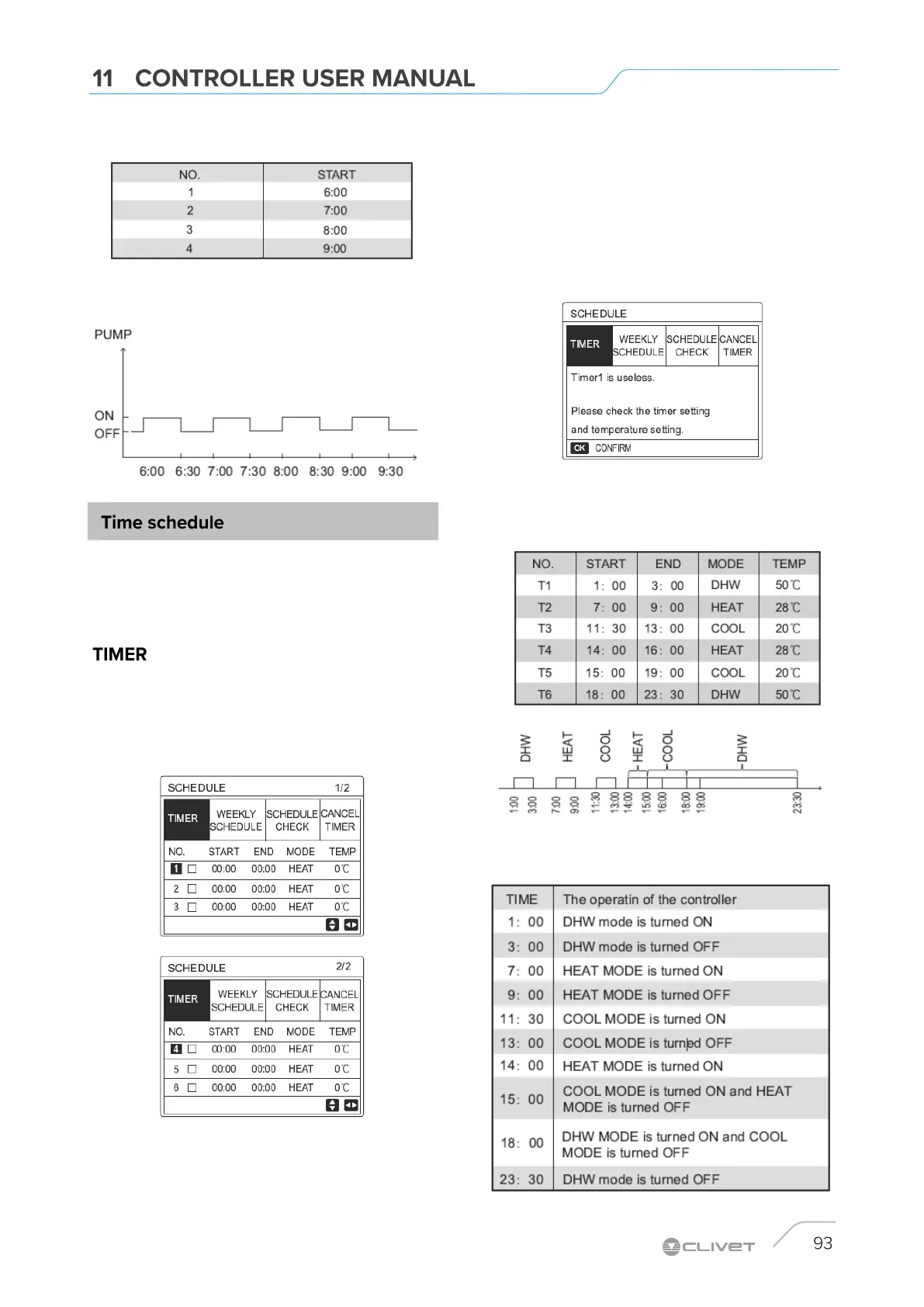
The PUMP activates as follows:
The PROGRAM menu. includes the following elements:
1. TIMER
2. PROGRAM. WEEKLY .
3. CONTR. PROGRAM.
4. CANCEL TIMER
If the weekly schedule is active and the timer function is
deactivated, the most recent setting is valid.
If the timer is activated, the timer icon appears on the home
page.
Use LEFT RIGHT and UP DOWN to scroll and UP DOWN to
adjust the time, mode and temperature
Use LEFT RIGHT and UP DOWN to scroll and UP DOWN to
adjust the time, mode and temperature.
Move and press OK to select / deselect. 6 timers can be set.
To cancel the TIMER, move the cursor and press OK.
If the set start time is later than the end time (or if the
temperature is not within mode range), the following page is
displayed:
Example: 6 timers are set as follows.
The unit is activated as shown in figure
The control unit is activated as follows


 To Next Page
 Loading...