5
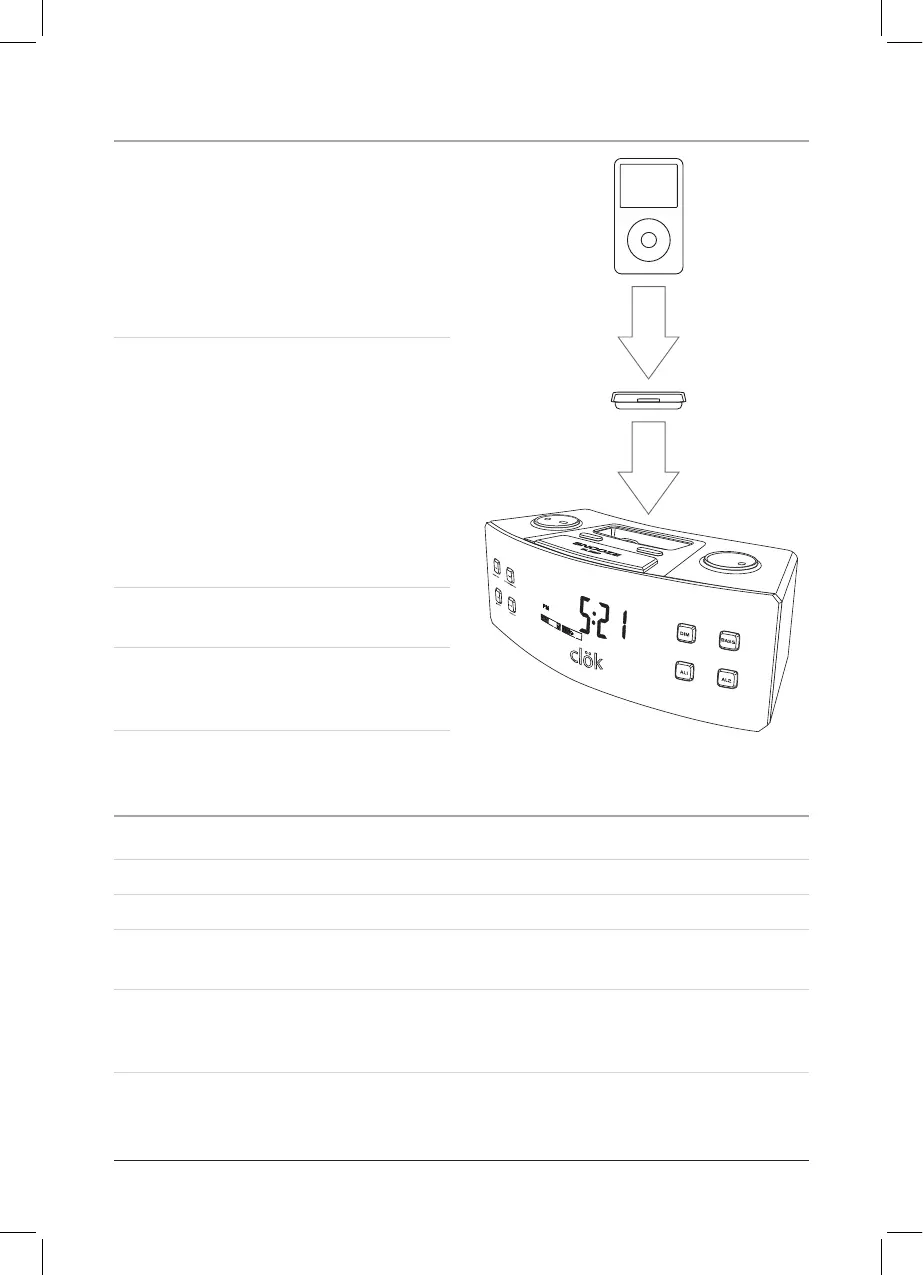
Docking an iPod
1. Locate the numbered BracketWKDW¿WV
the iPod that will be docked.
Each included Bracket has a number
on it, indicating which iPod model
that bracket is compatible with. See
the separate bracket chart page to
identify which bracket is needed.
2. Snap the Bracket into place over the
iPod connector in the Dock for iPod.
$OO%UDFNHWVZLOORQO\¿WRQHZD\RQWR
the Dock.
:KHQLQVHUWLQJDQL3RGQDQR¿UVW
or second generation), slide the
Dock connection on the unit so that it
matches the opening on the iPod nano
¿UVWRUVHFRQGJHQHUDWLRQ
3. Connect the iPod to the iPod
connector inside the Dock for iPod.
Once an iPod is connected to the
Dock for iPod, the unit will play and
charge the docked iPod.
Playing an iPod
1. Dock an iPod onto the unit by following the “Docking an iPod” instructions.
2. Press the Power Button to turn the unit on.
3. Press the Function Button to adjust the unit to iPod mode.
4. Press the Clock/Display/Play/Pause Button to play and pause music from the
docked iPod.
5. Press the Hour/Skip/Search Buttons to skip through audio tracks when in iPod
mode. Press and hold the Hour/Skip/Search Buttons to search through a single
audio track when in iPod mode.



 To Next Page