Page: 4
cloudmassager.com
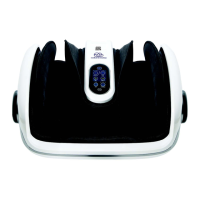
Heat Buon:
Vibraon Buon (second from the top)
When the Cloud Massager is acvated with the power buon, the heat buon will be red when acvated. Press it
once to go from heat on (red) to heat o (faint purplish blue). The heat is a purposeful low intensity heat de-
signed to slowly encourage blood ood ow while experiencing your massage. As your feet are slowly warmed,
they become acclimated. This may feel like there is no heat. If you would like to check how much heat there actu-
ally is please try the following steps:
(a) While your Cloud Massager is o unzip part of the cover.
(b) Power on without your feet in the massager. (note it will sound louder without your feet in the massager,
this is normal)
(c) Carefully look below the unzipped pad, you will see a light.
(d) Let your massager run for 10 minutes or so without your feet in the massager.
(e) Power o, feel the webbing below the unzipped pad above the light source. It should be noceably warmer.
The vibraon buon has 3 choices. Simply press the buon to navigate your choices.
O- This will appear as a very faint purple/blue color.
Low Vibraon- This will appear as blue
Higher Vibraon - This will appear as red.
The vibraon is designed to focus on your heal (the most dense dicult to penetrate part of your foot) The vibraons
will ow through the inatable cus to be felt on the sides and top of your feet during a massage.
This buon is one buon, meaning it is not designed to be able to press the up or down arrow on the buon. The
opposing arrows is a symbol indicang pressure can go up or down.
Each me you press the opposing arrows buon (middle buon 3rd from the top and boom) a color change will
indicate a changing intensity of your massage.
(a) Solid Blue Least Intense (recommended to start)
(b) Flashing Blue More Intense
(c) Green Solid More Intense
(d) Flashing Red More Intense
(e) Solid Red Most Intense
Intensity Buon (opposing arrows)


 To Next Page