PAGE 8
PROGRAM SETTINGS
DEMO
S WAY
VIBRATEROLL
HEAT PROGRAM
PRESSURE
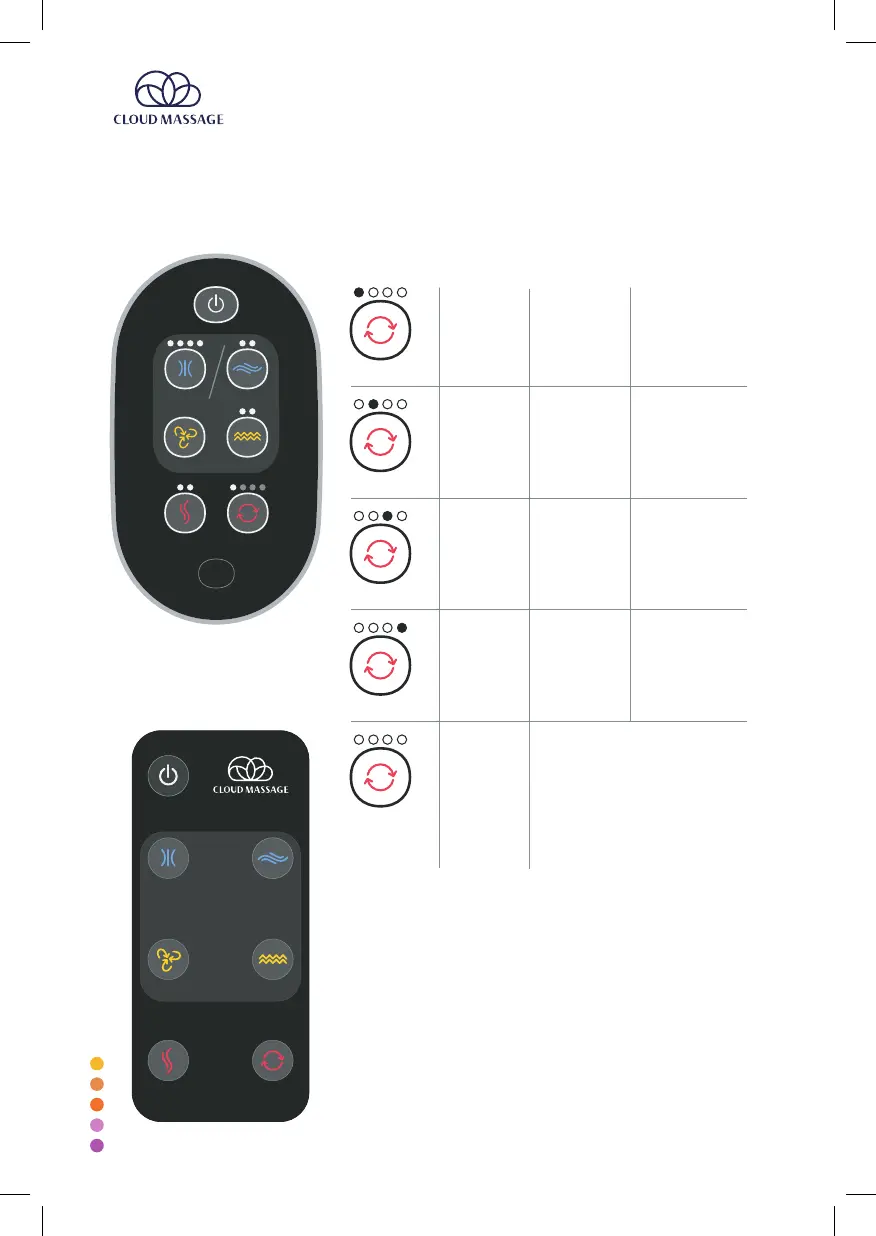
The program button controls the pre-programmed massages.
Pressing the button will cycle through the options as follows:
PROGRAM
PROGRAM
PROGRAM
PROGRAM
PROGRAM
No Program
(Off)
Program 1
Program 2
Program 3
Program 4
PRESSURE
LEVEL 1 &
VIBRATE
LEVEL 1
ROLL &
VIBRATE 1
PRESSURE 1
SWAY 1
ROLL &
VIBRATE 1
PRESSURE 1
SWAY 1
ROLL &
VIBRATE 1
GREEN SOLID
GREEN FLASHING
BLUE FLASHING
BLUE SOLID
NAME
ACTIVE
FEATURES
CORRESPONDS TO
(existing interface)
Note: When the system is set to no
program, users can still control the
individual functions (pressure,
swaying, rollers, vibration). Selected
functions will remain active
constantly
and simultaneously.
Because pressure and sway cannot
be on simultaneously, in this mode
turning on one of these should
automatically turn off the other one.
Remote Control
PRESSURE
SWAY
ROLL
VIBRATE
HEAT PROGRAM
To change the battery in the remote control, put
pressure on the release knob and slide out the battery
compartment.


 To Next Page