The Cloud9 CloudHub is a sophisticated communication device designed for professional environments, offering a comprehensive suite of features for efficient and secure communication. It serves as a central hub for various communication functionalities, integrating seamlessly with Windows-based PCs and laptops.
Function Description:
The Cloud9 CloudHub primarily functions as a desktop communication terminal, enabling users to manage multiple communication lines and contacts. It is designed for high-volume, real-time communication, making it suitable for trading floors, command centers, and other demanding professional settings. The device features a large, interactive display that shows "CURRENT ACTIVITY" and "FAVOURITES," allowing users to quickly access ongoing conversations and frequently used contacts.
Key communication features include:
- Multiple Line Management: The display shows various active lines and groups, such as "BRIN," "MIC," "NY Research," "Inpro Options," "Globex Corp," "HUB Fuel," "DYNE Energy," "STRL Cooper," "LDN," "MSSV Dynamics," and "LEAC." Each entry indicates the number of subscribers or participants, and some show specific names like "Olivia Williams," "Burton," "Trey Knights," "Elena Foreman," "Nina Mckay," "Robert Housten," and "Brit Sharma."
- Contact Management: Users can view and manage contacts, including individual names and phone numbers (e.g., "Michele Gonzales 9176201175").
- Group Communication: The device supports group calls and conferences, indicated by entries like "NY Research 6 Subscribers" and "MSSV Dynamics 4 Subscribers."
- Direct Dialing: A numerical keypad is integrated for direct dialing, complete with standard telephone keys (0-9, *, #) and function buttons.
- Audio Controls: Dedicated buttons for volume control, mute, and speakerphone functionality are present, ensuring clear audio and flexible communication options.
- Navigation and Selection: "PREVIOUS" and "NEXT" buttons facilitate navigation through lists, while a "GO TO" button likely allows for quick access to specific functions or contacts.
Important Technical Specifications:
The Cloud9 CloudHub is designed for robust performance and connectivity. While specific internal hardware specifications are not detailed, the manual highlights its external connectivity and power requirements:
- Power Supply: The device requires an AC Power Supply and a Power Cord for operation. The power supply connector is installed into the CloudHub's Power Supply Input.
- USB Connectivity: It features a USB-C slot for connecting to a Windows-based PC or laptop using a supplied USB-C to USB-A 2M Cable. This connection is crucial for integrating the CloudHub with software like C9 Trader.
- Handset Connectivity: The CloudHub supports one or two Cloud9 Handsets, which connect via RJ11 connectors. There are dedicated RJ11 sockets for a "Right Handset" and a "Left Handset" (if a secondary handset is required). The design includes cable channels to keep the handset cables tidy and secure.
- Microphone Connectivity: An optional Cloud9 Gooseneck Microphone can be attached. The microphone bracket mounts over two captive nuts on the CloudHub's underside, and the microphone input plugs into a dedicated input jack. Cable channels are provided for routing the microphone cable.
- Optional Extras:
- Cloud9 Gooseneck Microphone: Enhances voice input quality.
- Cloud9 Handset PTT or PTM: Push-to-Talk (PTT) or Push-to-Mute (PTM) handsets with built-in toggle switches and volume rollers offer additional control and convenience.
Usage Features:
The Cloud9 CloudHub is designed for ease of use and efficient workflow in professional settings.
- Intuitive Interface: The large display and clearly labeled buttons provide an intuitive interface for managing calls and contacts. The "CURRENT ACTIVITY" and "FAVOURITES" sections on the screen allow for quick access to essential information and frequently used functions.
- Physical Keypad and Function Buttons: A tactile keypad and dedicated function buttons (e.g., for speaker, mute, volume, navigation) ensure quick and precise control, even during intense communication periods.
- Ergonomic Design: The device's form factor, including the placement of the handset and microphone, suggests an ergonomic design for prolonged use. The cable management features (cable channels) contribute to a tidy and organized workspace.
- Seamless PC Integration: Connecting the CloudHub to a PC or laptop via USB-C allows it to function as an integrated communication peripheral for applications like C9 Trader. This integration likely enables advanced features such as contact synchronization, call logging, and software-controlled communication.
- Flexible Handset Options: The ability to connect one or two handsets, along with optional PTT/PTM handsets, offers flexibility to suit individual user preferences and operational requirements.
- Gooseneck Microphone: The optional gooseneck microphone provides hands-free communication, which is beneficial for multitasking or for users who prefer a fixed microphone position. The mounting mechanism ensures stability and optimal positioning.
- Setup Simplicity: The manual provides clear, step-by-step instructions for installing the power supply, handsets, microphone, and connecting to a PC, indicating a user-friendly setup process. Diagrams accompany each step to ensure correct installation.
Maintenance Features:
While the manual does not explicitly detail maintenance features, the design implies certain aspects:
- Durable Construction: The robust appearance of the CloudHub suggests a durable construction suitable for demanding professional environments, minimizing the need for frequent repairs.
- Modular Components: The use of detachable components like the power supply, handsets, and microphone allows for easy replacement or upgrade of individual parts, simplifying maintenance and extending the device's lifespan.
- Cable Management: Integrated cable channels help protect cables from damage and reduce clutter, which can prevent wear and tear and simplify troubleshooting.
- Software Updates: As the device integrates with PC software (C9 Trader), it is likely that software updates will be provided to enhance functionality, address bugs, and improve security, contributing to the device's long-term performance.
- Cleaning: The smooth surfaces and clear separation of components suggest that the device can be easily cleaned with appropriate cleaning solutions, maintaining hygiene and appearance in a shared workspace.
In summary, the Cloud9 CloudHub is a professional-grade communication device designed for high-performance environments, offering extensive call management capabilities, robust connectivity, and user-friendly features, all integrated with a PC for enhanced functionality.

 Need help?
 General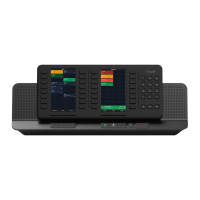

 To Next Page
