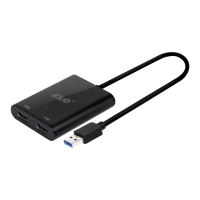
This document is a Quick Installation Guide for the Club 3D CSV-1477 USB 3.2 Gen1 to Dual DP™ Adapter. It provides instructions for installing the necessary drivers and connecting the adapter, as well as guidance on changing display modes.
Function Description:
The Club 3D CSV-1477 is a USB 3.2 Gen1 to Dual DisplayPort™ (DP™) Adapter. Its primary function is to allow users to connect extra DisplayPort monitors to their computer via a USB 3.2 Gen1 port. This adapter extends the display capabilities of a computer, enabling the use of multiple external monitors for enhanced productivity or expanded viewing experiences. It supports various display modes, including Mirror mode, Extend mode, and setting an external monitor as the Primary display.
Important Technical Specifications:
- Model: CSV-1477
- Interface: USB 3.2 Gen1 (input) to Dual DisplayPort™ (output)
- Driver Requirement: Requires driver installation before connecting the adapter to the computer.
- Display Modes Supported: Mirror mode, Extend mode, Primary display.
- Operating System Compatibility: Specifically mentions Windows OS for driver installation instructions, suggesting primary compatibility with Windows environments. The guide notes that strings and screenshots may vary slightly across different operating systems, implying potential compatibility with others, though Windows is explicitly detailed.
- Resolution: The example screenshot shows a resolution of 1920 x 1080 (Recommended), indicating support for Full HD resolutions. The actual maximum supported resolution would depend on the adapter's capabilities and the connected monitors.
Usage Features:
- Driver Installation:
- Prerequisite: Users are explicitly instructed NOT to connect the adapter to the computer before completing the driver installation. This is a critical step to ensure proper functionality.
- Download: The latest driver must be downloaded from the official Club-3D website (www.club-3d.com) under the CSV-1477 product page's download tab.
- Installation Process (Windows OS):
- Download the driver.
- Run
Setup.exe to initiate the installation.
- Click "Finish" when prompted to complete the installation.
- Troubleshooting Driver Installation:
- If AutoPlay does not start automatically, users should locate and double-click the
Setup.exe file in the driver folder.
- Administrator password and confirmation (via a User Account Control dialog box) may be required.
- In some Windows Operating Systems, the driver might install automatically. If not, manual installation following the outlined steps is necessary.
- Connecting the Adapter:
- After successful driver installation, the adapter can be connected to the monitor or computer. The guide implies connecting the USB end to the computer and the DisplayPort ends to the monitors.
- Changing the Display Mode:
- Once the extra monitors are connected via the adapter, they can be configured.
- Method 1 (Windows Desktop Context Menu):
- Right-click anywhere on the Windows Desktop.
- Select "Screen Resolution" from the context menu.
- Within the "Change the appearance of your displays" window, users can select the desired display (e.g., 1, 2, 3), adjust resolution, orientation, and choose "Multiple displays" options like "Extend desktop to this display."
- Method 2 (Windows System Tray Utility):
- Click the utility icon (represented by a square with a checkmark) in the Windows System Tray.
- Select "DisplayLink Manager" or "Video Setup" from the options. This suggests the adapter utilizes DisplayLink technology, which is common for USB-based display adapters.
- Supported Modes: The adapter allows configuration for Mirror mode (duplicating the primary display), Extend mode (expanding the desktop across multiple displays), or setting one of the connected monitors as the Primary display.
- DisplayPort™ Technology: The adapter incorporates DisplayPort™ technology, indicating support for high-quality digital video and audio transmission.
Maintenance Features:
- Driver Updates: Users are advised to visit www.club-3d.com for driver updates. Keeping drivers updated is crucial for optimal performance, compatibility with new operating system versions, and potential bug fixes.
- Support: For further support, users can contact support@club-3d.com. This provides a direct channel for technical assistance or troubleshooting issues not covered in the quick installation guide.
- General Care: While not explicitly detailed in the provided pages, general maintenance for such electronic devices typically includes keeping the adapter clean, avoiding extreme temperatures or humidity, and ensuring proper ventilation if applicable. The guide's emphasis on correct driver installation and connection procedures also serves as a form of preventative maintenance to ensure the device operates as intended.
In summary, the Club 3D CSV-1477 is a versatile USB 3.2 Gen1 to Dual DisplayPort™ adapter designed to easily expand a computer's display capabilities. Its key features include straightforward driver installation (with specific instructions for Windows), flexible display mode configuration, and reliance on DisplayPort™ technology for quality output. Regular driver updates and access to customer support are provided to ensure a smooth user experience.

 Need help?

 To Next Page
 General