
 Need help?
Do you have a question about the Clydek BC36LQ and is the answer not in the manual?
Instructions for initial Bluetooth pairing with a mobile device.
Guide to setting the FM transmitter frequency for optimal broadcast.
Details on selecting and controlling music playback from different sources.
Procedures for making, receiving, and managing calls using Bluetooth.
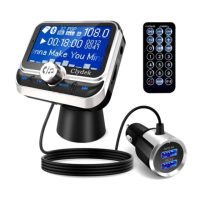
This document describes the BC36LQ Bluetooth car charger, a multi-functional device designed to enhance the in-car experience with music playback, hands-free calling, and charging capabilities.
The BC36LQ is a versatile car charger that supports full FM frequency (87.5MHZ-108MHZ) and features automatic power-off memory. It comes with an LCD dot matrix display and supports music playback from USB flash drives and TF cards. Key functionalities include Bluetooth for answering, rejecting, hanging up, and redialing calls, as well as private call options. It also offers Aux input/output, a voice assistant function, folder selection for music playback, and remote control operation. For charging, it provides a QC3.0 mobile phone charging output with a maximum of 18W. The device can be mounted using either air conditioning clips or on the center console.
The device features several physical components:
For first-time use, enable Bluetooth on your mobile phone, search for "BC36," and connect to it.
a. Tune your car radio to an empty channel. b. Short press the "FM" button to enter FM mode (frequency beat). c. Long press the "K" button for rapid FM- adjustment; short press for single FM- step. d. Long press the "M" button for rapid FM+ adjustment; short press for single FM+ step. e. The FM transmission frequency can also be adjusted by rotating the left and right rotation buttons. f. The transmission frequency ranges from 87.5 to 108 MHZ. After selecting a frequency, if no operation occurs for 3 seconds, it will automatically confirm, save, and exit.
a. Switch between Bluetooth, U disk, and TF card modes by short pressing the "MODE" button. b. Short press the "▷II" button to play/pause. c. In U disk/TF card mode, short press "K" to play the last song; long press to quickly exit. d. In U disk/TF card mode, short press "M" to play the next song; long press to quickly exit. e. During playback in U disk/TF card mode, after pausing playback, short press "K" / "M" to select play mode and EQ, or press and hold the "MODE" button for 3 seconds to enter the U disk / TF card directory to select folder play. f. The volume can be adjusted by the left and right rotation.
a. Applicable in Bluetooth/USB Disk/TF card mode. b. The "▷II" button serves as the calling operation key. c. Short press once to answer a call. d. Short press once to hang up a call. e. Long press to reject a call. f. Double click twice to redial the last number. g. During a call, short press "K" / "M" to convert the call between Bluetooth and the mobile phone. h. The volume can be adjusted by the left and right rotation keys.
a. In Bluetooth/U disk/TF mode, long press the "MODE" button for 3 seconds to enter the main menu. b. Short press "K" / "M" to move the selection; press "▷II" to confirm the option button. c. To enter a submenu, short press "K" / "M" to move the selection; press "▷II" to confirm the option button. d. Short press "Mode" to exit.
After Bluetooth connection, press "▷II" for 3 seconds to use Siri/voice assistant. This function is supported by Apple, Samsung, and native Android system phones. Note: some phones may not support this function.
When using Aux mode, ensure to remove any U disk and TF card.
After the car is turned on, the device enters Bluetooth pairing mode. The upper left corner of the display will show the car's real-time electric frequency voltage, with a voltage detection accuracy of ±0.5V.
Plug a mobile device that supports QC3.0 charging into the USB2 interface. The device will automatically identify the charging device type and handshake with it via the corresponding charging protocol to deliver maximum charging current. This saves charging time while protecting the device. The BC36LQ complies with QC3.0, QC2.0, FCP, PE, PE2.0, Apple, Samsung, and BC1.2 fast charging protocols.
The remote control provides comprehensive functionality:
The product package includes:
 General
| Brand | Clydek |
|---|---|
| Model | BC36LQ |
| Category | Automobile Accessories |
| Language | English |

 To Next Page