EasyManua.ls Logo

CMC WIDI THRU6 BT - User Manual

CMC WIDI THRU6 BT
22 pages
Print Icon
To Next Page IconTo Next Page
Loading...
1 / 22
WIDI THRU6 BT
USER MANUAL V06
Hello, thank you for purchasing CME’s professional product!
Please read this manual completely before using this product. The
pictures in the manual are for illustration purposes only, the actual
product may vary. For more technical support content and videos,
please visit this page: www.cme-pro.com/support/
IMPORTANT INFORMATION
WARNING
Improper connection may cause damage to the device.
COPYRIGHT
Copyright © 2022 CME Pte. Ltd. All rights reserved. CME is a
registered trademark of CME Pte. Ltd. in Singapore and/or other
countries. All other trademarks or registered trademarks are the
property of their respective owners.
LIMITED WARRANTY
CME provides a one-year standard Limited Warranty for this
product only to the person or entity that originally purchased this
product from an authorized dealer or distributor of CME. The
warranty period starts on the date of purchase of this product. CME
Question and Answer IconNeed help?

Do you have a question about the CMC WIDI THRU6 BT and is the answer not in the manual?

Summary

Bluetooth MIDI Connection

Bluetooth Connection Between Two WIDI Thru6 BTs

Pair two WIDI Thru6 BT units wirelessly for MIDI data transfer.

Bluetooth Connection to Built-in MIDI Devices

Connect WIDI Thru6 BT to devices with integrated Bluetooth MIDI.

Bluetooth Connection to macOS

Connect WIDI Thru6 BT to a Mac computer via Bluetooth MIDI.

Bluetooth Connection to iOS Devices

Connect WIDI Thru6 BT to an iPhone or iPad via Bluetooth MIDI.

Specifications

Bluetooth Technology Details

Information on Bluetooth version and channel support.

Power Supply Requirements

Details the power source and connector type for the device.

FAQ

Troubleshooting: Bluetooth MIDI Communication Failure

Offers solutions for problems with Bluetooth MIDI message transmission.

Troubleshooting: Poor Wireless Connection Performance

Addresses issues with short range, high latency, or intermittent wireless signals.

Summary

Bluetooth MIDI Connection

Bluetooth Connection Between Two WIDI Thru6 BTs

Pair two WIDI Thru6 BT units wirelessly for MIDI data transfer.

Bluetooth Connection to Built-in MIDI Devices

Connect WIDI Thru6 BT to devices with integrated Bluetooth MIDI.

Bluetooth Connection to macOS

Connect WIDI Thru6 BT to a Mac computer via Bluetooth MIDI.

Bluetooth Connection to iOS Devices

Connect WIDI Thru6 BT to an iPhone or iPad via Bluetooth MIDI.

Specifications

Bluetooth Technology Details

Information on Bluetooth version and channel support.

Power Supply Requirements

Details the power source and connector type for the device.

FAQ

Troubleshooting: Bluetooth MIDI Communication Failure

Offers solutions for problems with Bluetooth MIDI message transmission.

Troubleshooting: Poor Wireless Connection Performance

Addresses issues with short range, high latency, or intermittent wireless signals.

Overview

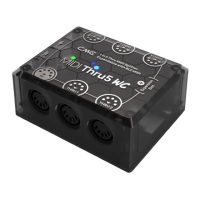
The CME WIDI Thru6 BT is a versatile MIDI Thru/Splitter box with integrated wireless Bluetooth MIDI functionality, designed to accurately forward MIDI messages from both wired and Bluetooth MIDI inputs to multiple MIDI Thru outputs. It serves as a central hub for various MIDI devices and BLE MIDI-capable computers and mobile devices.

Function Description:

The WIDI Thru6 BT acts as a 2-in-6-thru MIDI splitter with built-in WIDI BLE MIDI. It features one standard 5-pin MIDI IN port and five standard 5-pin MIDI THRU ports. Additionally, it incorporates a bi-directional Bluetooth MIDI module offering 1 input, 1 output, and 16 channels. This combined configuration allows for a total of 6 MIDI inputs and 2 MIDI outputs. The device is powered via a standard USB Type-C connection (5V). Multiple WIDI Thru6 BT units can be daisy-chained to create larger MIDI systems, expanding the number of available Thru ports.

The device can connect to a wide range of MIDI products with standard MIDI interfaces, including synthesizers, MIDI controllers, MIDI interfaces, keytars, electronic wind instruments, v-accordions, electronic drums, digital pianos, electronic portable keyboards, audio interfaces, and digital mixers. It also supports connection to BLE MIDI-capable devices and computers such as Bluetooth MIDI controllers, iPhones, iPads, Macs, PCs, Android tablets, and mobile phones.

Important Technical Specifications:

  • MIDI Connectors: 1x 5-pin MIDI Input, 5x 5-pin MIDI Through.
  • LED Indicators: 2 LED lights (one green for power, one multi-color for Bluetooth status).
  • Compatible Devices: Devices with standard MIDI sockets.
  • MIDI Messages: Supports all MIDI standard messages, including notes, controllers, clocks, sysex, MIDI timecode, and MPE.
  • Wired Transmission: Close to Zero Latency and zero Jitter.
  • Bluetooth Technology: Bluetooth 5 (Bluetooth Low Energy MIDI), bi-directional 16 channels.
  • Bluetooth Compatible Devices: WIDI Master, WIDI Jack, WIDI Uhost, WIDI Bud Pro, WIDI Core, WIDI BUD, standard Bluetooth MIDI controllers, Mac/iPhone/iPad/iPod Touch, Windows 10/11 computers, Android mobile devices (all with Bluetooth Low Energy 4.0 or higher).
  • Compatible OS (BLE MIDI): macOS Yosemite or higher, iOS 8 or higher, Windows 10/11 or higher, Android 8 or higher.
  • Wireless Transmission Delay: As low as 3 ms (test results of two WIDI Thru6 BTs based on Bluetooth 5 connection).
  • Range: 20 meters/65.6 feet (without obstruction).
  • Power Supply: USB-C Socket. Powered by Standard 5V USB bus.
  • Power Consumption: 37mW.
  • Size: 82.5 mm (L) x 64 mm (W) x 33.5 mm (H) / 3.25 in (L) x 2.52 in (W) x 1.32 in (H).
  • Weight: 98.4 g/3.47 oz.
  • Firmware Upgrade: Wireless upgrade via Bluetooth using the WIDI App for iOS or Android.

Usage Features:

  • Powering the Device: The WIDI Thru6 BT is powered via its USB Type-C socket using a standard 5V USB power supply (e.g., charger, power bank, computer USB socket). There is no power switch; simply plug in the USB power supply to start.
  • Wired MIDI Connection: Connect the MIDI OUT or MIDI THRU of a MIDI device to the WIDI Thru6 BT's MIDI IN socket. Then, connect one or more of the WIDI Thru6 BT's MIDI THRU 1-5 sockets to the MIDI IN of external MIDI devices. MIDI messages received at the MIDI IN port will be forwarded to all connected THRU ports and the BLE Out.
  • Daisy-chaining: For more than five MIDI Thru ports, multiple WIDI Thru6 BTs can be daisy-chained by connecting a MIDI Thru port of one unit to the MIDI IN port of the next. Each unit requires separate power.
  • Bluetooth MIDI Connection (General): All WIDI products use a consistent method for Bluetooth connection.
  • Bluetooth MIDI Connection (Two WIDI Thru6 BTs): Power on both units. They will automatically pair, indicated by the blue LED changing from slow flashing to solid. One unit will act as a Bluetooth central (turquoise LED). LEDs flash dynamically during data transfer.
  • Bluetooth MIDI Connection (MIDI device with built-in Bluetooth MIDI and WIDI Thru6 BT): Power on both devices. The WIDI Thru6 BT will automatically pair, and its blue LED will change to solid turquoise. LEDs flash dynamically during data transfer.
  • Bluetooth MIDI Connection (macOS X and WIDI Thru6 BT):
    1. Power on the WIDI Thru6 BT (blue LED blinking slowly).
    2. Enable Bluetooth on macOS (System Preferences > Bluetooth > Turn on Bluetooth).
    3. Open Audio MIDI Setup (Go > Utilities > Audio MIDI Setup). If MIDI Studio is not visible, go to Window > Show MIDI Studio.
    4. Click the Bluetooth icon in MIDI Studio, find WIDI Thru6 BT, and click "Connect." The WIDI Thru6 BT icon will appear in MIDI Studio, confirming a successful connection.
  • Bluetooth MIDI Connection (iOS device and WIDI Thru6 BT):
    1. Download "midimittr" app from the App Store. (Alternatively, use an app with built-in Bluetooth MIDI connection).
    2. Power on the WIDI Thru6 BT (blue LED blinking slowly).
    3. Enable Bluetooth on iOS (Settings > Bluetooth).
    4. Open "midimittr" app, go to "Device," find WIDI Thru6 BT, click "Not Connected," then "Pair" on the pop-up. The status will update to "Connected." Minimize the app.
    5. Open a music app that accepts external MIDI input and select WIDI Thru6 BT as the MIDI input device. Note on iOS 16+: Offers automatic pairing with WIDI devices after initial confirmation. To avoid unwanted pairings, create fixed pairs via WIDI Groups or terminate Bluetooth on iOS when working with WIDI devices.
  • Bluetooth MIDI Connection (Windows 10/11 computer and WIDI Thru6 BT):
    • Direct connection requires music software to integrate Microsoft's UWP API (e.g., Cakewalk by Bandlab, Steinberg Cubase 12).
    • Alternative: Use a software virtual MIDI interface driver like the Korg BLE MIDI driver.
      1. Download and install the Korg BLE MIDI Windows driver from the Korg official website.
      2. Ensure Windows 10/11 and Bluetooth driver are updated (Bluetooth Low Energy 4.0 or 5.0 required).
      3. (Optional, recommended for multiple WIDI devices) Use WIDI App to set WIDI BLE role to "Force Peripheral" and rename devices.
      4. Power on WIDI Thru6 BT.
      5. Go to Windows [Start] – [Settings] – [Devices], open [Bluetooth and other devices], turn on Bluetooth, and click [Add Bluetooth or other devices].
      6. In Add Device, click [Bluetooth], select WIDI Thru6 BT, and click [Connect].
      7. Click [Finished] when "Your device is ready" appears.
      8. Repeat for other WIDI devices.
      9. In music software MIDI settings, select WIDI Thru6 BT as MIDI input/output device (Korg BLE MIDI driver will discover it).
  • Group Connection with Multiple WIDI Devices: Allows bi-directional data transmission up to [1-to-4 MIDI Thru] and [4-to-1 MIDI merge]. Multiple groups are supported.
    1. Open the WIDI App.
    2. Power on a WIDI Thru6 BT.
    3. Set all WIDI Thru6 BTs to "Force Peripheral" role and rename them (requires restart).
    4. Repeat for all WIDI Thru6 BTs to be added to the group.
    5. Power on all WIDI Thru6 BTs simultaneously.
    6. In WIDI App, go to Group menu, click "Create New Group," enter a name.
    7. Drag and drop WIDI Thru6 BTs to central and peripheral positions.
    8. Click "Download Group" to save settings to the central WIDI Thru6 BT. Devices will restart and connect to the group. Note: Group settings are stored in the central device's memory and will auto-connect upon power-on. To delete group settings, connect to the central WIDI Thru6 BT via WIDI App and click [Remove group settings].
  • Group Auto-Learn: Establishes [1-to-4 MIDI Thru] and [4-to-1 MIDI merge] group connections between WIDI series products and other brands of Bluetooth MIDI products.
    1. Set all WIDI devices as "Force Peripheral."
    2. Enable "Group Auto-Learning" for the central WIDI device (WIDI LED slowly flashes blue). Close the WIDI application.
    3. Turn on up to 4 BLE MIDI peripherals (including WIDI) to automatically connect.
    4. Once all devices are connected (blue LED solid, or fast flashing with data), press the button on the WIDI central device to store the group (LED turns green when pressed, turquoise when released). Note: iOS, Windows 10/11, and Android are not eligible for WIDI groups. For macOS, click "Advertise" in MIDI Studio's Bluetooth configuration.

Maintenance Features:

  • Manual Factory Reset: When the WIDI Thru6 BT is not powered on, press and hold the button, then power on the device. Release the button when the LED light flashes slowly 3 times. This resets the interface to factory default.
  • Manual "Force Peripheral" Mode: When the WIDI Thru6 BT is powered on, press and hold the button for 3 seconds, then release. This manually sets the Bluetooth role to "Force Peripheral" mode (for connecting to a computer or mobile phone) and disconnects any existing Bluetooth MIDI connections.
  • Firmware Upgrade: Firmware can be upgraded wirelessly via Bluetooth using the WIDI App available for iOS or Android.
  • Troubleshooting (LED not lighting up): Check if the USB power socket or adapter is powered. Check if the USB power cable is damaged and replace if necessary.
  • Troubleshooting (Cannot send/receive MIDI via Bluetooth):
    • Verify WIDI Thru6 BT is selected as MIDI input/output in DAW software.
    • Ensure Bluetooth MIDI is successfully connected.
    • Check if MIDI cable between WIDI Thru6 BT and external MIDI device is connected correctly.
  • Troubleshooting (Short wireless distance, high latency, intermittent signal): WIDI Thru6 BT uses Bluetooth for wireless transmission. Signal interference or blockage (e.g., trees, reinforced concrete walls, electromagnetic waves) can affect performance. Avoid such sources of interference.
  • Powering by 5-pin MIDI: No, the WIDI Thru6 BT cannot be powered by 5-pin MIDI. It uses a high-speed optocoupler to isolate interference from the power supply ground loop between MIDI input and output, requiring USB power.
  • USB MIDI Interface: The USB-C socket is for power only and cannot be used as a USB MIDI interface.

Important Information:

  • Warning: Improper connection may cause damage to the device.
  • Copyright: © 2022 CME Pte. Ltd. CME is a registered trademark.
  • Limited Warranty: CME provides a one-year standard Limited Warranty for the original purchaser against defects in workmanship and materials. Proof of purchase is required for warranty service. The warranty does not cover normal wear and tear, accidental damage, abuse, or data loss due to improper operation.
  • Safety Information:
    • Do not connect during a thunder.
    • Avoid humid places for cords/outlets unless specifically designed.
    • Do not touch bare parts of the power cord/connector when connected to AC.
    • Follow setup instructions carefully.
    • Do not expose to rain or moisture to avoid fire/electrical shock.
    • Keep away from electrical interface sources (fluorescent light, motors).
    • Keep away from dust, heat, and vibration.
    • Do not expose to sunlight.
    • Do not place heavy objects or liquid containers on the instrument.
    • Do not touch connectors with wet hands.

CMC WIDI THRU6 BT Specifications

General IconGeneral
BrandCMC
ModelWIDI THRU6 BT
CategoryRecording Equipment
LanguageEnglish

Related product manuals