The CME MIDI Thru5 WC is a versatile MIDI Thru/Splitter box designed to expand and manage MIDI connections, with optional wireless Bluetooth MIDI capabilities.
Function Description:
The core function of the MIDI Thru5 WC is to accurately forward MIDI messages received at its single MIDI IN port to five standard 5-pin MIDI THRU ports. This allows a single MIDI output from a device to be split and sent to multiple MIDI input devices. It can be powered via a standard USB Type-C connection (5V). Multiple MIDI Thru5 WCs can be daisy-chained to create larger MIDI systems, providing more THRU ports as needed.
A key feature of the MIDI Thru5 WC is its expansion slot, which can accommodate a 16-channel bi-directional Bluetooth MIDI module (CME's WIDI Core, also referred to as the WC module). When this module is installed, the device functions similarly to CME's WIDI Thru6 BT, adding wireless MIDI functionality. This allows the MIDI Thru5 WC to connect to various BLE MIDI-capable devices and computers, including Bluetooth MIDI controllers, iPhones, iPads, Macs, PCs, Android tablets, and mobile phones.
The device supports all standard MIDI messages, including notes, controllers, clock, sysex, and MPE, ensuring comprehensive MIDI data transmission.
Important Technical Specifications:
- MIDI Connectors: 1x 5-pin MIDI Input, 5x 5-pin MIDI Thru.
- LED Indicators:
- Green LED (near USB power supply): Indicates power on.
- LED (center, with WIDI Core installed):
- Slow flashing blue: Bluetooth MIDI active, waiting for connection.
- Steady blue: Bluetooth MIDI successfully connected.
- Fast blinking blue: Bluetooth MIDI connected, receiving/sending MIDI messages.
- Light blue (turquoise) steady: Device connected as a Bluetooth MIDI central to peripherals.
- Green: Firmware upgrader mode.
- Compatible Devices: All MIDI products with standard MIDI interface (synthesizers, controllers, interfaces, keytars, electronic wind instruments, v-accordions, electronic drums, digital pianos, electronic portable keyboards, audio interfaces, digital mixers, etc.).
- Wired Transmission: Close to Zero Latency and zero Jitter.
- Power Supply: USB-C Socket, powered by Standard 5V USB bus.
- Power Consumption: 20 mW.
- Size: 82.5 mm (L) x 64 mm (W) x 33.5 mm (H) / 3.25 in (L) x 2.52 in (W) x 1.32 in (H).
- Weight: 96 g / 3.39 oz.
WIDI Core Module (Optional) Specifications:
- Technology: Bluetooth 5 (Bluetooth Low Energy MIDI), bi-directional 16 MIDI channels.
- Compatible Devices: WIDI Master, WIDI Jack, WIDI Uhost, WIDI Bud Pro, WIDI Core, WIDI BUD, standard Bluetooth MIDI controllers. Mac/iPhone/iPad/iPod Touch, Windows 10/11 computers, Android mobile devices (all with Bluetooth Low Energy 4.0 or higher).
- Compatible OS (BLE MIDI): macOS Yosemite or higher, iOS 8 or higher, Windows 10/11 or higher, Android 8 or higher.
- Wireless Transmission Latency: As low as 3 ms (test results with two MIDI Thru5 WCs with WC module based on Bluetooth 5 connection).
- Range: 20 meters / 65.6 feet (without obstruction).
- Firmware Upgrade: Wireless upgrade via Bluetooth using the WIDI App for iOS or Android.
- Weight: 4.4 g / 0.16 oz.
Usage Features:
- Plug-and-Play Operation: The MIDI Thru5 WC has no power switch; it powers on automatically when connected to a USB power source.
- Daisy-Chaining: Multiple MIDI Thru5 WCs can be connected in series to expand the number of available THRU ports. Each unit requires separate power.
- Optional Bluetooth MIDI Expansion: The device is designed for easy installation of the WIDI Core module, transforming it into a wireless MIDI hub. Installation involves removing the case, inserting the module, and reassembling.
- Firmware Upgrade (with WIDI Core): The WIDI Core module's firmware can be updated wirelessly using the CME WIDI App on iOS or Android devices. This requires putting the device into firmware upgrader mode by holding the button while powering on.
- Bluetooth MIDI Connections:
- Device-to-Device: Two MIDI Thru5 WCs with WIDI Core modules can automatically pair for bi-directional MIDI communication.
- MIDI Device with Built-in Bluetooth MIDI: The MIDI Thru5 WC can automatically pair with other MIDI devices that have built-in Bluetooth MIDI.
- macOS X: Connects via the Audio MIDI Setup utility, where the MIDI Thru5 WC appears as a Bluetooth MIDI device.
- iOS Device: Connects via the device's Bluetooth settings and can be used with MIDI apps that support external MIDI input or dedicated apps like "midimittr." iOS 16 and higher offer automatic pairing.
- Windows 10/11: Requires the Korg BLE MIDI Windows driver for direct connection with compatible music software (e.g., Cakewalk by Bandlab). For other software, a virtual MIDI interface driver may be needed. The WIDI App can be used to set the WIDI BLE role to "Force Peripheral" and rename devices for better management.
- Android Device: Requires a dedicated app like "MIDI BLE Connect" to act as a bridge for Bluetooth MIDI connections, as most music apps do not directly integrate the Android Bluetooth MIDI driver.
- Group Connection (with WIDI Core): The WIDI App allows users to create groups of WIDI devices for complex MIDI routing, supporting up to 1-to-4 MIDI Thru and 4-to-1 MIDI merge configurations.
- Group Auto-Learn (with WIDI Core): This function enables a central WIDI device to automatically scan and connect to up to four BLE MIDI peripherals (including other WIDI devices and other brands of Bluetooth MIDI products) to form a group.
Maintenance Features:
- Factory Reset (with WIDI Core): When not powered on, pressing and holding the button while powering on until the central LED flashes slowly 3 times will reset the interface to factory default.
- Force Peripheral Mode (with WIDI Core): When powered on, pressing and holding the button for 3 seconds will set the Bluetooth role to "Force Peripheral," useful for connecting to computers or mobile phones and disconnecting existing Bluetooth MIDI device connections.
- Troubleshooting: The manual provides a FAQ section addressing common issues such as power, LED indicators, and wireless connection problems.
- Support: Users can contact CME via email (info@cme-pro.com) or visit their support website (www.cme-pro.com/support/) for technical assistance.
- Avoid connecting during thunder.
- Do not set up in humid places unless the outlet is designed for it.
- Do not touch bare parts of the power cord or connector when connected to an AC outlet.
- Follow setup instructions carefully.
- Do not expose to rain or moisture.
- Keep away from electrical interference sources (fluorescent lights, motors).
- Keep away from dust, heat, and vibration.
- Do not expose to sunlight.
- Do not place heavy objects or liquid containers on the instrument.
- Do not touch connectors with wet hands.
Warranty:
CME provides a one-year standard Limited Warranty covering defects in workmanship and materials for the original purchaser from an authorized dealer. Proof of purchase is required for warranty service. The warranty does not cover normal wear and tear, accidental damage, abuse, or data loss due to improper operation.

 Need help?
 General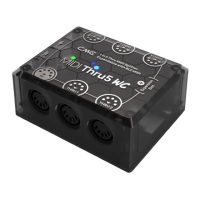

 To Next Page