5
2. Prepari
ng to use the FlashMax P3
WS light
Connect the power supply under the
base of the docking station to a main
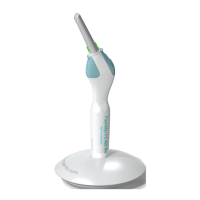
electrical outlet. Place the light in the
dock and the battery will begin charging.
This is indicated by a green light flashing.
3. Use and program modes
The FlashMax P3 WS is only intended
for the polymerization of dental materials:
2
s time cycle is used for a layered build-up
and/or bonding agents. The 5 s time cycle
is used for the finishing layer and/or
darker shades.
Three program modes
The FlashMax P3 light is used intermit-
tently in one of three programs each with
time settings of 2 or 5 seconds.
To see the program selected, press the
two buttons at the same time and hold
for 3 s until a beep is heard. The diode
will flash the color of the program, green,
orange or red.
To change the program, scroll using any
button. Stop at the chosen program and
wait for the beep. The light will stay in the
chosen mode until changed manually.
3.1 Intelligent Automated Functions
The FlashMax P3 is the first light with
this new concept.
The green program mode is the manual
mode. Press the large button and the unit
will light for 5 s. Press the small button
and it will light for 2 s.
In the orange program mode, pressing
the large button will give you 5 s of light,
a 0.5 s pause, then again 3 s of light. The
small button 2 s of light, a 0.5 s pause,
th
en 2 s of light.
This mode is used for layered build-ups
when the composite restoration is wide
enough to require two side by side
activations.
In the red program mode the large
button will give you 5s + 5s + 5s + 5s
continously, with 0,5 s pause between
each activation, until you press the
button again to stop it. The small button
gives 2s + 2s + 2s + 2s continuously,
with 0,5 s pause between each
activation, until you press the button
again to stop it. This mode is used for
cementing brackets or veneers or in any
other situation where repetitive
activations are required.
3.2 Temperature safety
The FlashMax P3 light has a safety cut
off to preserve the lifetime of the diode
should overheating occur.
When the light gets close to the cut
off temperature, you will be warned by
intermittent beeping. User time before
the warning varies between 45 and 80
seconds. The light can be used for ap-
proximately another 15 s before it cuts
off. Overheating is indicated by 3 short
beeps followed by fast red flashing.
3.3 Battery power saving
Sleep
If the light has not been activated for 5
minutes, or placed in the dock, it will go
into sleep mode to conserve energy.
Press any button to reactivate it.
Deep sleep
If not used or placed in the docking station
for 6 hours the light will go into deep
sleep mode. It must be placed in the
dock for one second to be reactivated.
English


 To Next Page