- 1 -
1. Products instruction
Based on GSM/3G/4G communication protocol, supports 1001 authorized users. Authorized
users can remotely control the equipment, systems and machines connected to the product by
SMS commands & free calling. It is widely used in access control systems, garage doors, swing
doors ,folding doors,sliding doors, parking system and the equipments that can be connected to
the relay control , the G202PLUS gate controller & G203 gate controller will send a notification (via
SMS) to the user of the result of the remote control (such as the opening and closing status of the
gate).
With real authorize and multi-level authorization, more security. no authorize no access, even
if you know the password.
2. Physical Layout
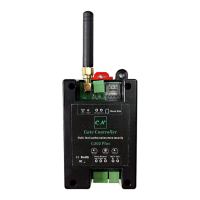
Connectiong port and lightings
Signal light:
1、 Registering the network signal: flashes quickly, once per second
2、 The network registration is successful: flashes quickly, flash every 2 seconds
3、 Reset successfully;quick flash 4 times
Run light:
1、 Device is loading SMS function: long light about 2 seconds
2、 Loading and process SMS successfully :slowly flash,flash every 2 seconds
3、Reset successfully;quick flash 4 times;
Relay light: Relay on:lighting,relay off: off
Reset button:
1. Press for 5 seconds to reset,it will delete all parameters before authorized.reset
successfully ,the RUN light will flash 4 times quickly,then device will short
power off and restart
2. Quickly press the reset button 2 times, the run and signal light will enter a
slient status, press the reset button quickly 1 time, the light will return normal
flash.after the device reset or power on again, the light also will return normal
flash.
3. Quickly press 4 times to reset device:
After the restart is successful, the device will feed back information to the super
administrator via SMS
Power supply input, Positive wire.


 To Next Page
 Loading...