
 Need help?
Do you have a question about the Coachsound TourMaster MLA2504 and is the answer not in the manual?
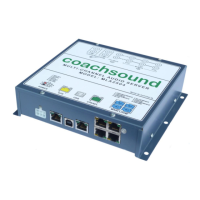
Diagram and explanation of the head unit's electrical ports and their connections.
Details on how to connect power to the system, including voltage and current requirements.
Describes stereo RCA input connections for external audio systems like DVD players.
Explains the stereo RCA output for connecting to external audio systems like PA.
Details the two independent microphone input connectors and their headphone channel mapping.
Overview of the Route Builder software for setting GPS waypoints and storing commentary.
Explains the purpose of various system folders like $COM, MUSIC, SYSTEM, and TOOLS.
Describes the location of system files and warns against modification.
Mentions the folder contains useful tools and a demo database for Route Builder.
Specifies the required audio file formats for tour commentary and music zones.
Details the buttons and display elements of the driver/guide control panel.
Explains how to turn the system ON and OFF using the POWER key.
Explains how to select different routes using the control panel's UP/DOWN keys.
Details how to choose the next or previous audio segment in either manual or auto mode.
Explains how to save GPS waypoints manually or via Route Builder for autonomous operation.
Provides step-by-step instructions for manually saving a GPS waypoint using the control panel.
Lists and explains potential error messages encountered during manual GPS waypoint saving.
Describes the procedure to access the system's option menu for settings adjustments.
Explains how to set the default or resume route and segment at system power-up.
Details how to set a specific route and segment to load by default at power-up.
Explains how to enable or disable the GPS autonomous mode for the system.
Covers adjusting volumes for audio inputs, microphones, and VOX sensitivity.
Describes how to select which audio channel is output through the AUDIO-OUT connector.
Explains how to enable or disable the microphone input channels and VOX circuits.
Details how to enable or disable the microphone VOX override feature for MIC-A and MIC-B.
Explains how to set "Silence Filler" audio for between commentaries, including options for ZONE or AUDIO IN.
 General
| Brand | Coachsound |
|---|---|
| Model | TourMaster MLA2504 |
| Category | Server |
| Language | English |

 To Next Page