EasyManua.ls Logo

Coaguchek XS - User Manual

Coaguchek XS
2 pages
Print Icon
To Next Page IconTo Next Page
Loading...
1
Insert test strip
Meter turns on automatically.
Important: Before using a
new pack of strips, insert the
code key (enclosed in the
pack of strips) in the side of
the meter.
2
Confirm the code chip
number (displayed) and
strip lot number (on side
of test strip container) are
identical, then press the M
button. Meter will warm up
for approximately 30 seconds.
Flashing hourglass displayed.
3
Obtain a large drop of blood
When the blood drop symbol
flashes and the 180 second
countdown begins obtain a
large drop of blood from the
side of the finger. Gently
milk your finger, DO NOT
SQUEEZE.
4
Apply blood to the test strip
Touch and hold the first large drop of blood to the transparent area
on the test strip, either to the semicircular well or to the side of the
sample application area. Blood will automatically be drawn into
the test strip and the test will begin. Note: Blood must be applied
within 15 seconds of lancing finger. CoaguChek XS will beep when
sufficient blood is present.
1
Removing used lancet
Pull off the Softclix cap. Eject
the used needle by sliding the
ejector forward.
2
Insert new lancet
Insert new lancet as far as it
will go into the lancet holder.
Twist off the protective cover.
3
Replace cap
Push the cap onto the lancing
device and check the comfort
dial is set to your level.
4
Prime lancing device
Press the priming button until
it clicks.
5
Press release button
Place Softclix against the side
of fingertip and press the
yellow release button.
TESTING WITH COAGUCHEK XS
HOW TO USE THE COAGUCHEK SOFTCLIX
For questions, phone toll-free 0508 69 5433
The CoaguChek Softclix is not suitable for use in hospitals or
for testing different persons as there is a risk of contamination.
For more information visit: www.coaguchek.co.nz
Question and Answer IconNeed help?

Do you have a question about the Coaguchek XS and is the answer not in the manual?

Overview

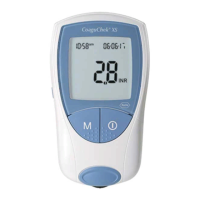
The CoaguChek XS is a portable device designed for self-testing of blood coagulation, specifically for monitoring INR (International Normalized Ratio) levels. It is intended for use by individuals on anticoagulant therapy to help manage their treatment. The device aims to provide accurate and timely results, empowering users to take an active role in their health management.

Function Description:

The CoaguChek XS system consists of a meter, test strips, and a lancing device (CoaguChek Softclix). Its primary function is to measure the prothrombin time (PT) and convert it into an INR value, which is crucial for individuals taking oral anticoagulants. The process involves obtaining a small blood sample from the fingertip, applying it to a test strip, and allowing the meter to analyze the sample.

Testing Process with CoaguChek XS:

  1. Insert Test Strip: The user inserts a test strip into the meter. The meter automatically turns on. If using a new pack of strips, the enclosed code key must first be inserted into the side of the meter.
  2. Confirm Code Chip: The meter displays the code chip number and prompts the user to confirm it matches the lot number on the test strip container. After confirmation by pressing the 'M' button, the meter warms up for approximately 30 seconds, indicated by a flashing hourglass symbol.
  3. Obtain Blood Sample: Once the blood drop symbol flashes and a 180-second countdown begins, the user obtains a large drop of blood from the side of their finger using the lancing device. It is emphasized to gently "milk" the finger and not squeeze it, as squeezing can falsify coagulation values.
  4. Apply Blood to Test Strip: The blood drop is touched and held to the transparent area of the test strip (either the semicircular well or the side of the sample application area). The blood is automatically drawn into the strip, and the test begins. Blood must be applied within 15 seconds of lancing the finger. The CoaguChek XS beeps when sufficient blood is present.

CoaguChek Softclix Lancing Device Usage:

The CoaguChek Softclix is a lancing device designed for comfortable and easy blood sampling.

  1. Removing Used Lancet: To remove a used lancet, the Softclix cap is pulled off, and the ejector is slid forward to release the needle.
  2. Inserting New Lancet: A new lancet is inserted as far as it will go into the lancet holder. The protective cover of the lancet is then twisted off.
  3. Replacing Cap: The cap is pushed back onto the lancing device, and the comfort dial is checked to ensure it's set to the user's desired level.
  4. Priming Lancing Device: The priming button is pressed until it clicks, preparing the device for use.
  5. Pressing Release Button: The Softclix is placed against the side of the fingertip, and the yellow release button is pressed to lance the finger.

Important Technical Specifications (Implied from Usage and Warnings):

  • Measurement Time: The warming-up period is approximately 30 seconds. The blood application window is 15 seconds after lancing. The total measurement time for INR is not explicitly stated but is implied to be relatively quick after blood application.
  • Temperature Range: The meter operates correctly between 15°C and 32°C. An error message with a flashing temperature symbol appears if the temperature is outside this range.
  • Power Source: The device is battery-powered, as indicated by the need to set the date and time after a battery change.
  • Memory: The device likely stores previous results, although specific memory capacity is not detailed.
  • Display: Features a digital display for results, code chip numbers, countdowns, and error messages.

Usage Features:

  • Portability: The compact design allows for easy self-testing at home or on the go.
  • User-Friendly Interface: Automatic turn-on, clear prompts for code chip confirmation, and audible beeps for sufficient blood application simplify the testing process.
  • Code Key System: Ensures that the meter is calibrated correctly for each new batch of test strips, enhancing accuracy.
  • Comfort Dial on Softclix: Allows users to adjust the lancing depth for personalized comfort.
  • Error Messages: The system provides specific error messages (e.g., Error 3: Test Strip, Error 4: Test Strip Unusable, Error 5: Blood Application, Error 6: Measurement, Temperature symbol flashing) to guide users in troubleshooting and ensure reliable results.
  • Date and Time Setting: The device requires date and time to be set, which is crucial for accurate record-keeping and potentially for expiry date checks. The menu allows setting date format (DD/MM/YY), year, month, day, time format (12 hour), hour, and minute.

Maintenance Features:

  • Code Key Replacement: A new code key must be inserted each time a new vial of strips is opened to ensure proper calibration.
  • Test Strip Storage: Strips must be stored in their original container, and the lid replaced immediately after use, to maintain their integrity and prevent contamination or degradation.
  • Expiry Date Check: Users are advised to check the expiry date on the test strip container and not use expired strips.
  • Hand Hygiene: Users are instructed to wash their hands in warm water and dry them thoroughly before handling test strips to prevent contamination.
  • Battery Change: The manual implies that batteries need to be changed, after which the date and time must be reset.

Key Warning Messages and Troubleshooting:

The CoaguChek XS incorporates a system check to prevent inaccurate results and displays specific error messages if a malfunction occurs:

  • Error 3: Test Strip: Indicates the test strip is beyond its expiry date. Users should check the meter's date and time settings and retest with a new lot of strips and code chip if necessary.
  • Error 4: Test Strip Unusable: Often caused by applying blood before the 180-second countdown has finished. Users should retest, ensuring they wait for the countdown to finish before pricking their finger and applying blood.
  • Error 5: Blood Application: Signifies insufficient blood applied to the test strip. Users should retest with a new test strip.
  • Error 6: Measurement: Occurs if the meter or strip is knocked after blood application. Users should retest with a new test strip.
  • Temperature Symbol Flashing: Indicates the meter is too cold (< 15°C) or too warm (> 32°C) to measure correctly.

Important Safety Note:

The CoaguChek Softclix is explicitly stated as "not suitable for use in hospitals or for testing different persons as there is a risk of contamination." This highlights its design for single-person, home-use only to prevent cross-contamination.

The CoaguChek XS system is designed to provide individuals with a reliable and convenient method for monitoring their INR levels, contributing to better management of anticoagulant therapy.

Coaguchek XS Specifications

General IconGeneral
BrandCoaguchek
ModelXS
CategoryBlood Glucose Meter
LanguageEnglish

Related product manuals