EasyManua.ls Logo

CoaguSense Coag-Sense - User Manual

CoaguSense Coag-Sense
72 pages
Print Icon
To Next Page IconTo Next Page
Loading...
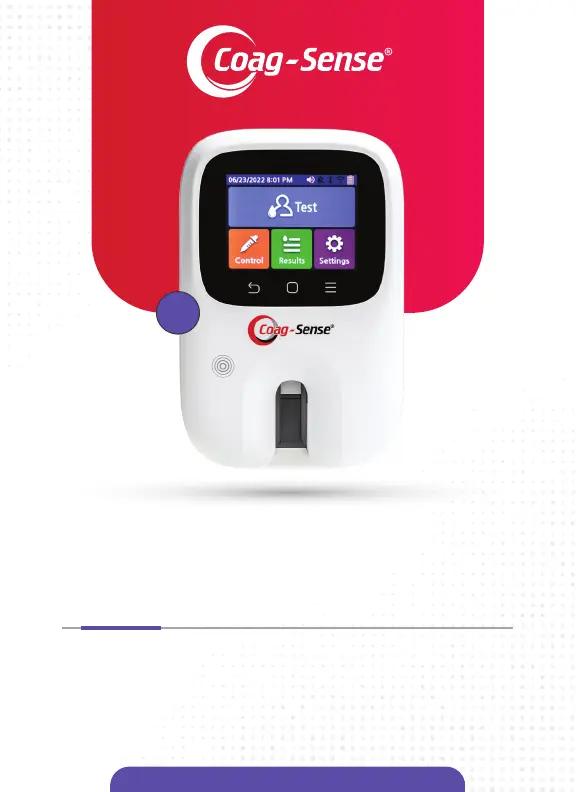
Prothrombin Time (PT)/INR
Monitoring System
Coag-Sense
®
Patient Self-Testing
User Manual
PST

Other manuals for CoaguSense Coag-Sense

Questions and Answers

  • B
    Brian NelsonAug 20, 2025
    What to do if CoaguSense Medical Equipment shows 'NO SAMPLE DETECTED'?
    • J
      John ButlerAug 20, 2025
      If the CoaguSense Medical Equipment displays 'NO SAMPLE DETECTED', it means either no sample or not enough sample was applied to the strip within 2 minutes after the “Apply Sample” message appeared. Repeat the entire procedure with a new strip, including a fingerstick on a different finger. Make sure to apply the sample within 2 minutes of seeing the “Apply Sample” message and ensure the pipette tip or transfer tube touches the sample well before dispensing the sample.
  • J
    John RobinsonAug 25, 2025
    What does 'CLOT TIME TOO SHORT' mean on CoaguSense Medical Equipment?
    • S
      Stacey WebsterAug 25, 2025
      If the CoaguSense Medical Equipment displays 'CLOT TIME TOO SHORT', it means the clotting time was very short and out of testing range. This can happen if there was insufficient sample due to an air bubble in the sample, or if the sample was drawn back into the pipette tip or transfer tube before removing it from the sample well. Repeat the entire procedure with a new strip, including the fingerstick on a different finger. Visually confirm that no air bubbles are in the sample before applying it to the test strip. Release the pipette plunger or pressure on the transfer tube only after removing the pipette tip or transfer tube from the sample application well. If the same message repeats, contact Technical Support.
  • M
    Mr. Kevin LambertAug 26, 2025
    How to fix 'BAR CODE READ FAILURE' on CoaguSense Medical Equipment?
    • S
      Sandra Gross DDSAug 26, 2025
      If your CoaguSense Medical Equipment shows 'BAR CODE READ FAILURE', it could be due to incorrect strip insertion, a problem with the strip or meter, or the meter being in direct sunlight or near a high-intensity light source. Remove the strip and reinsert it, holding the back of the instrument steady with one hand while fully inserting the strip with the other, using a quick, smooth motion. Move the meter indoors, away from direct sunlight or intense light. If the error continues, try again with a new strip. If the message persists, contact Tech Support.
  • L
    Lynn ZamoraAug 27, 2025
    What does 'CONTROL OUT OF RANGE' mean for CoaguSense Medical Equipment?
    • D
      David Palmer DDSAug 28, 2025
      If the CoaguSense Medical Equipment displays 'CONTROL OUT OF RANGE', the control strip result is outside its acceptable range. This might be due to a problem with the control strip, the activation solution, or how the Coag-Sense Control Strips were stored. Use a MiniPipette (not a transfer tube) to apply the control activation solution. Repeat the test with another control strip. If the second test is also out of range, contact Technical Support.
  • K
    Kevin AnthonyAug 30, 2025
    How to resolve 'WHEEL PROBLEM' on my CoaguSense Medical Equipment?
    • T
      Thomas WilsonAug 30, 2025
      If the CoaguSense Medical Equipment displays 'WHEEL PROBLEM', it could mean there's an issue with the strip, the meter, or a used strip was inserted. Reinsert the strip, holding the back of the meter steady with one hand while inserting the strip completely using a quick, smooth motion with the other. If the display continues, try again with another strip. If the message persists, contact Tech Support.
  • M
    Michael MartinSep 1, 2025
    What does 'HEATER PROBLEM' mean on my CoaguSense Medical Equipment?
    • R
      Russell Mack MDSep 1, 2025
      If the CoaguSense Medical Equipment displays 'HEATER PROBLEM', it indicates that the meter is either too warm or too cold, or there might be an internal issue. Move the meter to a location within its operating temperature range (65ºF to 90ºF, 18ºC to 32ºC) and allow it time to adjust. Turn the meter off and then on again. Try the test again with a new strip. If the problem persists, contact Tech Support.
  • J
    James BrooksSep 3, 2025
    Why does my CoaguSense Medical Equipment say 'ROOM TEMP INCORRECT SEE MANUAL'?
    • K
      Kayla SimsSep 3, 2025
      If the CoaguSense Medical Equipment shows 'ROOM TEMP INCORRECT SEE MANUAL', it means the room temperature is outside the meter's operating range. Move the meter to a location where the temperature is between 65ºF and 90ºF (18ºC to 32ºC), and allow the meter time to adjust to the correct temperature. Then, repeat the testing.
  • A
    Andrew TorresSep 4, 2025
    What should I do if my CoaguSense Medical Equipment shows 'DETECT PROBLEM'?
    • K
      Karen KellySep 4, 2025
      If the CoaguSense Medical Equipment displays 'DETECT PROBLEM', it indicates a potential issue with the strip or the meter itself. Remove the strip and reinsert it, holding the back of the instrument steady with one hand while fully inserting the strip with the other hand using a quick, smooth motion. Try again with a new strip. If the message continues to appear, contact Technical Support.
  • P
    Paul RuizSep 7, 2025
    How to fix 'CAL EXPIRED OR INVALID' error on CoaguSense Medical Equipment?
    • D
      David JensenSep 7, 2025
      If your CoaguSense Medical Equipment is displaying 'CAL EXPIRED OR INVALID', it means the test strips you are using have expired. Use a different lot of strips that hasn't expired. Also, make sure the date setting on the meter is correct.
  • A
    Aaron WrightSep 9, 2025
    What to do if CoaguSense Medical Equipment displays 'MOTOR PROBLEM'?
    • M
      Manuel ThompsonSep 9, 2025
      If the CoaguSense Medical Equipment displays 'MOTOR PROBLEM', there might be an issue with the strip or the meter. Turn the meter off and then back on. Try again with a new strip. If the message persists, contact Technical Support.

Summary

1. Introduction to Coag-Sense System

System Intended Use and Purpose

Defines the device's intended use and primary function.

Significance of PT;INR Monitoring

Explains the importance and necessity of PT/INR monitoring.

Important Manual Information and Safety

Manual Scope and Safety Guidelines

Outlines the manual's scope and provides critical safety advice for users.

2. System Description

Meter Components and Interface

Details the physical components and user interface elements of the meter.

Power Supply and System Contents

Describes the power source and lists all items included in the system package.

Overview of Buttons and Icons

Meter Buttons and Touchscreen Navigation

Explains the functions of physical buttons and navigating the touchscreen interface.

3. Meter Specifications

Operating Conditions and Technical Specs

Lists environmental requirements and key technical specifications of the meter.

4. Performance Characteristics

Expected Values and Normal Ranges

Defines expected results, measurement range, and normal ranges for PT/INR.

5. Warnings and Precautions

Patient Medication and Blood Sample Safety

Provides safety advice regarding patient medication and blood sample collection procedures.

Meter Handling, Cleaning, and Test Precautions

Covers safe practices for meter handling, cleaning, and precautions during testing.

6. Hazards and Symbols

Key Device and Regulatory Symbols

Explains common device symbols, including safety, regulatory, and manufacturer markings.

7. Meter Setup

Initial Setup and Power Operations

Guides through initial meter setup and powering the device on and off.

System Settings and Software Updates

Details default system settings and the process for software updates.

Communication Settings: Wi-Fi and Bluetooth

Provides instructions for configuring Wi-Fi and Bluetooth connectivity.

8. Performing a Control Test

Control Test Procedure and Execution

Details the steps for performing control tests, including strip and solution handling.

9. Collecting a Fingerstick Sample

Fingerstick Preparation and Blood Collection

Offers tips for successful fingersticks and proper blood collection techniques.

10. Performing a PT Test

Patient Test Procedure and Execution

Covers the patient test procedure from strip insertion to sample application.

Understanding and Handling Unexpected Results

Guides users on interpreting and handling unexpected test results.

11. Reviewing Stored Results

Accessing and Viewing Test Memory

Explains how to access and view stored test results from the meter's memory.

12. Printing Test Results

Printing Procedure and Requirements

Details the steps and requirements for printing test results from the meter.

13. Network Connectivity and Security

Internet Updates and LAN Security

Covers meter connectivity for updates and security measures for LAN.

14. Bluetooth App Security

Secure Bluetooth Connectivity Recommendations

Provides recommendations for secure Bluetooth app connectivity.

15. Meter Software Update

Software Update Procedure and Precautions

Outlines the software update process and important precautions to follow.

16. Battery Information and Safety

Battery Specifications, Life, and Warnings

Provides battery specifications, expected life, and critical safety warnings.

17. Cleaning and Disinfecting the Meter

Meter Cleaning and Disinfection Procedure

Details the safe procedure for cleaning and disinfecting the meter.

18. Troubleshooting Common Issues

Troubleshooting Error Messages and Solutions

Lists common error messages and their corresponding solutions.

Strip Insertion and Sample Detection Issues

Addresses issues with strip insertion and sample detection errors.

Battery, Display, and Touchscreen Issues

Covers troubleshooting for battery, display, and touchscreen problems.

NFC Tag, Scanner, and Software Issues

Troubleshoots issues with NFC tag, scanner, and software malfunctions.

19. Warranty Information

Limited Warranty Terms and Conditions

Details the terms and conditions of the limited warranty and its exclusions.

Expected Service Life and Meter Returns

Outlines the expected service life and procedures for returning the meter.

20. Reordering Product Information

Product Catalog and Ordering Codes

Provides a catalog of reorderable products with their respective codes.

21. EMC Compliance Tables

Electromagnetic Compatibility Test Results

Presents summarized Electromagnetic Compatibility (EMC) test results.

22. Document Index

Alphabetical Keyword Index

An alphabetical index of keywords and their corresponding page numbers.

CoaguSense Coag-Sense Specifications

General IconGeneral
BrandCoaguSense
ModelCoag-Sense
CategoryMeasuring Instruments
LanguageEnglish

Related product manuals