EasyManua.ls Logo

Coast to Coast TPS-555 - User Manual

Coast to Coast TPS-555
5 pages
Print Icon
To Next Page IconTo Next Page
Loading...
Instruction Manual
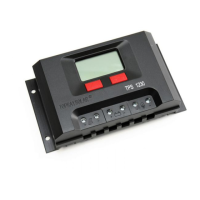
The TPS-555 Solar Charge Regulator is designed to control the charging from the solar panel/s into the
battery, and the power draw from the battery to the loads.
Feature
TPS555 Solar Charge Regulator is able to handle charge and discharge from a 12V battery bank.
It provides over-charging, over-discharging, and over-load protection. Therefore keeping the whole
solar system at a proper working condition.
PWM (pulse width modulation) charging circuit is used for higher efficiency
Big LCD display for easy monitoring
Technical data
Item
TPS-555 12V
Max. Solar Input current
30A
Max. load current
30A
Rated Output Voltage
DC12V
Over charge voltage
14.5V±0.4V
Over discharge protection
10.7V±0.4V
No load loss
25mA
Control method
PWM charging
Operating temperature
-25-40
Open circuit voltage of panel
28Vmax
Low voltage reconnection
12.0±0.4V
How to connect the charge controller
Question and Answer IconNeed help?

Do you have a question about the Coast to Coast TPS-555 and is the answer not in the manual?

Summary

Product Introduction and Features

TPS555 Solar Charge Regulator Overview

Details the function of the TPS-555 Solar Charge Regulator for charging from solar panels to the battery and power draw to loads.

Technical Specifications

Provides key technical data for the TPS-555 12V charge controller, including electrical parameters and operating conditions.

Connection and Disconnection Procedures

Connecting the Charge Controller

Step-by-step guide on how to connect the battery, solar panel, and load to the charge controller with correct polarity.

Disconnecting the Charge Controller

Procedure for safely disconnecting the solar panel and load from the charge controller in the correct sequence.

Controller Operation and Usage

Using the Display Shift Button

Explains how to cycle through LCD display modes showing battery voltage, load current, and solar charge current.

Load Output Control

Details how the load on/off switch affects LCD display and controls the load output status, including over-discharge protection.

Important Notices and Troubleshooting

Warning and Notice Guidelines

Important precautions for installation, handling, and operation to prevent damage, electric shock, or incorrect use.

Troubleshooting Common Issues

Provides solutions for common problems such as 'No Output' and 'Cannot Charge' by checking connections and battery status.

Overview

The Coast to Coast TPS-555 Solar Charge Regulator is a device designed to manage the charging process from solar panels to a 12V battery bank and control the power drawn from the battery to connected loads. It ensures the solar system operates efficiently and safely by providing various protections.

Function Description:

The primary function of the TPS-555 is to regulate the flow of electricity within a solar power system. It takes power generated by solar panels and directs it to charge a 12V battery bank. Simultaneously, it manages the discharge of power from the battery to connected DC loads. This dual control mechanism ensures that the battery is charged optimally and protected from conditions that could degrade its lifespan or performance. The regulator employs Pulse Width Modulation (PWM) charging, a technique known for its efficiency in battery charging by varying the charging current to maintain a stable voltage.

Important Technical Specifications:

  • Model: TPS-555 12V
  • Max. Solar Input Current: 30A
  • Max. Load Current: 30A
  • Rated Output Voltage: DC12V
  • Over Charge Voltage: 14.5V ± 0.4V – This is the voltage at which the regulator will stop or reduce charging to prevent overcharging the battery.
  • Over Discharge Protection: 10.7V ± 0.4V – If the battery voltage drops below this level, the regulator will disconnect the load to prevent deep discharge, which can damage the battery.
  • No Load Loss: < 25mA – This indicates the minimal power consumed by the regulator itself when no load is connected.
  • Control Method: PWM charging – An efficient charging method that extends battery life.
  • Operating Temperature: -25°C to 40°C – The temperature range within which the device is designed to operate reliably.
  • Open Circuit Voltage of Panel: 28Vmax – The maximum open-circuit voltage that the connected solar panel(s) should produce.
  • Low Voltage Reconnection: 12.0V ± 0.4V – After an over-discharge event, the load will be reconnected once the battery voltage rises to this level.
  • Maximum Power Input from Solar Panels: Less than 360W (for a 12V system) – This is a critical specification for system design, ensuring the connected solar panels do not exceed the regulator's capacity.

Usage Features:

The TPS-555 is designed for ease of use and monitoring, featuring a large LCD display.

  • Protections:
    • Over-charging protection: Prevents the battery from being charged beyond its safe voltage limit, extending battery life.
    • Over-discharging protection: Disconnects loads when the battery voltage drops too low, preventing deep discharge and battery damage.
    • Over-load protection: Safeguards the system from excessive current draw by connected loads.
  • LCD Display: A large LCD display provides easy monitoring of system parameters.
  • Display Shift Button: This button allows users to cycle through three different display modes:
    1. Battery Voltage: Shows the current working voltage of the battery (e.g., 12.8 V). In this mode, the "Load on/off switch" button does not change the display.
    2. Output Current to Load: Displays the current being drawn from the battery by the connected loads (e.g., 18.8A).
      • If the load output is ON, it shows the current.
      • If the load output is OFF, it shows 00.0A.
      • If over-discharge protection is activated, the load output will be cut off. Pressing the "Load on/off switch" button in this state is invalid and will trigger a buzzer alarm.
      • To reactivate the load output after over-discharge or overload protection, the battery voltage must be restored, and the "Load on/off switch" button must be pressed twice.
    3. Solar Charge Current: Shows the current being supplied from the solar panel to the battery (e.g., 18.8A). In this mode, the "Load on/off switch" button does not change the display.
  • Load On/Off Switch: This button allows manual control over the DC load output.

Connection Procedure (How to connect the charge controller):

  1. Wire Selection: Use multi-strand insulated copper wire, not less than 6mm², with a 5mm bare strip at the end for connection. Ensure connections are secure and tight to minimize power loss.
  2. Battery Connection: Connect the battery to the designated port, observing polarity ("+" for positive, "-" for negative).
  3. DC Load Connection: Connect the DC load to its designated port, observing polarity.
  4. Solar Panel Connection: Connect the solar panel to its designated port, observing polarity.
  5. Final Check: Verify all connections are secure and correct.

Disconnection and Connection Sequence (Important for safety and proper operation):

Disconnecting:

  1. Disconnect the positive and negative wires of the solar panel first.
  2. Turn off the load on/off switch, then disconnect the load.
  3. Finally, disconnect the positive and negative wires of the battery. Do not disconnect the battery before disconnecting the solar panel.

Connecting:

  1. First, connect the battery wires.
  2. Then, connect the solar panel wires.
  3. Finally, connect the load (if any).

This order MUST be followed to ensure correct operation of the controller.

Maintenance Features / Warnings and Notices:

  • System Design: When designing or installing the solar system, ensure the battery voltage (12VDC) and solar panel voltage are matching. The total power input from solar panels must not exceed 360W for the TPS-555 12V model.
  • Electrical Safety:
    • Do not touch or short the bare strip lead wire of the solar panel to prevent electric shock.
    • Cover the surface of the solar panel(s) during installation to prevent electric shock.
  • Environmental Protection: The charge controller is NOT waterproof. Keep it away from rain and water.
  • Operational Safety: The charge controller operates with high power outputs; avoid touching its surface when it is working.
  • Installation Location: Place the charge controller in a cool, well-ventilated position. Avoid direct sunlight, mounting in hot areas (like a kitchen), and areas with excessive dust and moisture.

Trouble Shooting:

  • No Output:
    • Check if the load is connected correctly.
    • Verify that the current draw is within the maximum output current limit (30A).
    • Ensure the battery voltage is not low (above 10.7V ± 0.4V).
  • Cannot Charge:
    • Check if the connection of the solar panel and battery to the controller is secure.
    • Check the battery's condition.

Coast to Coast TPS-555 Specifications

General IconGeneral
BrandCoast to Coast
ModelTPS-555
CategorySolar panel
LanguageEnglish