EasyManua.ls Logo

Cobra Marine MRF55 EU - User Manual

Cobra Marine MRF55 EU
37 pages
Print Icon
To Next Page IconTo Next Page
Loading...
A1
English
Our Thanks to You and
Customer Assistance
Intro Operation Customer
Assistance
Warranty
Notice
Secondary Icons
Caution Warning
Installation
Customer
Assistance
Introduction
Thank you for purchasing a CobraMarine
VHF radio.
Properly used, this product will give you many years
of reliable service.
How Your CobraMarine
VHF Radio Works
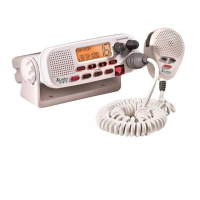
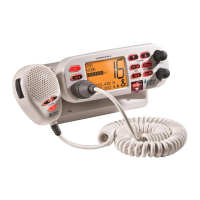
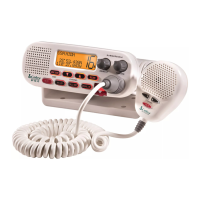
This radio is a VHF transceiver for fixed mounting on your boat. It gives you 2-way
vessel-to-vessel and vessel-to-shore station communications, primarily for safety
and secondarily for navigation and operational purposes. With it, you can call for
help, get information from other boaters, talk to lock or bridge tenders and make
radiotelephone calls to anywhere in the world through a marine operator.
Customer Assistance
Should you encounter any problems with this product, or not understand
its many features, please refer to this owner’s manual. If you require further
assistance after reading this manual, please contact your local dealer.
NOTE
Your equipment will be black. White images are shown in this manual for
illustration purposes only.
This equipment is intended for use in:
For Warranty, Product Service and
Accessory Information
Please contact your local dealer or distributor.
See the enclosed leaflet that provides contact
information for the CobraMarine
international
distributors.
Intro Operation Customer
Assistance
Warranty
Notice
Main Icons
Secondary Icons
Caution Warning
Installation
Customer
Assistance
Customer Assistance
©
2004 Cobr
a Electronics Europe Limited
Dungar House
Nor
thumber
land Avenue
Dun Laoghaire
County Dub
lin, Ireland
www.cobra.com
Intro Operation Customer
Assistance
Warranty
Notice
M
ain Icons
Secondary Icons
Caution Warning
Installation
Customer
Assistance
a
AT
a
BE
CY
a
CZ
DE
a
DK
a
EE
a
ES
a
FI
a
FR
a
GB
a
GR
a
HU
a
IE
a
IS
a
IT
a
LT
a
LV
a
LI
a
LU
a
MT
a
NL
a
NO
a
PL
a
PT
a
SE
a
CH
SI
a
SK
TR
VHF MARINE RADIO
MR F55EU
Printed in China Part No. 480-120-P
Owner’s Manual
Nothing comes close to a Cobra
®
English

For more information or to
order any of our products,
please visit our website:
www.cobra.com
CB Radios
microTALK
®
Radios
Radar/Laser Detectors
Safety Alert
®
Traffic Warning Systems
Handheld GPS Receivers
Mobile GPS Navigation Systems
HighGear
®
Accessories
CobraMarine
VHF Radios
Power Inverters
Accessories
The Cobra Electronics Corporation
line of quality products includes:
Nothing comes close to a Cobra
®
English
Questions and Answers

  • D
    Dr. Rodney PorterJul 31, 2025
    How to fix no sound from speaker on Cobra Marine Radio?
    • S
      Sonya AshleyJul 31, 2025
      If you're not getting any sound from the speaker on your Cobra Marine Radio, it might be because the volume is set too low or the squelch level is too deep. Try readjusting both the volume and squelch settings to see if that resolves the issue.
  • C
    cmacdonaldAug 4, 2025
    What to do if no answer to calls on Cobra Marine Radio?
    • L
      Leslie ParksAug 4, 2025
      If you're not getting any responses to your calls on your Cobra Marine Radio, it could be due to a couple of reasons. You might be out of range of the other station; try switching to high power (25 watts) or moving closer. Alternatively, the signal could be blocked by terrain. In this case, move until you have a direct line of sight to the other station.
  • T
    tinareedAug 9, 2025
    Why Cobra Marine Radio will transmit at 1 watt, but not at 25 watts?
    • B
      Brian PattersonAug 9, 2025
      If your Cobra Marine Radio transmits at 1 watt but not at 25 watts, there are a couple of potential causes. First, the selected channel might be limited to 1 watt, so try switching to another channel. Second, there might be an insufficient power supply; in this case, try recharging the battery.
  • B
    Brian HerringAug 14, 2025
    How to fix no display on LCD on Cobra Marine Radio?
    • D
      Deborah JohnsonAug 14, 2025
      If there is no display on the LCD screen of your Cobra Marine Radio when you turn it on, it might be due to an improper power connection. Check to ensure that all power connections are properly connected and secure.
  • F
    Francisco ReyesAug 19, 2025
    What to do if Cobra Marine Radio will not transmit?
    • G
      Gina StoneSep 12, 2025
      If your Cobra Marine Radio will not transmit, the selected channel might be limited to receive only. Try switching to another channel.
  • D
    David LoveAug 25, 2025
    How to fix DSC distress cannot be sent on Cobra Marine Radio?
    • T
      Teresa RogersAug 25, 2025
      If a DSC distress signal cannot be sent from your Cobra Marine Radio, it is likely because the MMSI (DSC self-identification) number has not been entered. Enter your MMSI number into the radio.

Summary

Our Thanks to You and Customer Assistance

How Your CobraMarine VHF Radio Works

Explains the 2-way VHF transceiver for boat communication, safety, and navigation.

Customer Assistance

Provides contact information and guidance for product issues or feature understanding.

Transceiver Controls, Indicators and Connections

Microphone Attachment

Details connecting the microphone to the transceiver's cord socket.

External Speaker (not included)

Explains how to connect an external speaker for louder output.

Important Safety Information

Warning and Caution Statements

Defines WARNING and CAUTION statements and their implications.

General Precautions

Outlines general precautions for radio usage and RF exposure limits.

Recommendations for Marine Communication

Licensing Information

Details licensing requirements for VHF marine radio operation in different regions.

VHF Marine Radio Procedures

Maintain Your Watch

Advises keeping the radio on and tuned to Channel 16 when underway.

Voice Calling

Explains the procedure for making voice calls to other vessels or shore stations.

Digital Selective Calling (DSC)

Maritime Mobile Service Identity (MMSI)

Explains the purpose of an MMSI and how to obtain one for DSC operation.

Radiotelephone Calls

Emergency Messages and Distress Procedure

Details procedures for emergency and distress messages, including MAYDAY, PAN PAN, and SECURITE signals.

Marine Distress Procedure - DSC

VHF Marine Channel Assignments

Distress, Safety, Calling, and Intership Safety

Outlines channels for emergencies, safety messages, and initial calling.

Commercial, Non-Commercial, and Port Operations

Channels for business, recreational, and port traffic management.

Public Correspondence and Navigational

Channels for telephone calls via marine operator and navigational advice.

Digital Selective Calling

Channel 70 designated exclusively for DSC communication.

World City Time Zones

Installation and Start-Up

Included in this Package

Lists all items found in the product package with the VHF radio.

Mounting and Powering the Radio

Surface Mount

Instructions for installing the transceiver using a surface mounting kit.

Microphone Bracket

Details on how to install the microphone bracket near the transceiver.

Antenna Requirements and Attachment

Electrical Power Connection

Guides on connecting the radio to the vessel's power source safely.

Antenna Requirements and Attachment

Discusses external antenna needs and proper attachment procedures.

External Devices and Connections

Global Positioning System (GPS) Device (not included)

Recommends connecting a GPS for position data and DSC message inclusion.

Getting Started

Provides initial steps for operating the radio and understanding controls.

Set-Up Routines

Settings Menu Navigation

Explains how to navigate the radio's settings menu for customization.

Display and Tone Adjustments

Covers LCD backlight, contrast, and confirmation tone settings.

Time and Position Settings

Details manual setting of vessel position, time, and channel maps.

Voice Transmission

Transmit Power Output

Explains how to select between 1W and 25W transmit power for optimal communication.

Advanced Operation

Channel 16

Provides quick access to the vital Channel 16 for calls.

Dual-Watch

Allows monitoring Channel 16 and one other channel simultaneously.

Scan

Enables scanning through active channels to find conversations.

DSC Set-Up

User MMSI Number

Guides on entering and verifying the unique MMSI for DSC operation.

If You Transfer Your Radio to a Different Vessel

Advises on updating MMSI information when changing vessels.

Group MMSI Number

Explains how to use group MMSI numbers for multi-station communication.

DSC Operation

Sending Distress Calls

Step-by-step instructions for initiating a DSC distress call.

Receiving Distress Calls

Explains how the radio behaves upon receiving a DSC distress call.

Sending an All Ships Call

Procedure for broadcasting urgent or safety messages to all stations.

Sending an Individual Call

How to initiate a DSC call to a specific station.

Maintenance

Troubleshooting

Specifications

Cobra Marine MRF55 EU Specifications

General IconGeneral
BrandCobra Marine
ModelMRF55 EU
CategoryMarine Radio
LanguageEnglish

Related product manuals