EasyManua.ls Logo

Cobra MARINE HH500 - User Manual

Cobra MARINE HH500
48 pages
Print Icon
To Next Page IconTo Next Page
Loading...
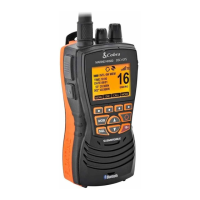
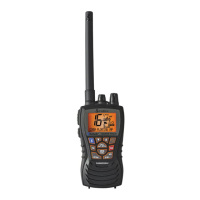
VHF MARINE RADIO
MR HH500 FLT BT
Printed in China Part No. 480-845-P Version B
Owner’s Manual
Nothing Comes Close to a Cobra
®
English

Questions and Answers

  • J
    Jesse RhodesJul 27, 2025
    Why Cobra MARINE HH500 has no sound from speaker?
    • K
      Kimberly WalkerJul 27, 2025
      If there's no sound coming from the speaker of your Cobra Marine Radio, it might be because the volume level is too low or the squelch level is set too high. Try readjusting both the volume and squelch settings to resolve this issue.
  • M
    madison83Jul 31, 2025
    What to do if my Cobra Marine Radio will transmit at one (1) or three (3) watts, but not at six (6) watts?
    • E
      Eric BennettJul 31, 2025
      If your Cobra Marine Radio transmits at lower power levels but not at six watts, the batteries may be low, so you should recharge or replace them. Alternatively, the selected channel might be limited to one watt, in which case you should switch to another channel.
  • B
    Brian RyanAug 4, 2025
    What to do if Cobra Marine Radio has no display on LCD when radio is turned on?
    • I
      iwolfeAug 4, 2025
      If the LCD on your Cobra Marine Radio doesn't display anything when you turn it on, the batteries may be exhausted; try recharging or replacing them. Another possibility is that the batteries aren't installed correctly. Remove them and reinstall them, making sure to follow the polarity markings.
  • A
    Ann OchoaAug 8, 2025
    Why Cobra MARINE HH500 has no answer to calls?
    • A
      Austin BrightAug 8, 2025
      If your Cobra Marine Radio gets no response to calls, you might be out of range of the other station. Try switching to three or six watts or moving closer. Also, the signal could be blocked by terrain, so move until you have a line of sight to the other station.
  • S
    sanchezchristopherAug 12, 2025
    What to do if Cobra MARINE HH500 batteries run down quickly?
    • J
      Jenna ValdezAug 12, 2025
      If the batteries in your Cobra Marine Radio are draining quickly, it's likely they are at the end of their life. Replace them with new batteries.
  • M
    Marie FrazierAug 16, 2025
    What to do if my Cobra MARINE HH500 will not transmit?
    • M
      Mrs. Nicole Kennedy DDSAug 16, 2025
      If your Cobra Marine Radio won't transmit, the selected channel might be receive-only. Try switching to another channel.
  • J
    Justin WilliamsAug 21, 2025
    How to unlock Cobra MARINE HH500 if there is no response to button press?
    • D
      Daniel LarsonAug 21, 2025
      If your Cobra Marine Radio isn't responding to button presses, the button lock might be activated. Press the Backlight/Key Lock button to deactivate it.

Summary

Important Safety Information

General Precautions

Installation

Included in this Package

Lists all items provided with the CobraMarine VHF radio upon purchase.

Operating Your Radio

Getting Started

Guides users through initial setup, button identification, and basic radio operation.

Setup Mode Programming

Squelch Control

Explains how to set the squelch level to filter out noise and improve reception.

Bluetooth Mode Pairing and Programming

Pairing Your Mobile Phone

Step-by-step guide on how to pair a Bluetooth-enabled mobile phone with the radio.

Bluetooth Mode Programming

Details how to adjust settings for answering and conducting Bluetooth mobile phone calls.

Weather Mode Programming

Standby;Receive and Transmit

Advanced Operation

Tri-Watch Mode

Explains how to monitor three important channels simultaneously.

Using Tri-Watch

Details how to set up and operate the Tri-Watch scanning feature.

Memory Location Mode

Covers storing, recalling, and erasing frequently used channels in memory locations.

Rewind Operation

Rewind-Say-Again Feature

Allows replaying or recording the last 20 seconds of an incoming audio transmission.

Using Rewind-Say-Again to Record VOICE Audio Transmission

Guides users on how to record voice transmissions using the Rewind feature.

Mobile Phone Operation With Bluetooth

Answer Incoming Phone Calls

Explains how to answer and end mobile phone calls using the radio as a speaker/microphone.

Initiating a Call

Covers making calls from the mobile phone via the radio, including voice dialing.

Last Number Redial

Details how to redial the last number stored in the mobile phone's call log.

Maintenance and Troubleshooting

VHF Marine Radio Protocols

VHF Marine Radio Procedures

Outlines standard procedures for using the VHF radio for communication at sea.

Voice Calling

Provides guidance on making voice calls to other vessels or shore installations.

Emergency Messages and Distress Procedure

Details procedures for sending emergency and distress messages, including signal types.

Marine Distress Procedure

Step-by-step guide for making a distress call, including essential information to convey.

Warranty and Trademark Acknowledgement

Cobra MARINE HH500 Specifications

General IconGeneral
ModelHH500
TypeHandheld VHF Marine Radio
Waterproof RatingIPX7
SubmersibleYes
NOAA Weather RadioYes
Weather AlertYes
Speaker Microphone JackYes
GPSNo
BluetoothNo
FloatationYes
DisplayLCD
Battery TypeLi-ion
FeaturesNOAA Weather Radio

Related product manuals