EasyManua.ls Logo

Cobra microTALK CXT345 - User Manual

Cobra microTALK CXT345
11 pages
Print Icon
To Next Page IconTo Next Page
Loading...
Introduction
©2012 Cobra Electronics Corporation
6500 West Cortland Street
Chicago, Illinois 60707 USA
www.cobra.com
Making Life Easier and Safer
Staying in touch with your family and friends is
convenient and easy when using your microTALK
®
radio. Some of the many uses you will discover include:
Communicating with others while hiking, biking, and working; keeping
track of family and friends at a crowded public event; checking with
travel companions in another car; talking with neighbors; arranging
meeting spots with others while shopping at the mall.
Secure your microTALK
®
radio while on the go.
Carrying your microTALK
®
radio with you is easy
when using the belt clip or optional wrist strap.
The belt clip easily attaches to your belt, purse,
or backpack.
For Assistance in the U.S.A.
In this user’s manual, you should find all the information you need to
operate your microTALK
®
radio. If you require further assistance after
reading this manual, Cobra Electronics offers the following customer
assistance services:
Automated Help Desk
English only. 24 hours a day, 7 days a week 773-889-3087 (phone).
Customer Assistance Operators
English and Spanish. 8:00 a.m. to 5:30 p.m. Central Time,
Monday through Friday (except holidays) 773-889-3087 (phone).
Questions
English and Spanish. Faxes can be received at 773-622-2269 (fax).
Technical Assistance
English only. www.cobra.com (on-line: Frequently Asked Questions).
English and Spanish. productinfo
@cobra.com (e-mail).
For Assistance Outside the U.S.A.
Contact Your Local Dealer
Customer Assistance
A1
Owner’s Manual
Nothing Comes Close to a Cobra
®
Nothing Comes Close to a Cobra
®
For more information or to
order any of our products,
please visit our website:
www.cobra.com
Belt Clip
Printed in China
Part No. 480-831-P
English
Version D
TWO-WAY RADIO MODEL
CXT345
CXT345_MANL.indd 1-1 1/17/13 8:08 AM
Question and Answer IconNeed help?

Do you have a question about the Cobra microTALK CXT345 and is the answer not in the manual?

Summary

Introduction and Assistance

Belt Clip Usage

Secures the radio to clothing or bags for convenient carrying.

Customer Assistance Information

Contact details and support services for users in the USA.

Product Features and Warranty

Backlit LCD Display Overview

Details the various icons and information displayed on the radio's screen.

Limited One-Year Warranty

Terms and conditions of the manufacturer's warranty for the radio.

Radio Care and Battery Installation

Proper Radio Care

Guidelines for maintaining the radio and protecting it from damage.

Installing and Charging Batteries

Instructions for inserting batteries and using the charging jack.

Basic Operation and Communication

Quick Start and Powering On

Initial steps to turn on the radio and begin using it.

Battery Status and Auto Save

Understanding battery levels and the automatic power saving feature.

Communicating and Channel Selection

How to talk, listen, and set communication channels.

Advanced Operation Features

Volume, Call Tones, and Display Illumination

Adjusting volume, sending call alerts, and lighting the screen.

Squelch, Range Extender, and Lock

Managing noise reduction, extending range, and locking buttons.

Mode Functions - Privacy Codes

Scrolling Through Modes

Navigating the radio's menu options using the Mode button.

Understanding Privacy Codes

Explanation of CTCSS and DCS systems for reducing interference.

Setting CTCSS Privacy Codes

Step-by-step instructions to select CTCSS privacy codes.

Mode Functions - DCS and VOX

Setting DCS Privacy Codes

Guide to configuring DCS privacy codes for clearer communication.

Voice Activated Transmit (VOX)

Enabling and adjusting the hands-free VOX transmission feature.

Mode Functions - Scanning

Channel Scanning

How to automatically scan channels to find active transmissions.

Privacy Code Scanning

Scanning for privacy codes within a specific channel.

Mode Functions - Alerts and Weather

Call Tones and Roger Beep

Setting distinct call alerts and confirmation tones.

NOAA Weather Radio and Alerts

Listening to weather broadcasts and receiving hazard alerts.

Specifications, Licensing, and Safety

FRS;GMRS Frequency Allocation

Table of frequencies, channels, and power output for radio services.

FCC License Requirements

Important notice regarding the FCC license needed for GMRS operation.

RF Exposure and Safe Usage

Guidelines for safe radio operation and compliance with RF exposure limits.

Product Service and Support

U.S.A. Product Service

Procedures for obtaining repair or replacement for products purchased in the USA.

International Service Contact

Information for customers outside the USA to get product service.

Summary

Introduction and Assistance

Belt Clip Usage

Secures the radio to clothing or bags for convenient carrying.

Customer Assistance Information

Contact details and support services for users in the USA.

Product Features and Warranty

Backlit LCD Display Overview

Details the various icons and information displayed on the radio's screen.

Limited One-Year Warranty

Terms and conditions of the manufacturer's warranty for the radio.

Radio Care and Battery Installation

Proper Radio Care

Guidelines for maintaining the radio and protecting it from damage.

Installing and Charging Batteries

Instructions for inserting batteries and using the charging jack.

Basic Operation and Communication

Quick Start and Powering On

Initial steps to turn on the radio and begin using it.

Battery Status and Auto Save

Understanding battery levels and the automatic power saving feature.

Communicating and Channel Selection

How to talk, listen, and set communication channels.

Advanced Operation Features

Volume, Call Tones, and Display Illumination

Adjusting volume, sending call alerts, and lighting the screen.

Squelch, Range Extender, and Lock

Managing noise reduction, extending range, and locking buttons.

Mode Functions - Privacy Codes

Scrolling Through Modes

Navigating the radio's menu options using the Mode button.

Understanding Privacy Codes

Explanation of CTCSS and DCS systems for reducing interference.

Setting CTCSS Privacy Codes

Step-by-step instructions to select CTCSS privacy codes.

Mode Functions - DCS and VOX

Setting DCS Privacy Codes

Guide to configuring DCS privacy codes for clearer communication.

Voice Activated Transmit (VOX)

Enabling and adjusting the hands-free VOX transmission feature.

Mode Functions - Scanning

Channel Scanning

How to automatically scan channels to find active transmissions.

Privacy Code Scanning

Scanning for privacy codes within a specific channel.

Mode Functions - Alerts and Weather

Call Tones and Roger Beep

Setting distinct call alerts and confirmation tones.

NOAA Weather Radio and Alerts

Listening to weather broadcasts and receiving hazard alerts.

Specifications, Licensing, and Safety

FRS;GMRS Frequency Allocation

Table of frequencies, channels, and power output for radio services.

FCC License Requirements

Important notice regarding the FCC license needed for GMRS operation.

RF Exposure and Safe Usage

Guidelines for safe radio operation and compliance with RF exposure limits.

Product Service and Support

U.S.A. Product Service

Procedures for obtaining repair or replacement for products purchased in the USA.

International Service Contact

Information for customers outside the USA to get product service.

Overview

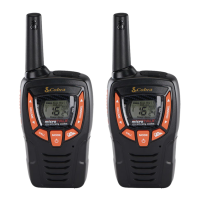
The Cobra CXT345 microTALK is a two-way radio designed for convenient and easy communication, making it suitable for various activities such as hiking, biking, working, keeping track of family and friends at crowded events, checking with travel companions, talking with neighbors, and arranging meeting spots while shopping.

Function Description

The primary function of the Cobra CXT345 is two-way radio communication. It operates on 22 channels, with seven shared with FRS/GMRS, seven FRS-only, and eight GMRS-only. Additionally, it features 10 NOAA All Hazards Radio channels and a Weather Alert function, allowing users to listen to NOAA All Hazards Radio channels and receive emergency alerts from designated NOAA broadcast stations.

The radio incorporates 121 Privacy Codes (38 CTCSS codes and 83 DCS codes) to help reduce interference from other users on any given channel. It supports hands-free operation (VOX), automatically transmitting when the user speaks, with adjustable VOX sensitivity to match voice volume and avoid background noise triggers.

Other functions include:

  • Scan: Allows the radio to automatically scan channels and privacy codes, stopping when an incoming transmission is detected.
  • Call Alert: Transmits one of five selectable call tones to alert another person.
  • Roger Beep Confirmation Tone: An audible tone sounds when the Talk button is released, signaling to the other party that the transmission is complete.
  • Auto Squelch/Maximum Range: Automatically shuts off weak transmissions and unwanted noise. It also features a maximum range extender to receive all signals and extend the radio's range.
  • Button Lock: Locks the Channel Up, Channel Down, and Mode/Power buttons to prevent accidental operation.

Usage Features

The Cobra CXT345 is designed for user-friendly operation with several features to enhance the communication experience:

  • Turning On/Off: Press and hold the Mode/Power button until audible tones indicate the radio is on or off.
  • Channel Selection: Use the Channel Up or Channel Down buttons to select any of the 22 available channels. Both radios must be tuned to the same channel to communicate.
  • Talking: Press and hold the Talk button, speak into the microphone (approximately two inches from your mouth), and release the Talk button to listen for a response. The radio cannot receive calls while the Talk button is pressed.
  • Calling: Press and release the Call button to send a two-second call tone, establishing voice communication.
  • Volume Adjustment: Use the Volume Up or Volume Down buttons to adjust the speaker volume (levels 1 through 8). A double beep indicates minimum or maximum volume.
  • Display Illumination: Press and release the Light/Max Range button to illuminate the backlit LCD display.
  • Auto Squelch/Maximum Range Extender: Temporarily turn off auto squelch by pressing the Light/Max Range button for less than five seconds. To turn on the maximum range extender, press and hold the Light/Max Range button for at least five seconds until two beeps are heard. The range extender turns off when the button is released or the channel is changed.
  • Lock Function: Press and hold the Lock button for two seconds to toggle the lock on or off. The Lock icon appears on the display when activated.
  • Privacy Code Selection (CTCSS/DCS): After selecting a channel, press the Mode/Power button until the CTCSS or DCS icon flashes. Use the Channel Up or Channel Down buttons to select a privacy code. Both radios must use the same privacy code system and number.
  • VOX Mode: Press the Mode/Power button until the VOX icon flashes to turn VOX on or off using the Channel Up or Channel Down buttons. To set VOX sensitivity, press the Mode/Power button until the VOX icon flashes and the sensitivity level (LE1 through LE5) is displayed, then adjust with the Channel Up or Channel Down buttons.
  • Channel Scan: Press the Mode/Power button until the Scan icon and channel numbers appear, then use the Channel Up or Channel Down buttons to start scanning. The radio stops on detected transmissions for 10 seconds.
  • Privacy Code Scan: While in Standby mode, select a channel, then press the Mode/Power button until the CTCSS or DCS icon and privacy code numbers flash. Use the Channel Up or Channel Down buttons to begin scanning privacy codes within that channel.
  • Call Tone Settings: Press the Mode/Power button until "C" and the call tone number (01-05) are displayed. Use the Channel Up or Channel Down buttons to preview and select a call tone.
  • Roger Beep On/Off: Press the Mode/Power button until the Roger Beep icon flashes. Use the Channel Up or Channel Down buttons to toggle the roger beep on or off.
  • NOAA All Hazards Radio Channels: Press the Weather button until the All Hazards Radio icon and channel are displayed. Use the Channel Up or Channel Down buttons to change channels. Hold the Weather button until On or Off is displayed to exit.
  • Weather Alert Mode: Press the Weather/Lock button until the Weather Alert icon flashes. Use the Channel Up or Channel Down buttons to turn the alert on or off. Press and hold the Weather/Lock button again to save the setting and exit.

Maintenance Features

Proper care ensures years of trouble-free service from your microTALK radio:

  • Handling: Handle the radio gently.
  • Environment: Keep the radio away from dust, water, and damp places. Avoid exposure to extreme temperatures.
  • Battery Installation/Replacement:
    1. Remove the belt clip by releasing the latch and sliding it up.
    2. Pull up the battery door latch to remove the cover.
    3. Insert three AA rechargeable or non-rechargeable alkaline batteries, observing polarity markings.
    4. Replace the battery compartment cover and belt clip.
    • Do not attempt to charge alkaline batteries.
    • Do not mix old and new batteries.
    • Do not mix alkaline, standard (carbon-zinc), or rechargeable (Ni-Cd, Ni-MH) batteries.
  • Battery Charging:
    1. Ensure batteries are inserted correctly.
    2. Insert the charging cable into the charge jack at the top of the radio.
    3. Plug the cable into a USB-compatible power port.
    • Use only the supplied rechargeable batteries and charger.
    • Cobra recommends turning the radio off while charging.
    • Non-rechargeable alkaline batteries can also be used, but not charged in the radio.
  • Battery Status Indicator: The display shows the battery charge status with four bars indicating a full charge. When battery power is low, the last bar blinks, and an audible tone sounds twice before shutdown, signaling it's time to replace or recharge batteries. The radio displays a flashing battery icon while charging if it's on.
  • Auto Battery Save: If no transmissions occur within 10 seconds, the radio automatically switches to Power Save mode, and the Power Saver icon flashes. This does not affect receiving incoming transmissions.
  • Rain Resistance: The radio is rain resistant to JIS3 standards.

Cobra microTALK CXT345 Specifications

General IconGeneral
Number of Channels22
NOAA Weather ChannelsYes
VOXYes
Weather AlertsYes
Backlit DisplayYes
Vibrate AlertYes
Power Output0.5 Watts
Battery LifeUp to 10 hours
Frequency RangeFRS/GMRS
Privacy Codes121
Water ResistantYes

Related product manuals