
 Need help?
Do you have a question about the Cobra microTALK PX650 and is the answer not in the manual?
Essential safety precautions for operating the radio and its accessories.
Specific safety instructions and warnings related to battery handling and care.
Overview of how the radio enhances communication and safety.
Information on obtaining support, warranty, and product information.
Important precautions for operating the radio safely and effectively.
Information regarding potential interference and FCC/ISED compliance.
Explanation of different LED light indicators and their meanings.
Step-by-step guide for installing and securing batteries in the radio.
Basic instructions for charging the radio and getting started.
Steps to power the radio on and off using the knob control.
A brief guide to setting up and using the radio for the first time.
Initial steps to get the radio operational for communication.
Details on the radio's water and splash proofing and limitations.
Instructions on how to talk and listen to another person using the radio.
How to receive incoming transmissions and stay in standby mode.
Instructions on how to increase or decrease the radio's volume.
Using the call button to alert others and establish a second call tone.
Explanation of auto squelch and how to maximize radio range.
How to lock and unlock the FUNC/CODE and Channel knobs.
Information on radio range based on terrain and environment conditions.
Procedures for checking the current channel and privacy code settings.
Guide to selecting channels and privacy codes for communication.
Steps to reset all channels with factory default privacy codes.
Instructions on how to turn VOX mode on or off and set sensitivity.
How to turn the roger beep confirmation tone on or off.
How to activate and use the emergency alert feature.
Details on channel frequencies and power output for compatibility.
Statements regarding compliance with FCC and ISED regulations.
Information on RF exposure limits and safe operating distances.
Details of the limited one-year warranty for the product.
Acknowledgment of trademarks and copyrights related to the product.
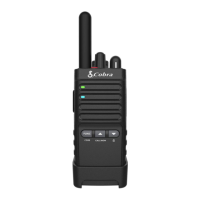
This document describes the Cobra microTALK PX650 two-way radio, an IP54 waterproof and dustproof device designed for convenient and easy communication. It features 22 channels with preset privacy codes, user-adjustable privacy codes (38 CTCSS codes), hands-free operation (VOX), call alert, button lock, speaker/microphone/charge jack, selectable Roger Beep, battery/power saver, keystroke tones, low battery audible alert, auto squelch, maximum range extender, holster with swivel clip, and an emergency call feature.
The Cobra microTALK PX650 is a portable two-way radio that allows users to communicate with others over short to medium distances. It operates on 22 channels, each with a default privacy code, and offers the flexibility to set custom CTCSS privacy codes to reduce interference from other users. The radio supports hands-free operation through its Voice Activated Transmit (VOX) feature, automatically transmitting when the user speaks, with adjustable sensitivity to suit different voice volumes and minimize background noise triggers. A call alert function allows users to signal others they are calling with a two-second tone. The device also includes an emergency alert mode, which, when activated, automatically sets the radio to a "hands-free" emergency control mode for 30 seconds, maximizing speaker volume and emitting a warbling alert tone for 8 seconds, followed by 22 seconds of voice transmission. This feature is intended for urgent help situations.
To begin using the radio, users must first ensure the battery is properly installed and charged. The radio is turned on and off using the ON/OFF/Volume Knob. Once on, the radio chirps, and the current channel number and any user-adjusted privacy code setting are prompted, placing the radio in Standby mode, ready to receive transmissions. The Green LED flashes every 5 seconds in Standby mode.
Communication is initiated by pressing and holding the Talk button, speaking into the microphone (approximately two inches from the mouth), and then releasing the Talk button to listen for a response. Incoming calls cannot be received while the Talk button is pressed. Both radios must be tuned to the same channel and privacy code to communicate.
The volume can be adjusted by first pressing and holding the Call/Mon button for three seconds to turn off auto squelch, then rotating the Volume Knob. Rotating clockwise increases the volume, while counterclockwise decreases it. Pressing and holding the Call/Mon button again enables auto squelch.
The radio's range varies depending on terrain and conditions. In flat, open country, it operates at maximum range. Buildings and foliage can reduce the range, and dense foliage and hilly terrain further limit it. Channels 8 through 14 automatically switch to low power, which also limits range. The auto squelch feature automatically shuts off weak transmissions and unwanted noise. This can be turned off (maximum range extender on) by pressing and holding the Call/Mon button for at least three seconds, indicated by two beeps.
The Lock function prevents accidental operation of the FUNC/CODE button and Channel Knob. It is activated or deactivated by pressing and holding the Lock button for two seconds, confirmed by a double beep. In Lock mode, a three-beep warning sounds if the locked buttons are pressed.
The FUNC/CODE button allows users to scroll through and select various features, including VOX On/Off, VOX Sensitivity, and Roger Beep On/Off. To set VOX sensitivity, users press the FUNC button until the current level is prompted (from 1 to 5, with 5 being most sensitive). The Up or Down buttons adjust the setting. The Roger Beep Confirmation Tone, an audible tone heard by the listener when the Talk button is released, can also be turned on or off through the FUNC menu.
Channels and privacy codes are selected using the Channel/Privacy Code Selection Knob. Turning the knob one step in Standby mode prompts the current channel and privacy code setting. Users can then rotate the knob to change the channel or press the Talk button to confirm the setting and return to Standby mode. If no buttons are pressed for 6 seconds, the radio returns to Standby mode after prompting the current channel.
CTCSS privacy codes can be set after selecting a channel. Users press and hold the FUNC/CODE button until the current code number is prompted. They can then use the Channel/Privacy Code Selection Knob or the Up/Down buttons to select a desired CTCSS code. The radio remembers the last privacy code system and number selected for each channel. "Code Off" allows all signals to be heard on a channel.
The PX650 is designed for durability, being IP54 waterproof and dustproof. This means it is resistant to water and rain splashes when the battery cover, headset accessory, and micro-USB ports are sealed. Users should only open the battery compartment door or headset port/USB charge cover when the radio is dry. The micro-USB cable and plug are not waterproof, so charging should occur in a dry location.
For charging, the radio can be placed in a desktop charger or connected directly via the micro-USB cable to a USB-compatible power port. The Red LED indicator turns on during charging and off when complete. New batteries should be charged for 8 hours before first use. Cobra recommends turning the radio off while charging.
To install or replace batteries, the holster must be removed by releasing the belt clip latch and sliding it downward. A flat head screwdriver or coin is used to remove the screw securing the back battery panel. The battery connector is then attached to the radio's socket, and the battery is placed inside the compartment, ensuring wires are aligned and tucked in carefully to maintain the O-ring's sealing performance. The battery compartment cover is then screwed back on mildly to avoid damage.
The radio should be handled gently, kept away from dust, and not exposed to extreme temperatures or placed in water. Cleaners or solvents should not be used; only a damp or dry cloth is recommended for cleaning the exterior. Users should not attempt to service the receiver themselves, as this voids the warranty.
The manual also provides important safety instructions regarding battery handling, including warnings against incineration, disposal in fire, disassembly, crushing, puncturing, or drying with heat sources. In case of battery liquid leakage, immediate washing with soap and water, neutralization with mild acid, and seeking medical attention for eye contact are advised.
For product service and support, users are instructed to contact Altis Global Limited directly via phone or email, rather than returning the product to the retail store. Warranty service requires proof of purchase, a written description of the problem, and contact information. The manual also provides information on recycling batteries according to local, state, or federal laws.
 General
| Waterproof | No |
|---|---|
| Display | LCD |
| Vibrate Alert | Yes |
| NOAA Weather Alerts | Yes |
| Channels | 22 |
| Privacy Codes | 121 |
| NOAA Weather Channels | 10 |
| VOX | Yes |
| Water Resistance | Water Resistant |


 To Next Page