Reference
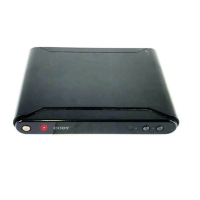
This chapter discusses ways to troubleshoot the DTV-102 converter box and provides the module specifications.
5.1 Troubleshooting Guide
If you are experiencing problems with the DTV-102, see Table 1 for available solutions.
Table 1. DTV-102 Module Troubleshooting
- 32 -
Symptom Solution
No power
Make sure the power supply is securely plugged into a standard wall outlet and the
cor d is plugged into the powe r c onnector on the C B module.
Make sure the CB module is turned on using the front panel power button or the
remote control power button.
CB is not responding to the
remote control
Make sure to point the remote control directly at the remote control sensor on the
CB, with no obstacles in between them.
Y ou may be too far from C B. T ry moving clos er.
Make sure that the remote control batteries are installed in the correct direction (+
and –).
The batteries may be depleted. Try replacing them with new ones.
Verify C B is operating correctly by pressing buttons on the front panel of CB.
No picture
Make sure that the antenna in cable is correctly connected to the CB.
Make sure that the video out cable is correctly connected to the CB and TV.
Make sure that the CB and TV are turned on.
Make sure that the TV is correctly set to the selected CB video output channel.
R efer to the TV owner’s manual for further informa tion.
Check the antenna and the antenna cable. There may be damage or interference
sources.
Picture is blocky or not clear
Check the antenna and the antenna cable. There may be damage or interference
sources.
Reposition the antenna to improve signal s trength. S ignal strength can also be
affected by rain or snow. In the US A, the website www.antennaweb. org
can
provide help in determining the bes t antenna orie ntation.
No sound
Make sure that the audio cables are correctly connected between the CB audio
outputs a nd the T V a udio inputs.
Make sure that C B and TV are turned on.
Make sure the CB and T V volume settings are at a reasonable level.
Make s ure tha t the M U T E fun c tio n is not a ctiva te d on the C B or T V.
Ma ke s ure the T V is corr e c tly s et to the s ele c te d C B a udio o utput cha nne l.
When TV has only one audio input jack, use a standard audio cable (white) to
conne ct th e a u dio o utput ja c k ( wh ite ) on the C B to the a udio in pu t ja ck on the T V .
The red audio cable and the CB red audio output jack are not needed.
Reference
5.2 Specifications
Product
Converter Box for ATSC to NTSC
Connecting Jacks
ANT IN
F connector (75 ohm)
ANT OUT
F connector (75 ohm)
Video Output
1-pin RCA jack, 1Vpp, 480i composite
Analog Audio Output
2-pin RCA jack (L, R), 450 mVrms (100k ohm)
RF Input
DTV standard ATSC
Channel Coverage
Terrestrial: 2-69
Power Source
100-240 VAC, 50/60 Hz +/-0.5 %
- 33 -
All digital channels a re not
received
Ma ke sur e tha t the Auto P rogra m proc es s in the C ha nne l me nu h a s bee n
completed. It will be required when you s etup the C B for the firs t time or when the
C B is moved to a loc a tion whe re other cha nnels are broa dcas t.
The selected channel does not exist at the time. There are not always
sub-cha nnels being broadca s t.
When the A uto P rogra m proces s is interrupted and not completed, s ome cha nnels
will not be rec eived. Ma ke s ure to comple te the Auto P rogra m proce s s in the
Channel menu.
CC display stays on or two
sets of captions are shown
Make sure the CB CC mode is set to Off.
Make sure that the TV’s C C display is turned off. Refer to the TV owner’s manual
for further information on how to turn off its C C feature.
Forgot the PIN for V-Chip
U nplu g th e A C power c ord a nd wait for a pprox . 5 s ec o nds , the n plu g in th e po we r
cor d. I n the V -C hip m e nu, ente r the de fa ult nu mbe r "0 0 0 0 . "
Power Consumption
w/o smart antenna, 8W (Power on),
Operating Condition
41 F° (5 C°) - 104 F° (40 C°)
Board Dimensions
(241 mm x 168 mm x 43 mm)
Weight
425g
Accessories
Remote Control 1 (Provided)
Batteries (size AAA) 2 (Provided)
RF cable 1
RCA cable
(Video+Audio L/R) 1
Designs and Specifications are subject to change without notice.


 To Previous Page
 Loading...