EasyManua.ls Logo

Coby Kyros MID7015 - Page 27

Coby Kyros MID7015
126 pages
Print Icon
To Next Page IconTo Next Page
To Previous Page IconTo Previous Page
Loading...
Page 27 Browsing The Web
English
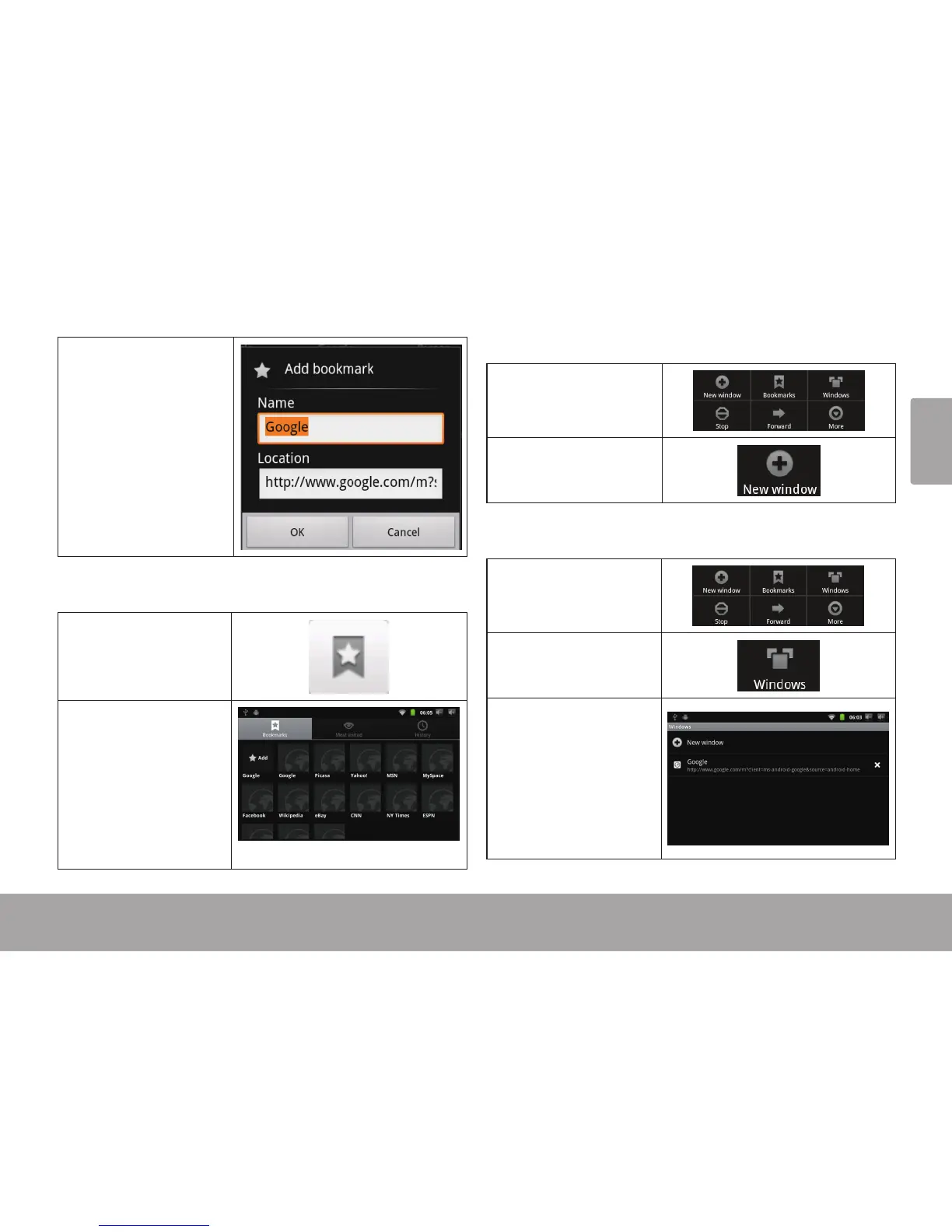
4. If desired, you can
modify the name
of the bookmark
or its location (URL
address). Otherwise,
touch OK to nish
adding the book-
mark.
To go to a bookmarked webpage.
1. Touch the Book-
mark icon to the
right of the Address
bar.
2. Touch a bookmark
tile to open it.
To open a new browser window.
1. Press the Menu key
to show the Browser
options.
2. Touch New Win-
dow to open a new
browser window.
To switch between browser windows.
1. Press the Menu key
to show the Browser
options.
2. Touch Windows to
show a list of open
browser windows.
3. Touch the name of a
window to switch to
it, or touch the “x” to
close the window.

Table of Contents

Related product manuals