10
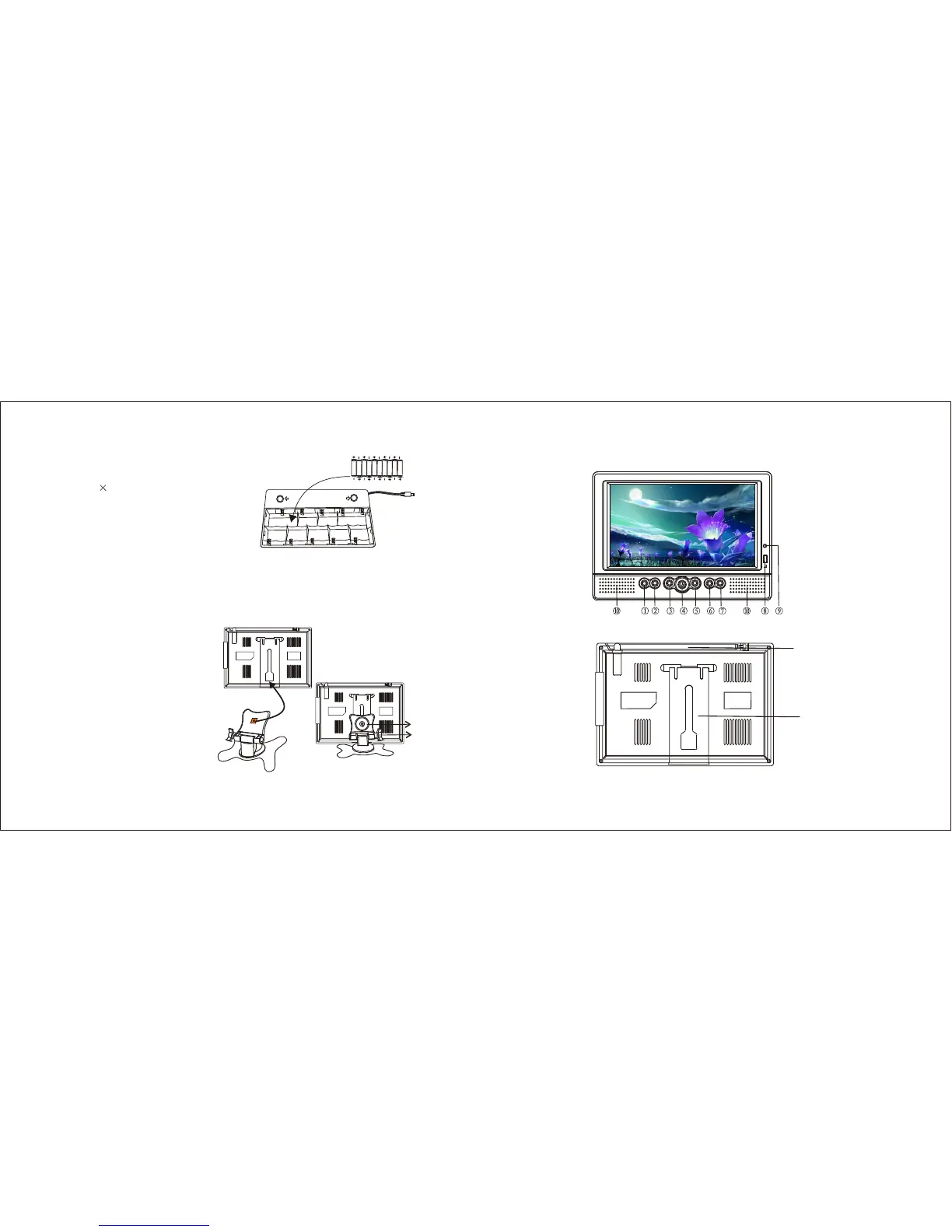
5. Battery Installation( Optional):
Open and remove the battery door located on
the bottom of the battery compartment stand.
Insert 10 “AA” (UM-3) batteries into thebattery
compartment (see right p i cture). B e su re the
pol arity (+and-) matches the markings inside.
Close the battery door, and connect the power
cord of the battery compartment to the power
source input jack of the unit.
Metal washer
Knob1
Knob2
3-1
3-2
3-3
12. Stand Holder(Plastic)
11.Rotary Telescopic
Antenna
1. Volume Down Control
2. Volume Up Control
3. AV/TV Switch
4. Stand By Button
5. Menu Button
6. Channel Up Button
7. Channel Down Button
8. Remote Control Sensor
9. Power/Standby Indicator
10. Built In Speakers
2. General Part
FRONT VIEW
MENU
VOL- VOL+ CH-CH+AV/TV
3
NOTE:
Do not mix new batteries with old or used ones.
Only use the batteries of the same type and brand.
Remove the batteries when not in use for a long period of time.
Do not connect the AC adaptor to the battery compartment while the power cord from the
battery compartment is connected to the unit.
6. Stand Fixture(Optional)
- Loosen the metal washer on the top of
the stand, but do not separate it from
the stand (see picture 3-1).
- Insert the metal washer with the stand
into the slot on the back of the unit,
and slide the stand up to a suitable
height (see picture 3-2).
- Tighten Knob 1 (see picture 3-3) to
fasten the stand to the unit. Adjust the
angle of the unit, and then tighten
Knob 2 (see picture 3-3) to lock it in
place.


 To Next Page
 Loading...