9
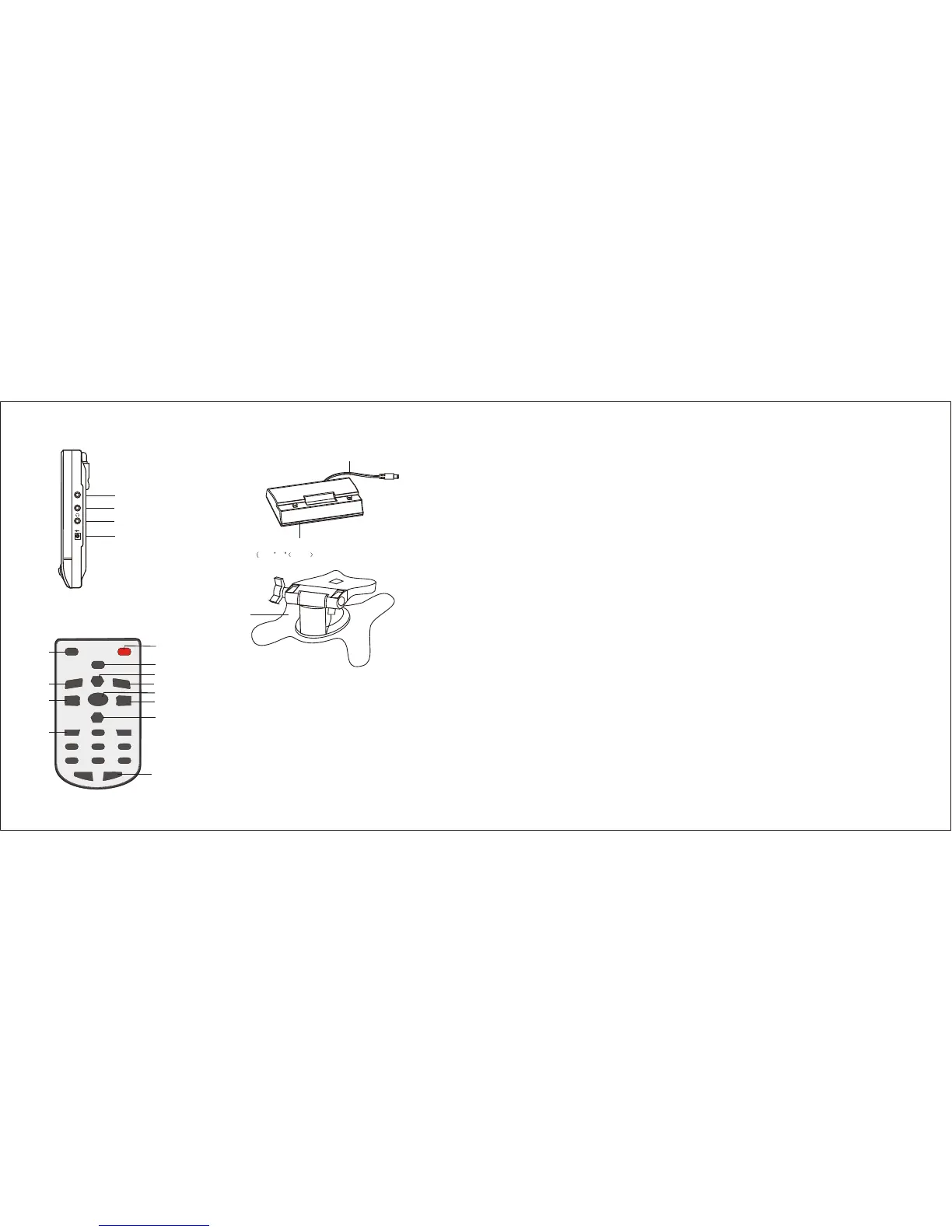
17. Detachable Battery Compartment Stand
18. Power Cord to DC 12V INPUT
19. Car Stand
AV/TVAV/TV
POWERPOWER
MUTEMUTE
CH+CH+
TUNETUNE
VOL+VOL+VOL-VOL-
1 1
2 2
33
66
55
44
77 88
99
00
-/--
CH-CH-
1. AV/TV Switch
3.
4.
5. Mute
2. Volume Down Control
Number Selector
Stand By button
Button
6. Channel Up Control
Mode
Volume Up Control
Channel Down Control
Single/Two/Three Digits Selector
11. Picture Button
12. Set Up Button
7. Tune
8.
9.
10.
(2). Remote Control
5
4
7
8
9
10
6
1
2
3
PICPIC
SETUPSETUP
11
12
4
3. AV/TV button
Use the AV/TV button to switch between watching V ID E O an d T V. Swit ch to
VIDEO. when using an external video source such a s a DVD o rVCR . Switch to
TV to watch TV through the antenna or cable TV.
4. MUTE button
Press the MUTE button one time, there is mute signal on the screen, press again,
the volume will resume.
5. VOL up / VOL down button
Use the VOL up and VOL down buttons to adjust the volume of the unit. The
volume range is 0-63. VOL up and VOL down buttons are also used to adjust
features in the MENU.
6. CH up/ CH down button
Use the CH up and CH down buttons to go from channel to channel. Also use the
CH up and CH down buttons to navigate the MENU functions.
7. NUMERICAL button(0-9)
Numerical button 0-9 is used for selecting program number , button 0-9 has the
function of power on when the TV is in waiting status.
8. -/-- button
If you want to select two-figure o r there-figur e program numbe r , yo u nee d to
press -/-- button, after -/-- shows on the screen, you can use the numerical button
to input the desired program number.
NOTE:
If some channels do not have sound use the FINE feature to fine-tune th e channel .
If sound does not appear please refer to the Troubleshooting section.
- AUTO
Use this feature to program all available channels. Use the CH up or CH down
button to highlight the AUTO feature. Then, press VOL up or VOL down to initiate
this feature. Allow the unit to search all possible channels.
10 X AA UM-3 SIZE batteries are not included)
SIDE VIEW
13. Antenna Jack
14. AV IN Jack
15. Headphone Jack
16. Power Source Input Jack
ANT.
AV IN
DC IN-12V
++
--


 To Next Page
 Loading...