ANT.
AV IN
8
- BAND
This feature simply displays what type of frequency is currently displayed (UHF, VHF, etc).
The BAND function can not be adjusted.
- FINE
The FINE feature controls the fine tuning of each channel. Use the VOL up and VOL down but-
tons to fine tune each frequency for better sound and picture.
-
SIGNAL
The unit can work with both cable TV and an antenna. Simply adjust this feature to either ANT
for use with an antenna or CATV for use with cable TV.
The unit can receive up to 80 channels with the antenna setting (ANT) and 136 cha nnels wi th
cable TV(CATV) setting.
- PROG
This function shows the current channel displayed. Use the VOL up
or VOL down buttons to scroll through the channels.
- SKIP
This function allows you to add or delete any channel. If you would
like to delete a channel simply navigate to the desired channe l with
the PROG button and press the VOL up or VOL down button unti l
this function reads ON .
If you would like to add a channel simply press the VOL up or VOL
down button until the SKIP feature reads OFF .
PRESET
PROG 120
SKIP OFF
BAND VHF-L
FINE
SIGNAL CATV
AUTO
2-5
Press MENU button of the unit or the TUNE button on the remote
until the PRESET screen appears (see picture 2-5).
Press CH up or CH down to scroll through these options.
Press VOL up or VOL down to adjust the desired option.
- PRESET
5
ANT.
AV IN
DC IN-12V
++
--
Antenna
Red
YELLOW
AUDIO INPUT
VIDEO INPUT
AC Adaptor
Headphone
(not included)
AC Adaptor
Detachable Battery Compartment Stand
10
X
AA UM-3 SIZE batteries are not included)10
X
AA UM-3 SIZE batteries are not included)
Power Cord to
DC 12V Input
(Options)
(Options)
(1-2)(1-1)
3. Connection
,,
,,
2
3
4
1
. Connection of the External AV Equipment
Plug the AV cable into the AV IN jack(14) . (Press AV/TV button(1) to enable the con-
nection of external audio and video equipment).
. Use of Headphone
- Connect the Headphone to at (15) for private listening.
- The speakers will not operate when headphones are connected.
CAUTION : Listening at high power for too long could damage your ears.
. Connection to the Power Source
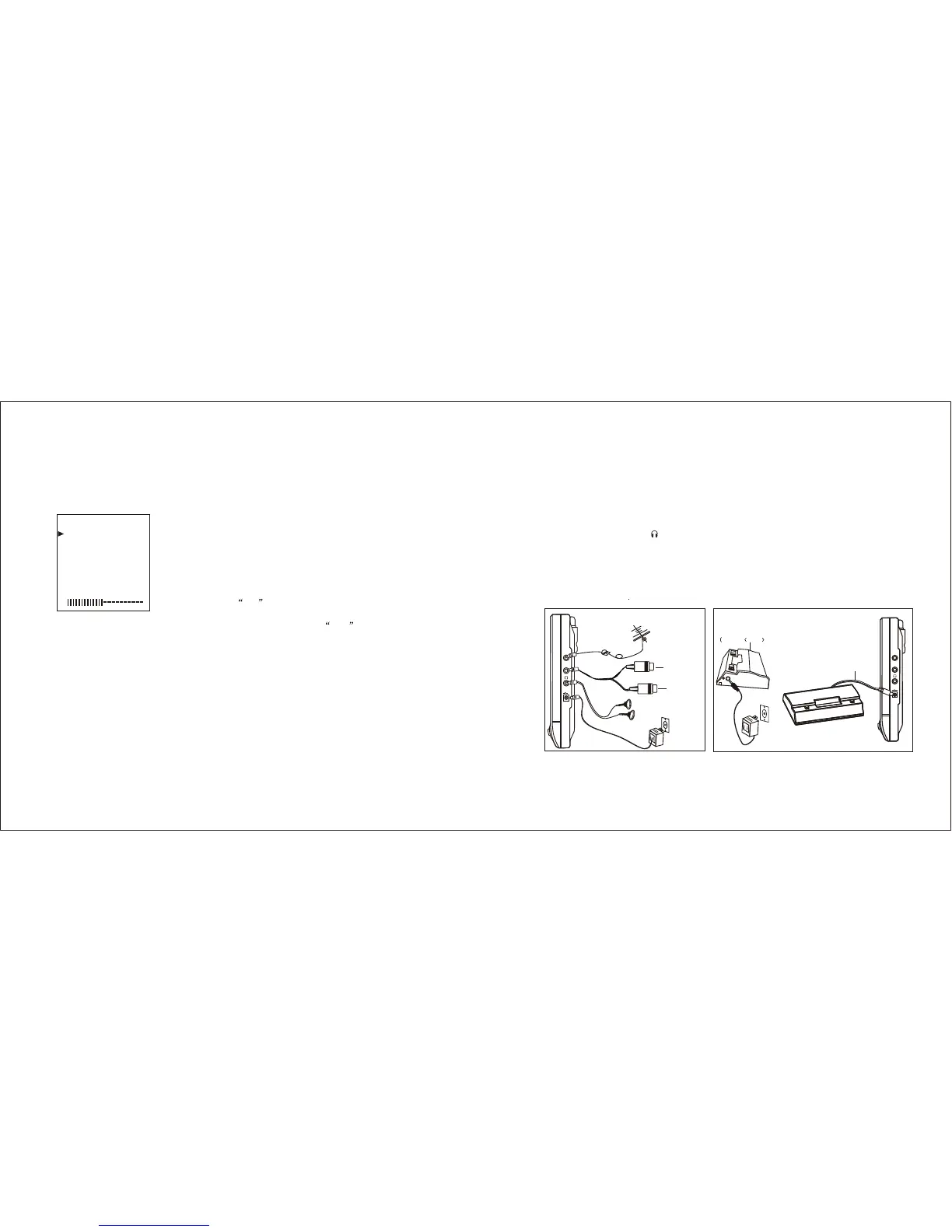
(1) Connect one round end of attached AC adaptor to the power source
input jack (16 ) and the other end to the wall outlet at the suitable voltage .(1-1)
(2) Connect the detachable battery compartment stand power cord to the power source
input jack (16).
. Connection of the Antenna (See picture 1-1)
Plug the antenna into the ANT jack (13).
NOTE: The unit can receive CATV/ANT signals from the ANT jack input.
(See picture 1-1)
(See picture 1-1)
or car adaptor
(See picture 1-2)
DC IN-12V
++
--


 To Next Page
 Loading...