9
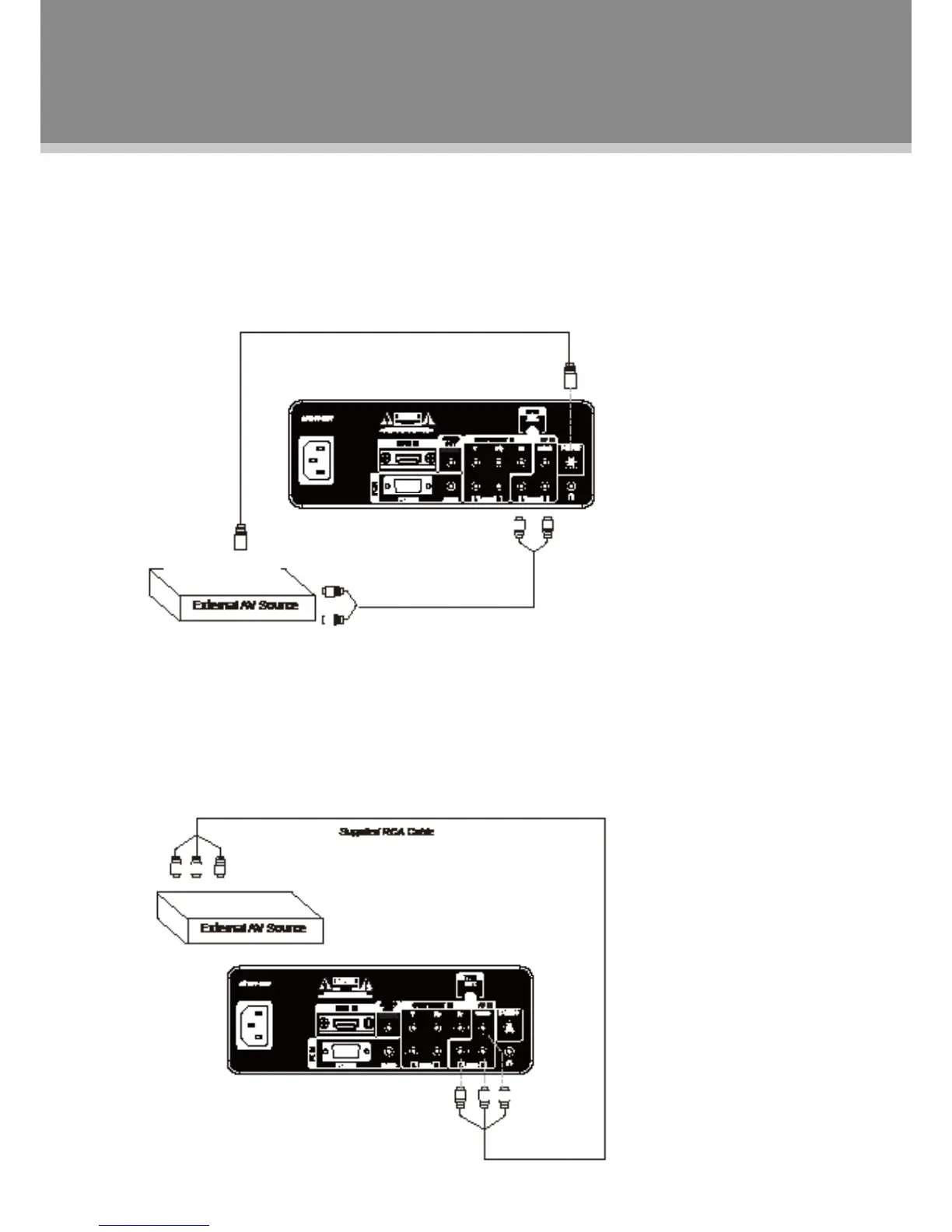
S-Video Input
The S-Video port is capable of accepting signals from standard video sources. (e.g., cable/satellite boxes,
DVD players, VCRs, etc.)
RCA Input
The CVBS port is capable of accepting signals from standard video sources(e.g., cable/satellite boxes, DVD
players, VCRs, etc.) A composite A/V is required to make this connection. A composite A/V cable has a
(yellow/white/red) on each end. The yellow plug is used for the video signal, and the white and red plugs are
used for audio.
Connect the S-Video port by the S-Video cable to input the video signal. S-Video cable is not included 1.
with this product
Connect the L, R port by the white/red plug of the supplied AV cable to input the audio signal.2.
After all necessary connections have been properly made, turn on both units, select the S-Video mode 3.
with the SOURCE button.
Connect the VIDEO port with the yellow plug of the supplied AV cable.1.
Connect the L, R port with the white/red plug of the supplied AV cable.2.
After all necessary connections have been properly made, turn on both units, select the AV mode with the 3.
SOURCE button.
Cable Connections


 To Next Page