
EasyManua.ls Logo

Cocraft Advance 500 - User Manual

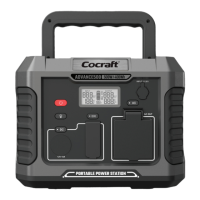
Cocraft Advance 500
28 pages
Print Icon
To Next Page IconTo Next Page
Loading...
ENGLISHSVENSKANORSKSUOMI
Important:
Read the entire instruction manual
carefully and make sure that you fully
understand it before you use the
equipment. Keep the manual for future
reference.
Viktig information:
Läs hela bruksanvisningen noggrant och
försäkra dig om att du har förstått den
innan du använder utrustningen. Spara
bruksanvisningen för framtida bruk.
Viktig informasjon:
Les disse anvisningene nøye og forsikre
deg om at du forstår dem, før du tar
produktet i bruk. Ta vare på anvisningene
for seinere bruk.
Tärkeää tietoa:
Lue nämä ohjeet huolellisesti ja varmista
että olet ymmärtänyt ne, ennen kuin
alat käyttää laitetta. Säilytä ohjeet
myöhempää tarvetta varten.
EASY TO CARRY AND USE
36-8703
POWER STATION
Ver. 20230419
Original instructions
Bruksanvisning i original
Originalbruksanvisning
Alkuperäinen käyttöohje
Art.no Model
36-8703 Advance 500
500 W / 400 Wh

Questions and Answers

  • C
    christopher30Aug 6, 2025
    What to do if Cocraft Advance 500 Portable Generator cannot be charged using mains adapter?
    • C
      Christopher BakerAug 7, 2025
      If your Cocraft Portable Generator isn't charging with the mains adapter, there might be a connection issue. Ensure the adapter is undamaged and correctly plugged into both the wall socket and the INPUT 12?28V on the product. If the LED indicator on the adapter doesn't light up when connected to a 230 V wall socket, verify that the wall socket has power. If the LED lights up but the product still doesn't charge, inspect the connecting cable between the adapter and the Power Station. For further assistance, contact customer service.
  • J
    Joseph LiuAug 15, 2025
    Why Cocraft Portable Generator cannot be charged using mains adapter?
    • T
      Timothy RobinsonAug 16, 2025
      Your Cocraft Portable Generator might not be charging due to several reasons: * A connection problem: Ensure the mains adapter is undamaged and properly connected to both the wall socket and the generator's INPUT 12?28V port. * The LED indicator on the mains adapter doesn't light up when plugged into a 230V wall socket: This could indicate a problem with the wall socket itself. Check if the wall socket has power. * The LED indicator lights up, but the generator still doesn't charge: This suggests a potential issue with the connecting cable between the adapter and the Power Station. Inspect the cable for damage.
  • W
    walkerjulieAug 27, 2025
    How to fix Cocraft Advance 500 when it cannot be charged using mains adapter?
    • M
      Matthew HartAug 27, 2025
      To troubleshoot a Cocraft Portable Generator that won't charge with the mains adapter: 1. Check all connections to ensure the mains adapter is undamaged and properly plugged into the wall socket and the INPUT 12?28V on the product. 2. Verify the wall socket has power if the LED indicator on the adapter isn't lit. 3. Inspect the connecting cable between the adapter and the Power Station if the LED is lit but the generator isn't charging.

Summary

Safety Precautions

General Safety Warnings

Important safety guidelines covering environmental exposure, handling, modification, and usage by vulnerable individuals.

Device Components and Functions

DC Outlets and Controls

Details on the 12V DC socket, USB-A QC, USB-C PD, and their activation controls.

AC Outlets and Controls

Information on the 230V AC socket and its activation button.

Indicator and Control Buttons

Explanation of the main switch, ECO button, display, torch, and work light.

Input and Output Ports

Overview of charging input, AC output, DC output, and USB ports.

Display and Operation

Display Information

Explanation of display elements like charging time, battery level, and power input/output.

Charging Procedure

Instructions for initial charging and maintenance to optimize battery capacity and service life.

Power Management Modes

Guidance on switching the device on/off and utilizing the ECO mode for energy saving.

Connecting and Lighting Features

Instructions for connecting devices and operating the integrated torch and work light.

Troubleshooting and Specifications

Common Troubleshooting Issues

Solutions for problems like failure to charge, no power output, or unexpected shutdowns.

Error Code Explanations

Details on error codes E2 and E3 related to overload protection.

Product Specifications

Technical data including battery type, capacity, input/output ratings, dimensions, and weight.

Responsible Disposal

Guidelines for environmentally sound disposal of the product at the end of its life.

Cocraft Advance 500 Specifications

General IconGeneral
BrandCocraft
ModelAdvance 500
CategoryPortable Generator
LanguageEnglish