EasyManua.ls Logo

Cogito Classic series - User Manual

Cogito Classic series
7 pages
Print Icon
To Next Page IconTo Next Page
Loading...
Quick Start Guide
Pairing: When the watch is OFF, press COMMAND + POWER
buttons until 1st beep (approx. 3 sec) and all icons will
blink every 2 sec.
Reset the watch: Press and hold the COMMAND + POWER +
PAGE LEFT + PAGE RIGHT buttons until you see the ALERT icon
on the CONNECTED Display and then the watch turns off.
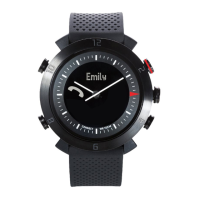
Incoming Call, Missed Call notification:
EN
COMMAND
POWER
NOTIFICATIONS
PAGE RIGHTPAGE LEFT
SET TIME
Pull 1/2 way and
turn to set the time
Blink and vibrate with
optional beeps
Power on/off
> 3 sec
NOTIFICATIONS
Tap PAGE LEFT or PAGE RIGHT to view
additional information
Tap PAGE LEFT and PAGE LEFT
together to see the time again
LIGHT
Tap any button
Caller ID (iOS only at this moment)
will be displayed during incoming
calls. Call numbers will be display if
the number is not stored in your
phone book.
Caller ID support Latin characters
only.
TEXT and social media app alerts:
Support SMS, MMS and social
media posts on Facebook, Twitter
and message notification from
WhatsApp, WeChat, Skype and
more...
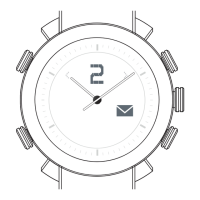
Email alerts:
Inbound email alerts.
Calendar and Reminder alerts:
Alerts you when there are
upcoming events or reminders.
Low and Critical battery alerts:
The CONNECTED
display shows the
battery percentage
and the Low and
Critical battery icons
blinks respectively.
To find the COGITO watch:
The watch beeps and blinks
when tapping the find my
watch icon
in the CONNECTED WATCH
app.
After tapping the out of range
icon , the watch beeps
and blinks when your phone
and watch are apart from
each other.
To activate out of range notification:
Alarms:
Alerts you when you have alarms.
This function is currently supported
by Android only.
Question and Answer IconNeed help?

Do you have a question about the Cogito Classic series and is the answer not in the manual?

Summary

COGITO Watch Features and Notifications

Watch Controls and Operations

Learn how to power on/off, set time, navigate pages, and use the light function.

Notification Types Overview

Understand the various alerts like emails, calls, social media, and alarms.

Connectivity and Location Features

Discover features like finding your watch and out-of-range alerts.

Connecting and Customizing Your COGITO Watch

Download and Install Companion App

Get the "CONNECTED WATCH" app for your iOS or Android device.

Bluetooth Pairing and Connection

Step-by-step guide to pair your watch with your smartphone.

Notification Settings Customization

Tailor which alerts appear on your watch via the app.

Advanced Watch Usage

Learn to acknowledge notifications, mute the watch, and take remote photos.

Watch Maintenance and Support

Battery Replacement Guide

Instructions for replacing the connected system and analog movement batteries.

Warranty and Registration

Details on the one-year limited warranty and how to register your product.

Compliance and Environmental Responsibility

Regulatory Compliance Statements

FCC, Industry Canada, and CE compliance information.

Environmental Protection Guidelines

Information on responsible disposal and recycling of electronic devices.
Cogito Classic series Specifications

General IconGeneral
BrandCogito
ModelClassic series
CategoryWatch
LanguageEnglish

Related product manuals