5
To Configure Options
SERV
GRN
Action
Mode
Diagnostic
Light
#
1.
Service
OFF
R em ove
Low e r H ousing
2.
C onfig
OFF
Set O p tions As
D esire d
(see Options
Navigation below)
3.
C onfig
4.
Sales or
R eady
GRN
x 2
Options Navigation
Scrolls to next set of op tions
within curren t Page.
Scrolls to next Page of options.
H o ld for
next P a g e
Press
onc e
Test U nit to Ensure P ro per S etup.
5.
R e-install Low er
H ousing . In let LE D s
flas h 5 tim es confirm ing
options are sa ve d.
SERV
SERV
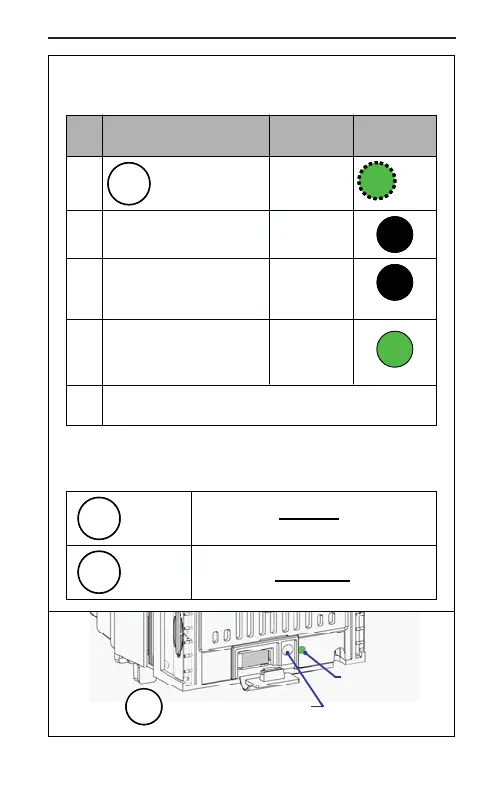
Service Mode Button
Diagnostic
Indicator LED
SERV
Press and release
button, Diagnostic
LED flashe s.
To Configure Options
SERV
GRN
Action
Mode
Diagnostic
Light
#
1.
Service
OFF
R em ove
Low e r H ousing
2.
C onfig
OFF
Set O p tions As
D esire d
(see Options
Navigation below)
3.
C onfig
4.
Sales or
R eady
GRN
x 2
Options Navigation
Scrolls to next set of op tions
within curren t Page.
Scrolls to next Page of options.
H o ld for
next P a g e
Press
onc e
Test U nit to Ensure P ro per S etup.
5.
R e-install Low er
H ousing . In let LE D s
flas h 5 tim es confirm ing
options are sa ve d.
SERV
SERV
Service Mode Button
Diagnostic
Indicator LED
SERV



 To Next Page