Need help?
Do you have a question about the Coleman Aktiv Sounds CBT60 and is the answer not in the manual?
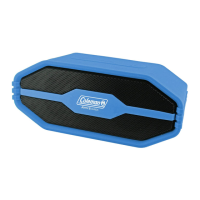
This document describes the Aktiv Sounds CBT60 Bluetooth Waterproof Portable Speaker, manufactured under license by Coleman.
The CBT60 is a portable Bluetooth speaker designed for wireless audio playback. It supports connecting to a Bluetooth source for streaming music and can also play music from a Memory Stick via its USB port. The speaker features an FM Radio for listening to radio stations. It also supports hands-free calling with controls for answering, declining, and ending calls. A key feature is its True Wireless Stereo (TWS) technology, which allows two CBT60 speakers to be linked together for a true left/right stereo sound experience. The device includes a SMART ASSISTANT button for activating a connected device's smart assistant (Siri/Google Assistant).
Powering On/Off: To power on, press and hold the POWER button for 4 seconds. An audible tone will sound, and the speaker will automatically enter Bluetooth Mode. A blue LED will flash quickly, indicating it is powered on and searching for a Bluetooth source. To power off, press and hold the POWER button.
Connecting via Bluetooth: Once powered on, the speaker automatically enters pairing mode. To connect, go to your phone/tablet's Bluetooth settings, enable Bluetooth, and select "Coleman_CBT60" from the device list. After selection, wait a few seconds for the pairing to complete. A successful pairing will be indicated by an audible tone from the speaker and the indicator ring LED staying solid blue. To forget a paired device, press and hold the TWS button. This will allow you to connect a new Bluetooth device to the speaker. The CBT60 will automatically connect to a previously paired device if the paired device's Bluetooth radio is powered, enabled, and within reachable distance.
Linking another CBT60 for True Wireless Sound (TWS): The CBT60 includes True Wireless Stereo (TWS) technology. This enables you to link two speakers to emit a true left/right stereo sound. To connect two speakers over TWS, ensure both speakers are powered on and disconnected from any Bluetooth devices. Press the TWS button on both speakers. An audible tone will be heard from both speakers. The TWS button will flash slowly while the TWS is pairing. Once the two speakers are connected, you will hear another audible tone, and the TWS button will stay lit. Once the two speakers are connected, follow the steps to connect your Bluetooth device to the speaker. To disconnect from TWS, simply press the TWS button. Once TWS connection is made between two speakers, they will automatically connect over TWS the next time they are powered on and within range. To forget the last TWS pairing process and hold the TWS button, this will forget the last TWS and Bluetooth connection.
Playing Music from a Memory Stick: To listen to music loaded on a Memory Stick, simply power on the speaker and insert a Memory Stick into the USB port on the back of the speaker. Ensure that music is in MP3 format and is stored in the root of the Memory Stick's directory. Memory Stick mode will automatically start playing upon inserting a Memory Stick. The speaker controls will function as normal.
Listening to FM Radio: To listen to FM Radio, simply turn on the speaker and press the MODE button to enter FM Radio mode. While in Radio mode, press and hold the PLAY/PAUSE button to auto search for an FM Radio station and to store it automatically. Press and hold the PLUS button to go to the next stored station, press and hold the MINUS button to go to the previous stored station. Press the PLUS or MINUS button to increase and decrease the volume. Press the PLAY/PAUSE button to mute the speaker.
Connecting via Auxiliary Input: If you would like to use a device that is not equipped with Bluetooth technology, simply connect the included auxiliary 3.5mm cable from your device to the Aux-In input at the back of the CBT60. Bluetooth audio will mute while a 3.5mm cable is plugged in. While connected via Auxiliary, the only controls that will function on the speaker is the PLAY/PAUSE button. All other functions are controlled from the connected device.
Controlling the Sound:
Answering or Making Calls: If there is an incoming call on your paired phone/tablet, the music will pause, and the ringer will ring through the CBT60 speaker. To answer a call, simply press the PLAY/PAUSE button. While on the call, press and hold the PLAY/PAUSE button to switch the call from the speaker to your connected device. To end a call, simply press the PLAY/PAUSE button. To decline a phone call, press and hold the PLAY/PAUSE button. For best performance and clarity, operate the CBT60 within an arm's length. Ensure that the microphone faces your direction.
Siri/Google Assistant Controls: If your connected Bluetooth device has Siri or Google Assistant, you can activate these features using the SMART ASSISTANT button. Press the SMART ASSISTANT button to activate your connected device's smart assistant.
LED Lighting Control: The LED lighting around the passive subs is automatically turned on when you power on the speaker. To turn them off, press and hold the MODE button, press and hold the MODE button again to turn them back on.
Charging your CBT60: Open the watertight sealed door, and simply plug the included USB C cord into the USB C port at the base of the speaker. The port is labeled DC 5V. Once plugged in, the LED will light up red. It will turn off once the internal battery is fully charged.
Preserving the Waterproof Seal: Ensure that the back compartment door is fully pushed in. This will prevent any dust and moisture from entering the USB and AUX ports.
Factory Reset: If you are experiencing connectivity issues, you may need to perform a hard reset on your CBT60. To do so, push the reset button under the door on the back of the speaker.


 To Next Page
 General