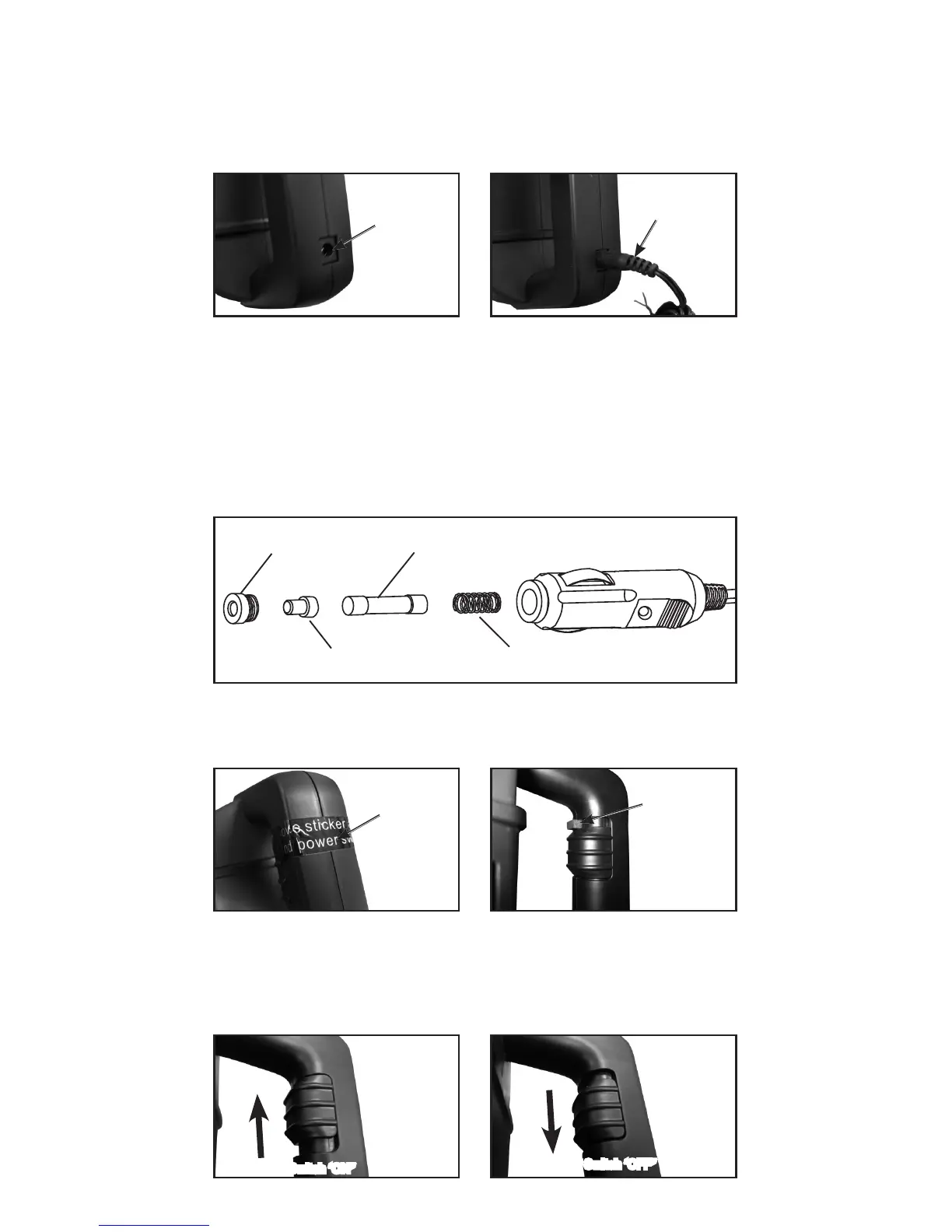
Charging Your CampVac™
Your CampVac™ can be charged with the 120 V AC Adapter or the 12 V
DC adapter (select models only).
• Connect the charger to an AC outlet or 12 volt plug.
• Connect the charger plug to the CampVac™. Charging port located
on the back of the handle.
Before Using Your CampVac™
• Remove Sticker and Pad before operating power switch.
CampVac™ Power Switch
The Power Switch is located on the top, inside of the handle.
• To turn Power ON slide power switch up.
• To turn Power OFF slide power switch down.
Charging Port
Sticker
Power Switch ‘ON”
Power Switch ‘OFF”
Pad
Connect Charger
To Replace Fuse in 12 V Charger
• Unscrew plug cap.
• Remove plug cap & fuse collar.
• Be sure not to lose fuse collar.
• Remove fuse.
• Replace fuse with 10 A / 250 V standard automotive buss
fuse only.
• Reassemble in reverse order.
Plug cap Fuse
SpringFuse collar


 To Next Page