screws.
5-2-2 Connecting header and Setting Switches
This section takes you through all the connections and switch
settings necessary on the motherboard. This will include:
Power Connections
¾ 24-pin ATX power
¾ 8-pin ATX 12V power
Internal Headers
¾ Front panel
¾ USB Headers
¾ Audio
Serial ATA III
Chassis Fans
Rear panel USB 2.0 Adapter
Expansion slots
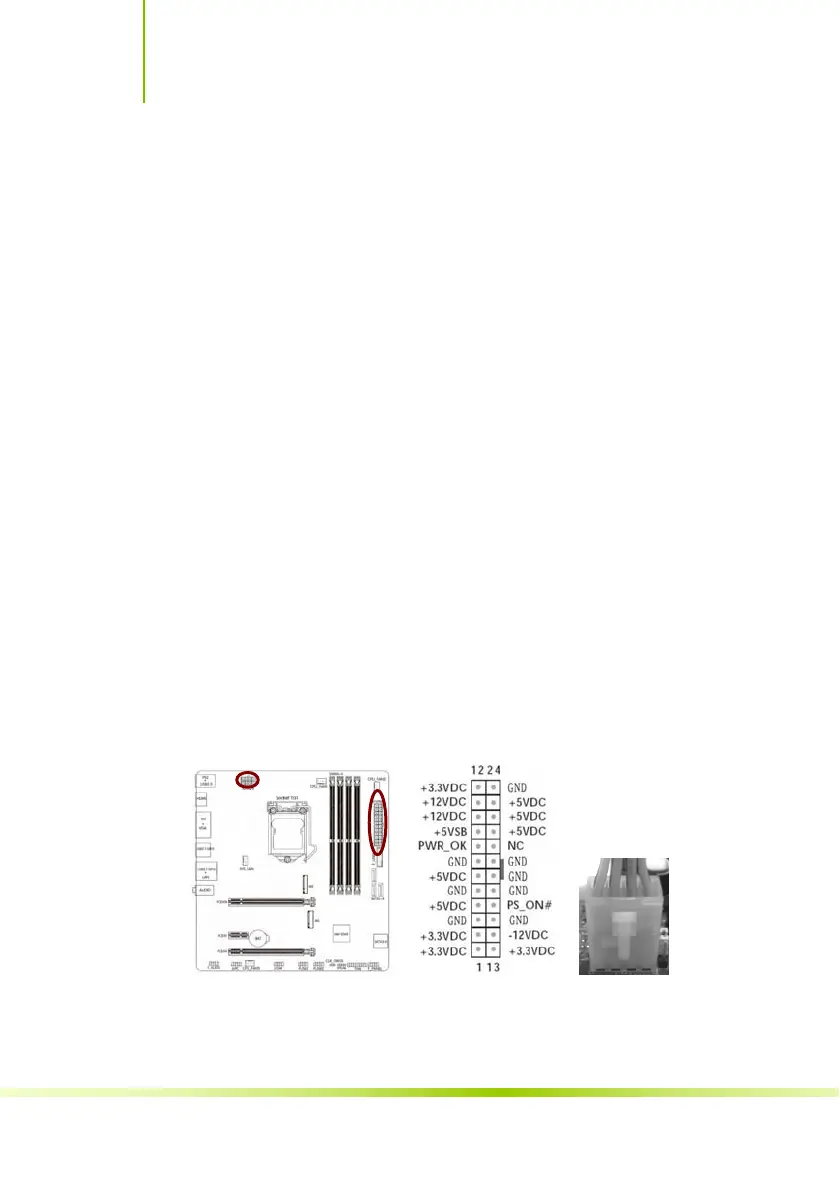
ATX power connectors (24-pin ATXPWR, 8-pin
ATX12V)
These connectors are for an ATX power supply. The plugs from
the power supply are designed to fit these connectors in only
one orientation. Find the proper orientation and push down
firmly until the connectors completely fit.
痲簊 B365M-PLUS V21/BATTLE-AX B365M-PLUS V21
34









 To Next Page