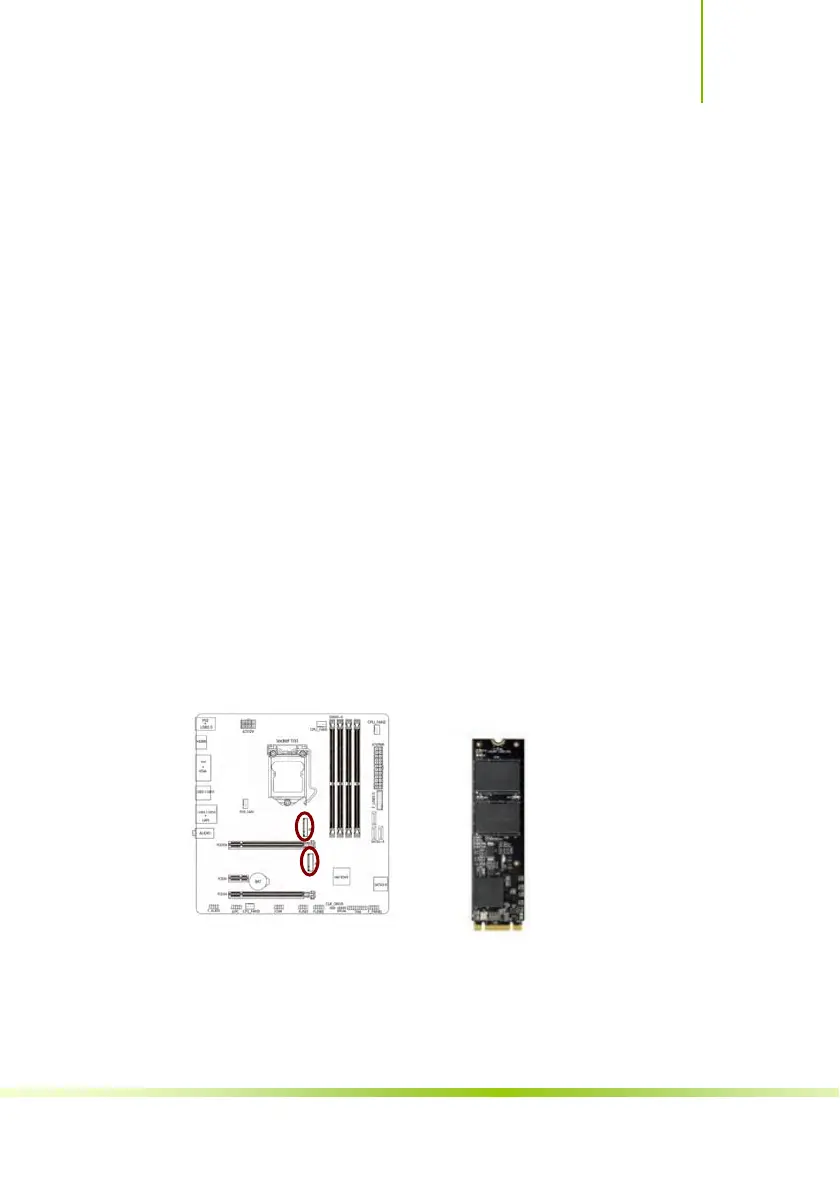
M.2 Slot
The motherboard has two M.2 slotsthe above one supports
PCI-e X4 SSD,another one supports PCI-e X4 SSD and MSATA
SSD.both of them all support Intel Optane technology and NVME
standard,support 2242/2260/2280
specification SSD,the data
transfer rate can be as high as 32Gb/s.
Intel OPTANE technology is the latest non-volatile storage
technology of Intel. It is a technology between high performance
and low latency between traditional memory and solid state
hard disk. When using Intel OPTANE technology, the M.2 slot
uses Intel dedicated OPTANE SSD, and is equipped with the
latest processor, installing WIN10 64bit system and RST driver.
In BIOS setting, we also need to open the Intel OPTANE
technology option.
Please install M.2 SSD correctly in the slot following the
following steps:
1. please use a screwdriver to remove the screws and studs in
order, and then lock the stud first when the actual M.2 SSD is
found to be suitable for the screw hole position.
2. insert the M.2 SSD into the slot in a inclined angle.
3. press M.2 SSD, then lock the screw.
39
Hardware Installation









 To Next Page