EasyManua.ls Logo

Colours Zephyr - Page 7

Default Icon
24 pages
Print Icon
To Next Page IconTo Next Page
To Previous Page IconTo Previous Page
Loading...
Chapter
3
GETTING IT RIGHT
PART 1
Making
the
Proper
Adjustments
As you
go
through
the
process
of fine
tun-
ing
yo
u
r
new Colours chair,
you
will
experi-
ence
how much small adjustments
effect
the
way your
cha
i
r
"feels"
and
"performs."
Review
this
checklist with
your
Colours
rep-
resentative
to
make sure
you get the
maxi-
mum performance from your Colours
wheelchair.
S
T
AN DARD
A
DJU
S
T M
ENT
S
CENTER OF GRAVITY
BACKREST
ANGLE
BRAKES
QUICK RELEASES
FOOTREST
BACKREST
HEIGHT
WHEELS
SHOCKS ( Boin g! &
S
ho
c
kBla
d
e on
l
y)
REAR
SEAT
HEIGHT (Sabe
r
o
n
ly
)
The sections,
on
adjustments
to the
chair,
have been
divided
into two parts.
Part
1
deals with
standard
adjustments
.
Part Two
deals with
advanced
adjustments.
We
recommend
that all adjustments be
made by
an
authorized Colours
dealer.
It
is im-
portant that you
DO NOT
attempt any of the
advanced adjustments discussed
in part
2.
Those
sections are
included solely
to
familiarize
you with
your
chair.
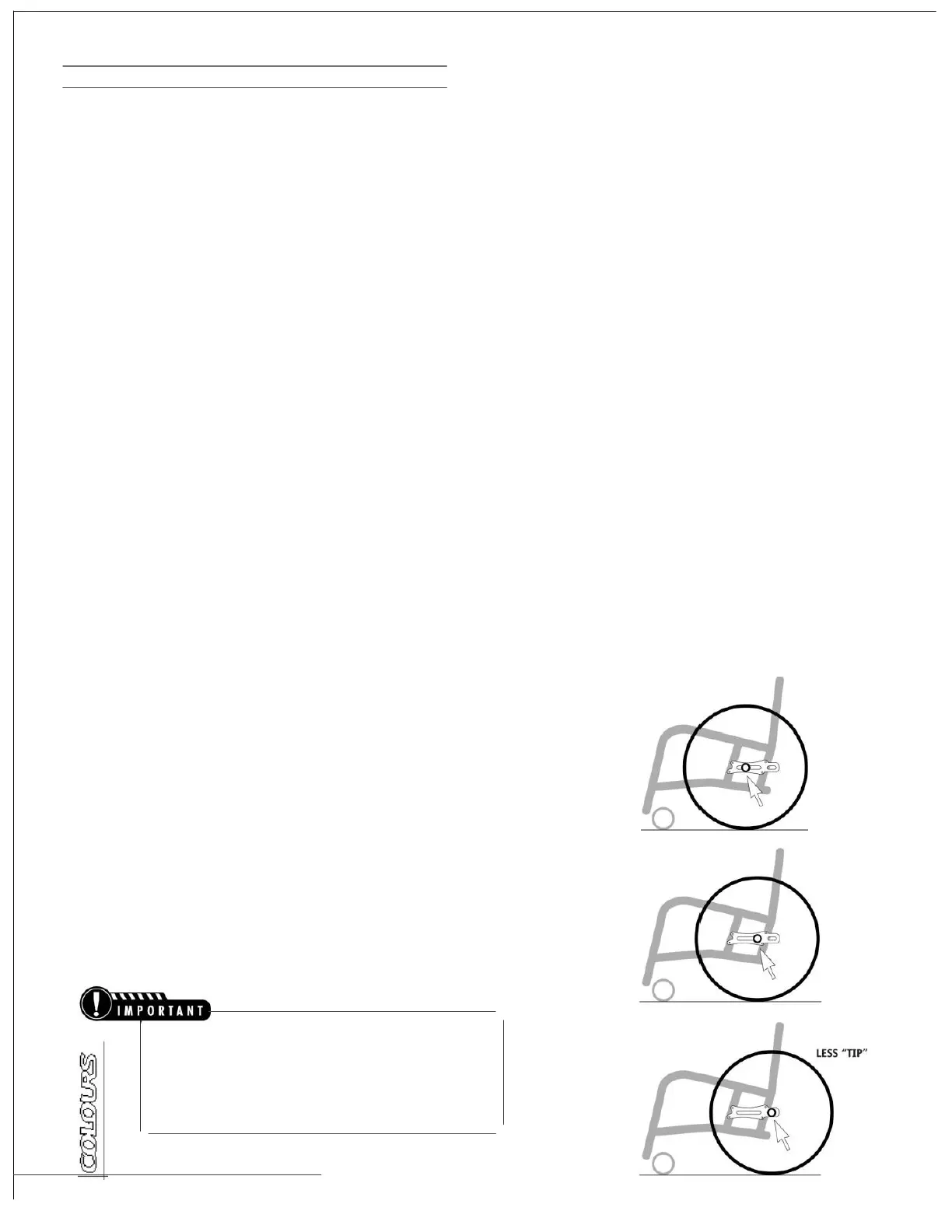
CENTER
OF GRAVITY
What
It's
All
About
One
of the
most important factors
in
designing
a
wheelchair
is
geometry.
Establishing your
sitting
position
and center
of
gravity
(COG)
is what
allows
the chair to
become
a part of you.
This
en-
ables
the chair to
work
with
you
instead of against you. In
essence, establishing
the
correct
COG
equates to having
balance
in
your
chair
.
This
is
why
it is so
important
to
determine your
sitting
position
and the
COG.
This adjustment
is
individualized
and
will
depend
greatly
on your
wheelchair skill
s
.
It
is
important
that you
consult
your dealer
and/or
clinician before experimenting with
the rear
wheel
align-
ment.
The Performance
of the
chair will depend greatly
on the
accuracy
of
this
adjustment. Remember
to
always
test the
degree
to
which
the
chair will
tip,
and how this changes as
the
rear wheel posi-
tion
is
change
d
.
5 O W
NER 'S
M
AN
U A
L
MORE
"
TIP
"

Related product manuals