Operating Instructions
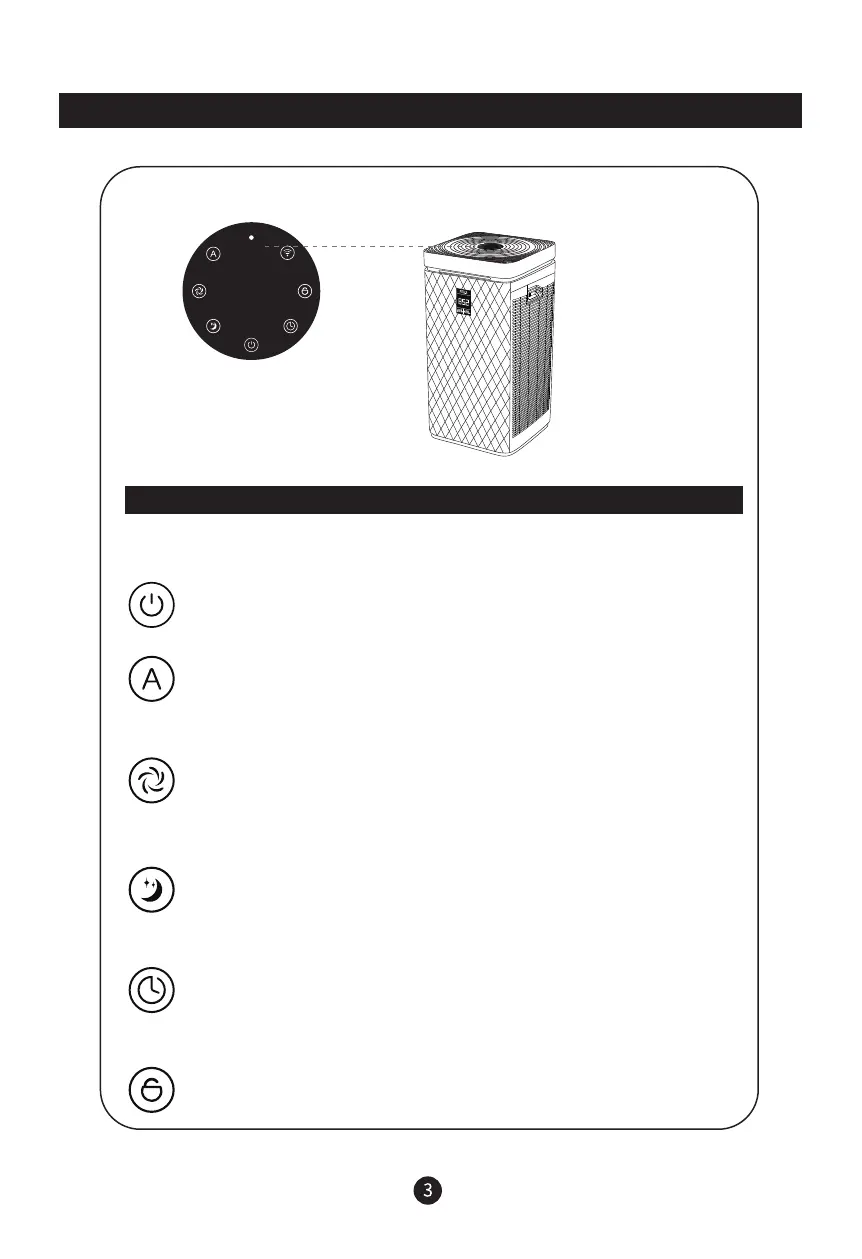
“ON/OFF” Button
Connect the power to enter the standby configuration, the power indicator lights up.
Press “ON/OFF” button to turn on/off the device.
“AUTO” Button
Press “AUTO” button, on/off the auto mode.
When under auto mode, the device will be adjustment the fan speed (1-4speeds)
automatically according to the air quality.
“SPEED” Button
Press “SPEED” button to adjust the fan speed.
a.The device is start running by auto mode.
b.Press “SPEED” button 1 time to off the auto mode when under auto mode.
“SLEEP” Button
Press “SLEEP” button on/off the sleep mode.
a.Press any button to turn off the sleep mode when under sleep mode.
When sleep mode, only “SLEEP” button light, other buttons are off light.
“TIMER” Button
Press “TIMER” button to set the timer on/off the device, cyclic setting as
0-12 hours.
“CHILD LOCK” Button
Press “CHILD LOCK” button 3s to on/off the child lock mode.
a.When under child lock mode, other buttons are not working.
Operating Instructions


 To Next Page