EasyManua.ls Logo

Comelit 1404 - User Manual

Comelit 1404
18 pages
Print Icon
To Next Page IconTo Next Page
Loading...
EN
TECHNICAL
MANUAL
LM
S1
MIN MAX
S2
LM LS LS LPin LPout
JP1B A
ON
1 2 3 4 5 6 7 8
ON
1 2 3 4 5 6 7 8
Ar 1404
t.
FREE DOWNLOAD
MYCOMELIT, L'APP PER IL PROFESSIONISTA
MYCOMELIT: THE APP FOR PROFESSIONALS
Digital switching device for Simplebus 2 system
Art. 1404
Question and Answer IconNeed help?

Do you have a question about the Comelit 1404 and is the answer not in the manual?

Summary

Warning

Intended Use

Product designed for audio/video communication systems in residential, commercial, industrial, and public buildings.

Installation Guidelines

All installation activities must be performed by qualified technical personnel, following manual indications.

Wiring Precautions

Disconnect power before wiring; use suitable wires and avoid routing with power cables.

Safe Usage Practices

Observe manual instructions and ensure system integrity to guarantee safe product usage.

Service and Maintenance

Products require minimal maintenance; repairs must be done by Comelit or qualified personnel.

Disclaimer of Responsibility

Comelit disclaims responsibility for misuse and reserves the right to change information without notice.

Product Description

Connections Overview

Operation and Programming Modes

Standard Mode (Default)

Configure the device for standard operation using DIP switches for zone address management.

TOP 1 Mode Configuration

Set up the device for TOP 1 mode, defining system area and zone addresses.

TOP 3 Mode Configuration

Configure the device for TOP 3 mode to manage multiple zones within a set range.

Dip-Switch and S3 Programming Table

Technical Specifications

System Performance and Layouts

Single-Family KIT: Standard Mode, 2 Inputs

Diagram for a single-family kit using standard mode with two inputs.

Single-Family KIT: Standard Mode, 3 Inputs

Diagram for a single-family kit using standard mode with three inputs.

System: 1210;1210 A, Standard Mode, 2 Inputs

Wiring diagram for systems using Art. 1210/1210A in standard mode with two inputs.

System: 1210;1210 A, Standard Mode, 1 Main & 2 Secondary Inputs

Diagram for Art. 1210/1210A systems in standard mode with one main and two secondary inputs.

System: 1210;1210 A, TOP1 Mode, Branched KIT

Layout for Art. 1210/1210A systems in TOP1 mode with branched kits and external units.

System: 4888 C, TOP1 Mode, Cascade KITs

Configuration for Art. 4888C systems in TOP1 mode, featuring branched kits and cascade setups.

System: 1210;1210 A, Standard Mode, Cascade KITs

Wiring diagram for Art. 1210/1210A systems in standard mode with kits arranged in cascade.

System: 1210;1210 A, TOP1;TOP3 Mode, Multiple Units

Diagram for Art. 1210/1210A systems in TOP1/TOP3 modes with multiple main and secondary units.

Summary

Warning

Intended Use

Product designed for audio/video communication systems in residential, commercial, industrial, and public buildings.

Installation Guidelines

All installation activities must be performed by qualified technical personnel, following manual indications.

Wiring Precautions

Disconnect power before wiring; use suitable wires and avoid routing with power cables.

Safe Usage Practices

Observe manual instructions and ensure system integrity to guarantee safe product usage.

Service and Maintenance

Products require minimal maintenance; repairs must be done by Comelit or qualified personnel.

Disclaimer of Responsibility

Comelit disclaims responsibility for misuse and reserves the right to change information without notice.

Product Description

Connections Overview

Operation and Programming Modes

Standard Mode (Default)

Configure the device for standard operation using DIP switches for zone address management.

TOP 1 Mode Configuration

Set up the device for TOP 1 mode, defining system area and zone addresses.

TOP 3 Mode Configuration

Configure the device for TOP 3 mode to manage multiple zones within a set range.

Dip-Switch and S3 Programming Table

Technical Specifications

System Performance and Layouts

Single-Family KIT: Standard Mode, 2 Inputs

Diagram for a single-family kit using standard mode with two inputs.

Single-Family KIT: Standard Mode, 3 Inputs

Diagram for a single-family kit using standard mode with three inputs.

System: 1210;1210 A, Standard Mode, 2 Inputs

Wiring diagram for systems using Art. 1210/1210A in standard mode with two inputs.

System: 1210;1210 A, Standard Mode, 1 Main & 2 Secondary Inputs

Diagram for Art. 1210/1210A systems in standard mode with one main and two secondary inputs.

System: 1210;1210 A, TOP1 Mode, Branched KIT

Layout for Art. 1210/1210A systems in TOP1 mode with branched kits and external units.

System: 4888 C, TOP1 Mode, Cascade KITs

Configuration for Art. 4888C systems in TOP1 mode, featuring branched kits and cascade setups.

System: 1210;1210 A, Standard Mode, Cascade KITs

Wiring diagram for Art. 1210/1210A systems in standard mode with kits arranged in cascade.

System: 1210;1210 A, TOP1;TOP3 Mode, Multiple Units

Diagram for Art. 1210/1210A systems in TOP1/TOP3 modes with multiple main and secondary units.

Overview

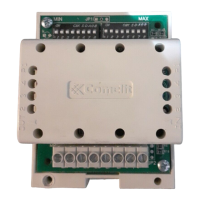
The Comelit Art. 1404 is a digital switching device designed for use in Simplebus 2 audio and video communication systems, particularly in installations with multiple entrances. It serves as a crucial component for managing and distributing signals within residential, commercial, industrial, and public buildings.

Function Description:

The Art. 1404 acts as a switching device that enables the expansion and organization of Simplebus 2 systems. It supports three primary operating modes:

  • STANDARD Mode (Default): This mode is used in systems requiring the addition of extra external units. In this mode, the device manages a range of codes for each riser, with S1 defining the minimum value (MIN) and S2 defining the maximum value (MAX) of the address range. It's crucial that separate switching devices manage non-overlapping code ranges.
  • TOP 1 Mode: This mode is for single-zone switching in systems with no switchboard or with only one switchboard. Here, the device defines a specific system area (ZONE) using S1 for the address (a number between 1 and 500) and DIP3 of S3 for zone address management (OFF for 1-250, ON for 251-500). The LM-LM output can connect up to 240 users and accessories (Art. 1256, Art. 1409), but not porter switchboards (Art. 1998NA or Art. 1998NV). The LS-LS input can be wired with external units in STANDARD mode and accessories. The LPin-LPin input is for external units wired directly or indirectly via a mixer (Art. 4888C), which must be set to TOP mode. A single switchboard (Art. 1998NA or Art. 1998NV) can be installed in series or parallel. Self-activation is not managed via wired external units on the LPin-LPin input. Importantly, there cannot be two Art. 1404 devices with the same ZONE address in the same system.
  • TOP 3 Mode: This mode is for multi-zone switching. It defines a range of ZONES managed by the device using S1 (minimum value MIN), S2 (maximum value MAX), and DIP3 of S3 (OFF for 1-250, ON for 251-500). The range can be extended (1-500) or limited to intervals (1-250 or 251-500). Only external units in TOP mode can be wired to the TOP 3 switching device, and self-activation is not managed via wired ports on the LPin-LPin input. Similar to STANDARD mode, separate switching devices must manage non-overlapping code ranges.

The device features a DL1 indicator LED:

  • Off: Switching device on secondary external unit.
  • Steadily lit: Switching device on main external unit.
  • Flashing: LP line missing or short-circuited/reset (only with R.I. 002).

Dip-Switches S1 and S2 are used for setting the range of user or zone addresses. Dip-Switch S3 controls the operating mode (DIP1, DIP2) and zone address management (DIP3). DIP4 of S3 manages the connection on the LS line, with OFF for external units on the LS section (default) and ON when no external unit is on the LS section (requiring a power supply unit Art. 1209 or Art. 1210/1210A). If there is no secondary external unit, DIP4 should be set to ON.

Terminal block M1 includes:

  • LM LM: Riser Bus line output.
  • LS LS: Secondary Bus line input, normally switched to LM LM (with DIP4 of S3 to OFF) or power supply Art. 1209/1210/1210A input (with DIP4 of S3 to ON).
  • LPin LPin: Main Bus line input (normally open on LM LM).
  • LPout LPout: Main Bus line for cascade distribution.

JP1 jumper is for video closure:

  • Position A: For all Art. 1404 if star type system configuration is used, or for only the last Art. 1404 if cascade type system configuration is used.
  • Position B: In all other cases.

The Art. 1404 must be wired with Art. 1209/1210/1210A or exiting the mixer Art. 4888C. The maximum number of switching devices Art. 1404 that can be connected to Art. 1210/1210A or Art. 4888C is 40 units.
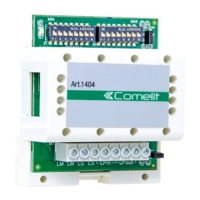
Important Technical Specifications:

  • Input connector: Terminal block
  • CE certification: EMC 2014/30/EU (EN 61000-6-1:2007, EN 61000-6-3:2007+A1:2011)
  • Height: 83 mm
  • Width: 66 mm
  • Depth: 37 mm
  • Product weight: 100 g
  • Operating temperature: -10 to 40 °C
  • Operating humidity (max. RH): 25 to 95 %
  • DIN rail mounting: Yes
  • DIN modules (no.): 4
  • Power supply voltage: 12VAC / 22VDC
  • Coating material type: Plastic
  • Product colour: White
  • Compatibility: Simplebus 2 audio/video system (Yes), Simplebus 2 audio system (Yes)

Usage Features:

  • Installation: Must be carried out by qualified technical personnel, adhering to all instructions in the provided manuals.
  • Wiring: Power supply must be disconnected before wiring. Wires should have a cross-section suited to distances, and it is advised against running system wires through the same duct as power cables (230V or higher).
  • Safe Usage: Users must carefully observe manual indications and ensure the system has not been tampered with or damaged.
  • Special Programming:
    • Bus line cascade distribution: JP1 should be left in position A only on the last switching device in a cascade.
    • Management of connection on the LS line: Useful for distributing video signals in cascade over TOP systems without requiring secondary external units. If no secondary external unit is present, DIP4 of S3 must be set to ON to provide power over LS via Art. 1209 or 1210/1210A.

Maintenance Features:

  • Comelit products generally do not require maintenance beyond routine cleaning, which should be performed according to the instructions in the manuals.
  • Any repairs to the product itself must be carried out exclusively by Comelit Group S.p.A.
  • Repairs to the systems must be carried out by qualified technical personnel.

Comelit 1404 Specifications

General IconGeneral
BrandComelit
Model1404
CategorySwitch
LanguageEnglish

Related product manuals