3
) Using relay codes
A
fter programming is completed, you can activate relay 1 by simply entering:
5
5127 E. In this example, the operating mode has been set to 0, in other words,
bistable (on/off).
T
o activate monostable operation, refer to point 5.
• Up to 300 codes can be set relay 1 or relay 2. If you attempt to enter a code
which has already been stored, an error is indicated.
4
) Cancelling relay codes
The following procedure cancels stored codes from memory:
1) Enter “0” and “E” (start programming procedure code)
2
) Check that the LED has lit up.
3
) Enter the supercode (see point 1), then “E”.
4) Enter “0” (cancel code) followed by “E”.
5) Enter the code to be cancelled, followed by “E”.
6
) The LED should now turn off.
Example:
to cancel code 55127, enter in sequence:
0
E start procedure
1
2345 E supercode
0E cancel
55127 E code to be cancelled
5
) Bistable/Monostable operation
T
he relays can be programmed to operate in bistable (on/off) or monostable
(timed) modes (the period of activation can also be set in the latter case).
B
istable mode:
e
ntering the value “0” sets the relay to activate when the code is first entered,
then de-activate when it is next entered.
M
onostable mode:
entering a value in the range 1 to 99 sets the relay to activate when the code is
entered and de-activate automatically once the specified period of time (1 to 99
s
econds) has expired.
Modifying relay timing
To modify the relay timing, first cancel the relay code as explained in point 4.
Example:
if relay 1 was activated with code 55127 in bistable mode, proceed as follows to
change its mode to monostable:
1) Cancel the code by entering in sequence:
0 E start procedure
12345 E supercode
0E cancel
55127E code to be cancelled
2) Re-enter the code with the desired operating mode:
0E start procedure
12345 E supercode
1E identification
5E monostable mode, 5” delay
55127 new code.
After this, relay 1 will activate on entry of code 55127 in monostable mode for 5”.
6) Anti-coercion function
When the operator must be able to send an alarm without being noticed, the anti-
coercion function can be activated. The anti-coercion function, composed of a
single digit, must be entered after one of the relay codes, and activates not only
the relay in question, but also the timed anti-coercion output (5”) (AC for Art. 3188
or AL for Art. 3328).
Programming the anti-coercion function:
1) Enter “0” and “E” (start programming procedure code)
2) Check that the LED has lit up.
3) Enter the supercode (see point 1), then “E”.
4) Enter “4” (select anti -coercion function), then “E”.
5) Enter the anti-coercion code (1 digit from 1 to 9), then “E”.
6) The LED should now turn off.
Example
to set an anti-coercion code of 3, enter in sequence:
0 E start procedure
12345 E supercode
4 E anti-coercion function
3 E anti-coercion code
N
ow, when the relay code is followed by the anti- coer cion code, the output relay
a
s well as the anti-coercion output will both be activated (the latter timed to 5”
a
pprox): 71032 3 E.
•
The anti-coercion code MUST be entered after the relay code and before
t
he final E.
• When the anti-coercion function is activated, the relay code may not be
more than 7 digits long.
•
The relay code may not terminate with the digit selected for the anti-
c
oercion function activation code.
• The anti-coercion output is of the open collector type (500 mA max).
7
) Programming the allowed errors number
T
his allows you to set the number of code entry errors allowed before the locking
function is activated.
If, for example, you set a value of 3, on the third incorrect code entry the key is
l
ocked for a period of 1 minute. You can also send an alarm signal (output AL),
a
fter the allowed number of errors, if this is provided for during programming. To
send the alarm, program “1” during the procedure, otherwise program “0” (see
below).
A
n incorrect code entry is the entry of a code not stored during programming,
f
ollowed by “E”.
Programming the allowed errors number
1) Enter “0” “E” (start procedure).
2
) Check that the LED has lit up.
3
) Enter the supercode (see point 1), followed by “E”.
4) Enter the number “5” (error lock function) followed by “E”.
5) Enter the allowed number of errors (1-9), but DO NOT enter “E”.
6
) Enter: “1” “E” to send an alarm when the key is locked; “0” “E” if you do not
w
ish to send an alarm.
7) The LED should now turn off.
E
xample:
to program key locking after 3 errors without sending an alarm, enter in sequence:
0 E start procedure
1
2345 E supercode
5 E error function
3 number of allowed errors
0 E do not send alarm
8) Programming the relay 1 activation delay for a remote key input
This procedure sets the activation time for relay 1 on a remote input. Values from
1 to 99 can be set. The default timing is 5 seconds.
Example:
To set the activation time to 10 seconds, enter in sequence:
0 E start procedure
12345 E supercode
6 E Remote Key timing function
10 E relay activation time
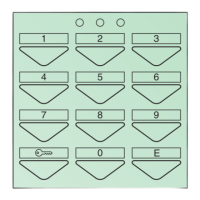
ENABLING THE “KEY” BUTTON
A
Short-circuiting terminals CK1 and CK2, for example via a timer, makes it possible
to activate relay 1 without entering the relay code but by simply pressing the “key”
button
A
.
RESET INPUT (Art. 3188 only)
Connecting this input with the negative (GND) completely locks the keypad and
de-activates all outputs (relays and alarms).
REMOTE KEY INPUT (RK)
Closing this contact with ground activates relay 1 for the set time (see point 8). The
contact can be connected remotely up to 20 m max.
TERMINAL BLOCK - DESCRIPTION
~- ~+ power supply 12V DC/AC
CK1 “key” button enable contact
CK2 key button enable contact (Art. 3188 only)
CK2 - key button enable/negative contact
+OUT unregulated positive
AC- anti-coercion output (Art. 3188 only) max 500 mA
AL- alarm output (and anti-coercion for Art. 3328) max 500 mA
NO/2 relay 2
C/2 relay 2
NC/2 relay 2
NO/1 relay 1
C/1 relay 1
NC/1 relay 1
PGM programming input
RST remote reset input (Art. 3188 only)
- negative (Art. 3188 only)
RK remote key input
6
EN


 To Next Page
 Loading...