11
È possibile tornare alla configurazione predefinita quando
quest'ultima è stata modificata. A tal fine, dovete digitare il codice
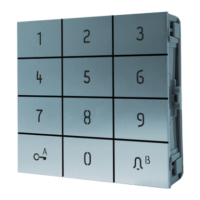
master, il codice di inizializzazione "BA0BAB" e infine due volte il
tasto "B" per uscire dalla programmazione.
Esempio: Inizializzazione di fabbrica con una tastiera
configurata in 5 caratteri.
Digitare: "12345" (modalità programmazione)
quindi: "BA0BAB" (immissione del codice di
inizializzazione fabbrica)
e infine: "BB" (uscita dalla modalità programmazione).
Inizializzazione di fabbrica
Factory setting
It is possible to revert to the default setting once it has been modified.
To do so, please enter the master code, the initialisation code
"BA0BAB" and finally the "B" key twice to leave programming.
Example: Factory setting with a key-pad set at 5 terms.
Type: "12345" (programming mode)
then: "BA0BAB" (entry of the factory initialisation code)
and finally: "BB" (exit programming mode)
Initialisation Usine
Il est possible de revenir à la configuration par défaut, lorsque celle-ci
a été modifiée. Pour ce faire, veuillez taper le code maitre, le code
d'initialisation "BA0BAB" et enfin deux fois la touche "B" pour sortir
de programmation.
Exemple : Initialisation usine avec un clavier configuré en 5
termes.
Taper: "12345" (mode programmation)
puis: "BA0BAB" (saisie du code d'initialisation usine)
et enfin: "BB" (sortie du mode programmation)
Terugzetten naar fabrieksinstellingen
Het is mogelijk om terug te keren naar de standaard configuratie
nadat deze is gewijzigd. Gelieve hiertoe de mastercode in te voeren,
vervolgens de terugstelcode "BA0BAB" en tot slot twee keer op de
toets "B" te drukken om de programmeerstand te verlaten.
Voorbeeld: Terugzetten naar fabrieksinstellingen met een
toetsenbord dat is geconfigureerd met 5 tekens.
Typ: "12345" (programmeerstand)
vervolgens: "BA0BAB" (code voor terugzetten naar
fabrieksinstellingen invoeren)
en tot slot: "BB" (programmeerstand verlaten)
Werkseinstellung
Es ist möglich, zur ursprünglichen Konfiguration zurückzukehren,
wenn diese geändert wurde. Geben Sie zu diesem Zweck den
Mastercode und den Initialisierungscode "BA0BAB" ein und drücken
sie dann zweimal die Taste "B", um den Programmiermodus zu
verlassen.
Beispiel:
Werkseinstellung mit einer auf 5 Stellen
konfigurierten Tastatur.
eingeben: "12345" (Programmiermodus)
dann: "BA0BAB" (Code für die Werkseinstellung)
und zum
Schluss:
"BB" (Programmiermodus verlassen)
Inicialización de fábrica
Es posible volver a la configuración por defecto, cuando haya sido
modificada. Para ello, introduzca el código maestro, el código de
inicialización "BA0BAB" y, por último, pulse dos veces la tecla "B"
para salir de la programación.
Ejemplo: Inicialización de fábrica con un teclado
configurado en 5 dígitos
Introducir: "12345" (modo de programación)
después: "BA0BAB" (introducción del código de
inicialización de fábrica)
y, por último: "BB" (salir del modo de programación)


 To Next Page
 Loading...