Tip: When logging in for the first time, the login interface will pop up
automatically.There are two cases when there is no login interface:
First, the mobile phone itself does not support pop-up windows; Second,
once set, once again enter the interface, you need to manually,Manual
entry method: Open the mobile phone browser, enter "192.168.10.1" in
the address bar.
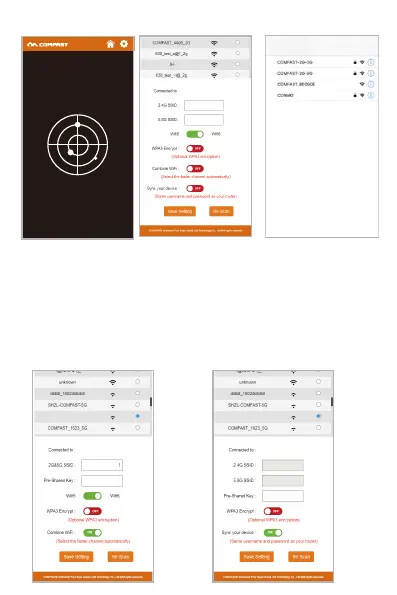
3.4、After setting the password for the first time, it will automatically enter
the repeater scanning page. Set the trunk then choose SSID of the
repeater, enter the upper routing password and click Save to complete the
repeater, reconnect to the wireless network to access the Internet, the
wireless password is the superior routing password (the expanded signal
will be in the superior Add "-2G / 5G" suffix such as XXXX-2G / 5G after
the WiFi name.
Wireless L AN
Illustrate
WiFi5/WiFi6 switch: The repeater selects WiFi5 or WiFi6 protocol, the default is
WiFi6.
WPA3 encryption: When this option is turned on, the repeater uses WPA2/WPA3
hybrid encryption.
Combine WiFi : Turn this option on, it merges 2G and 5G signals into one SSID, and
only shows the SIDD name after one relay in the list box.
Sync your device: Turn on this option, the new WiFi name will be the same as your
original WiFi name, no need to reset the extended WiFi name.
COMFAST-XXXX-2G
COMFAST-XXXX-2G
COMFAST-XXXX
COMFAST-XXXX
COMFAST-XXXX
COMFAST-XXXX
COMFAST-XXXX-2G


 To Next Page
 Loading...