EasyManua.ls Logo

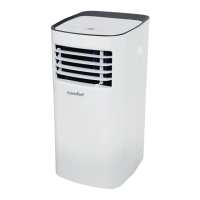
Comfee MPPH-10CRN1-BI0 - User Manual

Comfee MPPH-10CRN1-BI0
27 pages
Print Icon
To Next Page IconTo Next Page
Loading...
model no. MPPH-06CRN1-BI0
AIR CONDITIONER
Instruction Manual
Toll-free: 1-866-646-4332
IMPORTANT: Before using your air conditioner, please
read this manual carefully and keep it for future reference.
PORTABLE

Questions and Answers

  • R
    Robin RichardsonAug 7, 2025
    Why is my Comfee Air Conditioner not cool enough?
    • R
      Ricardo WarnerAug 7, 2025
      If the Comfee Air Conditioner isn't cooling enough, ensure all windows and doors are closed to keep the cool air in and remove any heat sources from the room. Make sure the exhaust air duct is properly connected and not blocked. Also, lower the temperature setting on the unit. A dirty air filter can restrict airflow, so clean the air filter. Place the unit on a flat, level floor.
  • J
    Jesse RomeroAug 16, 2025
    What to do if my Comfee MPPH-10CRN1-BI0 Air Conditioner does not start and P1 appears?
    • B
      Bruce KaufmanAug 16, 2025
      If your Comfee Air Conditioner unit doesn't start when you press the on/off button and 'P1' appears on the display, it means you need to drain the water from the bottom tray.
  • J
    Jason MorenoAug 27, 2025
    Why does my Comfee MPPH-10CRN1-BI0 make a gurgling sound?
    • A
      Ashley KennedyAug 27, 2025
      The gurgling sound you hear in your Comfee Air Conditioner is normal. It's just the sound of the refrigerant flowing inside. Try switching the unit on again after it has cooled down.

Summary

Safety Rules and Precautions

Safe Operation Practices

Essential do's and don'ts for safe appliance operation.

Energy Saving Tips

Recommendations for efficient energy use.

Critical Safety Warnings

Key advice on flammables and electrical safety.

Product Identification and Accessories

Operating Conditions and Included Items

Details on operating temperature ranges and package contents.

Unit Parts Identification

Front and Rear Components

Visual identification of front and rear parts of the air conditioner.

Air Conditioner Features

Operation Panel Overview

Explanation of the air conditioner's control panel and indicators.

Operating Instructions - Core Functions

Basic Controls and Modes

Details on mode selection, buttons, display, and error codes.

Operating Instructions - Additional Features

Auto-Restart and Airflow Adjustment

Information on automatic restart and manual airflow direction control.

Installation Instructions - Placement & Window Kit

Unit Placement and Window Kit Basics

Guidelines for unit positioning and general window slider kit installation.

Installation Instructions - Double-Hung Window

Double-Hung Sash Window Installation

Step-by-step guide for installing in double-hung windows.

Installation Instructions - Sliding Sash Window

Sliding Sash Window Installation

Step-by-step guide for installing in sliding sash windows.

Installation Instructions - Exhaust Hose

Exhaust Hose Installation

Instructions for connecting the exhaust hose to the unit.

Installation Instructions - Water Drainage

Water Drainage Management

Procedures for draining water in dehumidifying mode and handling full tray alerts.

Care and Maintenance

General Maintenance Guidelines

Important precautions before cleaning or servicing the unit.

Air Filter Care

Procedures for removing, cleaning, and mounting the air filter.

Unit Cleaning and Long-Term Storage

Steps for cleaning the enclosure and preparing the unit for extended periods of non-use.

Troubleshooting Common Issues

Common Issues and Solutions

A guide to common problems, their causes, and suggested remedies.

Remote Control - Specifications

Remote Control Specifications

Details on remote specifications, transmission, and environment.

Remote Control - Button Functions

Basic Button Operations

Explanation of ON/OFF, MODE, and TEMP/TIME buttons.

Remote Control - Advanced Functions

Additional Button Controls

Explanation of SLEEP, RESET, FAN, TIMER, CANCEL, CLOCK, LED, and LOCK buttons.

Remote Control - Display Indicators

Understanding Remote Displays

Explanation of transmission, mode, temp, time, fan speed, and lock indicators.

Remote Control - Usage and Maintenance

Handling and Battery Replacement

Guidelines for proper handling, signal transmission, and battery replacement.

Remote Control - Clock and Timer Setup

Setting the Clock

Step-by-step guide to setting the clock on the remote controller.

Remote Control - Operating Modes

Automatic Operation

How to use the remote for automatic cooling or fan operation.

Remote Control - Cooling, Fan, and Dry Modes

Cooling;Fan and Drying Operations

Instructions for operating in COOL, FAN ONLY, and DRY modes.

Remote Control - Timer Operation

Basic Timer Setting

Instructions for setting ON or OFF timers and canceling them.

Remote Control - Timer Examples

Timer ON and OFF Examples

Practical examples of setting ON and OFF timers.

Remote Control - Combined Timer

Combined Timer Operations

Instructions for setting both ON and OFF timers simultaneously.

Air Conditioner Limited Warranty

Warranty Terms and Consumer Responsibilities

Details of the warranty period, Midea's and consumer's responsibilities.

Warranty Exclusions and Service

Limitations of the warranty coverage and steps for obtaining service.

Comfee MPPH-10CRN1-BI0 Specifications

General IconGeneral
TypePortable Air Conditioner
Cooling Capacity10, 000 BTU
DehumidificationYes
Dehumidifying Capacity1.2 L/h
Noise Level (Indoor)52 dB
RefrigerantR290
Power Supply220-240V, 50Hz
Power Consumption (Cooling)1120 W
Dimensions (Indoor Unit)30 x 35 x 70 cm
Weight (Indoor Unit)27.5 kg

Related product manuals