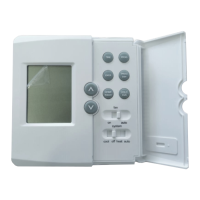
heat
off
cool
system
auto
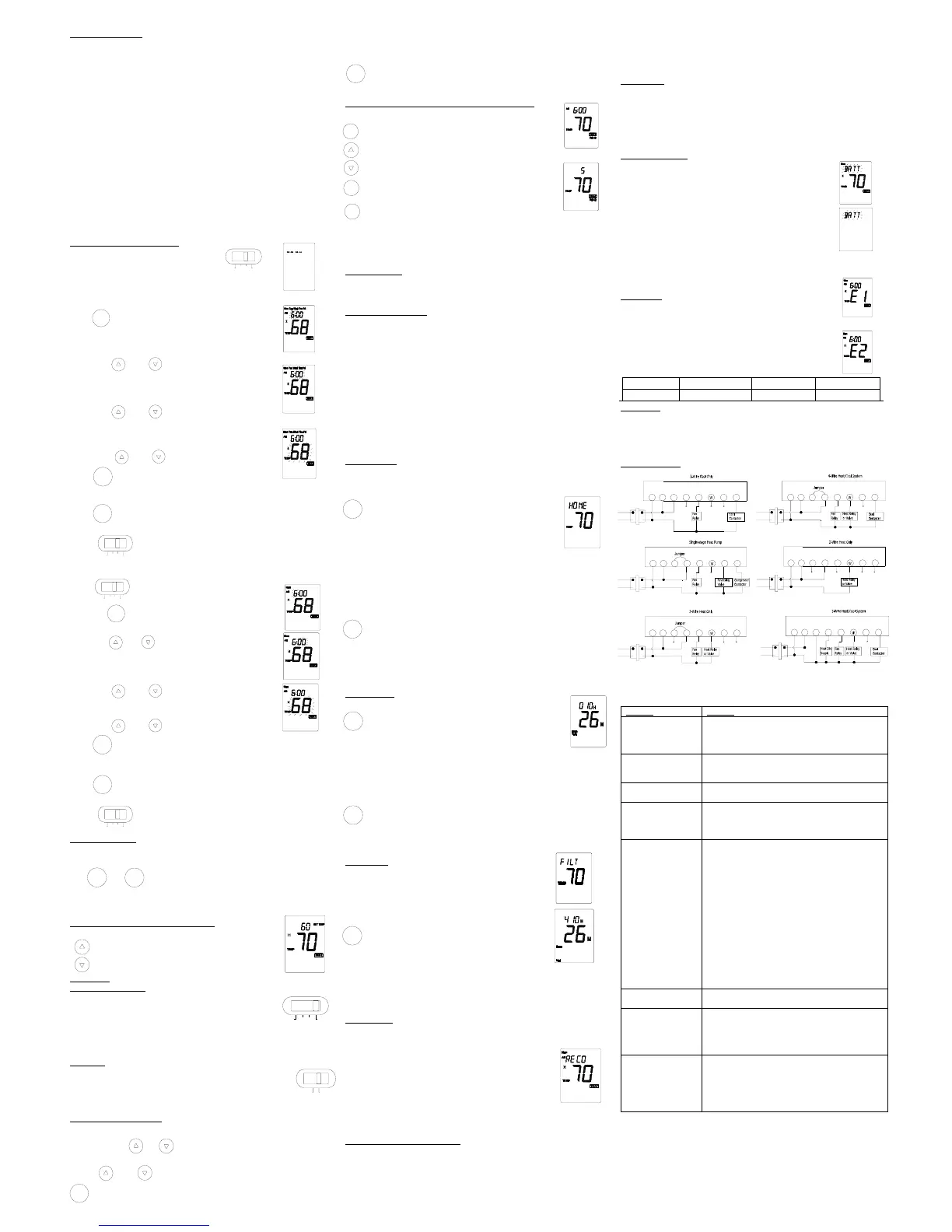
Manual Programming
■ Your thermostat can be programmed for weekdays and weekends, or have unique
programs for all 7 days. Use Weekday /Weekend Programs or 7-day Programming to
enter or revise programs to match your Personal Program Schedule. The same steps
are used when entering programs for the first time, or revising programs entered during
Auto Programming.
■ Familiarize yourself with Manual Programming, so that you can easily modify your
programs as your comfort needs change. The example below demonstrates the Manual
Programming method.
NOTE:
1,The program time can be set in 15-minute increments, and remains the same for both
Heat and Cool programs.
2,The program temperature can be set in increments of 1˚F (1˚C).
3,The Heat setpoint can not be set higher than the Cool set point, and the Cool set point
can not be set lower than the Heat set point.
4,If the system selector is in AUTO mode, the current operating mode will be used for
programming.
5,After 15 seconds without a key press, the thermostat will return to normal display
mode.
6,When setting the program time, note the AM/PM indicator.
7,With the Auto Recovery feature enabled, you do not need to set your comfort program
times early. Auto Recovery will determine how early Recovery will determine how early
to turn your system on, so that the room is comfortable at the program time.
8 .”PROG”,”PROG DAY” ,”HOME TODAY”keys do not work with non-program mode.
Weekday/Weekend Programming
Step 1
■Slide System Selector Switch to HEAT or
COOL to program the corresponding system.
NOTE: If the system selector is in the OFF position, no programming
is permitted. The LCD display will show only dashes when the
program key is pressed.
Step 2 ■ Press and enter program mode,
Display shows weekday programs and Program
hour are flashing .
■ Display for HEAT mode shown.
Step 3 .Use and to change the hour.
.
Step 4 Press PROG again to change the minute position ,the
current minute will be flashing.
Step 5 . Use and to change the minute.
Step6 Press PROG again to change the program temperature,
the current program temperature will be flashing.
Step 7 Use and to change the temperature.
Step 8 ■Press to change to the weekend program.
■Repeat Step 3 and 6 to complete the
weekend programs.
Step 9 ■Press it to enter normal mode or after 15 seconds, the thermostat will
return to normal mode automatically.
Step 10 ■ Change the System Selector Switch to the other system. And
repeat Step2 through 9 above.
7-DAY Programming
Step 1 ■ Slide System Selector Switch to HEAT or
COOL to program the corresponding system.
Step 2 ■ Press it to enter program mode, display shows
Monday programs and Program hour are flashing.
Step 3 .Use and to change the hour.
.
Step 4 Press PROG again to change to the minute position, the
current minute will be flashing.
Step 5 .Use and to change the minute.
Step6 Press PROG again to change to the program temperature
Step 7 .Use and to change the temperature.
Step 8 ■Press it to change the next program number.
■Repeat Step 3 and 6 to complete the remaining Weekday and
Weekend programs.
Step 9 ■Press it to normal mode or after 15 seconds, the thermostat will return
to normal mode automatically.
Step 10 ■ Change the System Selector Switch to the other system. And
repeat Step2 through 9 above.
Reviewing Programs
You may want to review the programs to confirm that the settings are compatible with
your lifestyle.
Use and to review the programs.
NOTE: Programs take affect as soon as the thermostat returns to normal mode.
If you are armchair programming the thermostat, slide the system selector
to the OFF position before mounting the thermostat to the wall plate.
Reviewing the Current Temperature Setting
Current time and temperature.
■Press it for 1 second or less.
■Set Temperature is shown above current room temperature.
OPERATION
System Selector Switch
The System Selector Switch on the front of the thermostat determines
the Operating mode of the thermostat. You may select COOL ,OFF ,
HEAT, AUTO. In order to take full advantage of this thermostat’s
feature, we recommend using the AUTO mode. Refer to the Auto Season Changeover
information on Auto Season Changeover.
NOTE: Anytime you install or remove the thermostat form the wallplate, slide the System
Selector to the OFF position to prevent the possibility of a rapid system On-Off.
Fan Switch
The Fan switch should normally be located in the AUTO position. The Fan
will be turned on along with normal operation of your system. In a normal
gas or oil furnace, the Fan will be turned on by your furnace after its warm-up
delay. For electric heat, air conditioning, and heat pump operation, the Fan will turn on
with the system. To run the Fan on continuously, slide the Fan switch to the ON position.
Temporary Manual Override
To temporarily change the current set temperature without affecting your program:
■Press and hold or for less than 1 second to enter Manual Override
mode..
■Press and to change to your desired new temperature.
■Press to normal mode or wait 15 seconds for it to return automatically.
■The current program number will flash to signify the Temporary Override.
At the next program change, the Temporary Override is canceled, and the
next program temperature becomes the setpoint temperature.
To end the Temporary Manual Override:
■Press and wait for HOLD display on the LCD
■Press HOLD/RUN key twice. This will return the set temperature to the current
program set temperature.
Permanent Override or a Designated Day Override
To hold your Manual Override for vacation or Until a Designated Day
■ Press it to make the current program temperature the HOLD
temperature. HOLD will be displayed on the LCD and the
Program number will disappear.
■ Follow the Temporary Manual Override instructions above
to change the Permanent Manual Override temperature.
■You can confirm the held set temperature by pressing for
less than 1 second.
■ Press again. Hold day will be displayed on the LCD and the
clock will disappear.
■Press TIME key to add override days. Press PROG key to
reduce override days.
■Follow the a Designated Day Override instructions above to change the
Permanent Manual Override temperature.
To end Override:
yUnder Permanent Override Press HOLD/RUN key twice. Under a Designated Day
Override press the HOLD/RUN once. The thermostat will return to the current program,
and the HOLD display will be canceled.
Auto Season Changeover
When the System Selector is in AUTO position , the thermostat will automatically change
between Heating and Cooling systems, depending on your program. We recommend
keeping your programmed heating and cooling temperature at least 4˚F (2˚C) apart to
allow the Auto Season Changeover to occur when the appropriate temperature span has
been reached. However, if your heating and cooling programs set temperatures are
close, there is a built-in program to prevent the thermostat is in Temporary, a Designated
Day Override or Permanent Override, as these overrides are energy saving settings.
Auto Season Changeover will still function in Home Today mode, as this is a comfort
setting.
For example, you may have the following temperatures programmed at a given time:
Heat Set Temp=68˚F, Cool Set Temp=78˚F
If the room temperature rises above 78˚F, then the thermostat will automatically change
to cool mode and turn on the air conditioner.
Likewise, the thermostat will automatically change to heart mode and turn on heat when
the room temperature falls below 68˚F.
HOME TODAY
This patent pending feature allows you to quickly and Temporarily Override your energy
saving program setting on days when you are normally away from home with one key
press.
■Press and enter the Home Today override .The highest
program temperature for today will be selected from your
programs in Heat mode and become the set temperature.(In
Cool mode ,Home Today will select the lowest program
temperature for today to be the set temperature.)
■The display will alternate between “HOME” and the current
time.
■When pressed during the day, the thermostat will remain in Home Today mode
until the first program of the next day.
■If the system is changed between Heat and Cool modes (either manually or by
Auto Season Changeover) during the “Home Today” override period, the setpoint
temperature will be automatically update. It will automatically change from the lowest
cool program setpoint to the highest heat program setpoint.
■Press it and exit Home Today mode before the schedule ending time. ”HOME”
is no longer displayed on the LCD screen, and the thermostat returns to the
current program.
■You can manually change the set point temperature while in Home Today mode.
Refer to the Temporary Manual Override instructions .Manually changing the set
temperature while in Home Today mode will not affect the Home Today ending
time, However, the set temperature will not change automatically with a manual
or Automatic change between heating and cooling.
Energy Monitor
■The Energy monitor feature measures and stores the amount
of time the heating and air conditioning system operates. Usage
can be display for Today (since 12 am), Yesterday, This Week
(since Monday), Last Week (last Monday through Sunday), and
Total (up to 999 Hrs). By monitoring your energy usage, you see
how much the set-back periods are saving, and you can test
program adjustment to save even more. To review energy usage, press to cycle
through Today, Yesterday, this Week, Last Week, and Total. Press again to return
to normal mode, or wait 15 seconds for the display to return to normal mode .You
can also return to normal mode at any time by pressing HOLD/RUN.
■For example: This LCD display shows Today’s usage to be 10 Hours, 26
minutes
■Press and hold for 3 seconds to reset the Energy Monitor’s counters.
The display will blink, and counters will be cleared to zero.
NOTE: Clearing the Energy Monitor counter will also clear the Filter Monitor counter , as
Filter usage and Total Energy usage are the same. Also, clearing the filter Monitor
counter will clear ALL Energy Monitor counters as well.
Filter Monitor
Your thermostat also keeps a record of the number of hours your
filter has been in use. To maximize your system’s performance and
energy efficiency, change or clear your filter regularly.
■When the total system run time for heat and cool reaches 400
hours, you to clean or change your system’s filter, “FILT” will
continue to flash until the counter is set back to zero.
■Press to review total filter usage. After 15 seconds, the
display will return to normal mode, or you can hit
HOLD/RUN to exit immediately.
The Filter Monitor will display up to 999 hours and 59 minutes of
usage. In this example, the counter is at 410 Hours, 26 minutes.
■To reset the Filter Monitor counter, depress ENER for 3 seconds. The display will blink,
and the counter will be reset to zero.
NOTE: Clearing the Filter Monitor counter will also clear ALL Energy Monitor counters,
as Filter usage and Total Energy usage are the same. Also, clearing the Energy Monitor
counters will clear the Filter Monitor counter as well.
Auto Recovery
Auto Recovery calculates how early to turn your system back on, so that the room
temperature is already comfortable by the start of the comfort temperature program
period. Auto Recovery work’s in both Heat and Cool modes.
yWhen the thermostat is in Auto Recovery mode, the display will
alternate “RECO” with time, and the program indicator will flash.
yAuto Recovery can be disabled by sliding the Recovery switch on
the circuit board to disable.
yAuto Recovery will not operate if Permanent hold or Temporary
hold is in operation.
yAuto Recovery can be canceled manually if HOLD is pressed during the recovery
process.
yAuto Recovery will be canceled and change to next period.
Details of Auto Recovery Operation:
■Auto Recovery can be disabled by sliding the Recovery switch on the circuit board to
the DISABLE position.
■Today is in operation.
■Auto Recovery can be canceled manually if HOLD/RUN is pressed during the
recovery process. If a recovery process is canceled manually then the recovery
process will not start again until the next program period starts (an exception is that if
time or program is changed then the thermostat will check Auto Recovery conditions
immediately).
■Auto Recovery will be canceled and change to Home Today mode if HOME TODAY is
pressed during the recovery process.
Backlighting
Your thermostat has an electroluminescent lamp that backlights the display for easy
viewing in the dark.
When any key is pressed the display is illuminated.
The display will remain illuminated for 8 seconds after the last key is pressed. This
allows the light to stay on if you need to operate several keys.
NOTE: If the thermostat is in Low Battery warning condition, the backlight will not
operate. Replace with 2 new AAA alkaline batteries to restore the Backlight function.
Low Battery Warning
Your thermostat has a two-stage lower battery warning system. When
the batteries are first detected to be weak, the first stage low battery
warning is indicated by“ BATT” flashing on the LCD display. At your
earliest convenience, you need to replace the batteries with 2 new
AAA alkaline batteries.
When the batteries become too week for normal operation, the
thermostat enters the second stage low battery warning which shuts
down the thermostat. In this condition, “BATT” flashes alone on the
display, and the thermostat will turn your system Off. Your system will
remain shut-off until the batteries are replaced.
NOTE: The thermostat will still keep the current Set Temperature
and Filter run time in memory until new batteries are installed. After confirming that new
batteries have been inserted, the thermostat will return to normal
operation.
Error Mode
If the thermostat is unable to control your system due to an unexpected
battery problem, the thermostat will enter Error Mode. In this condition,
the thermostat flashes “E1”or “E2”on the LCD display, and shuts off
your system. To correct this problem, replace the batteries with 2 new
AAA alkaline batteries, even if you have recently replaced them. Move
the battery out, and then hold any key to release the rest energy. Then
place the battery again. You will need to reprogram your thermostat
and confirm normal operation.
If Error Mode returns, please call us for further information.
LCD dis



 To Previous Page
 Loading...