18
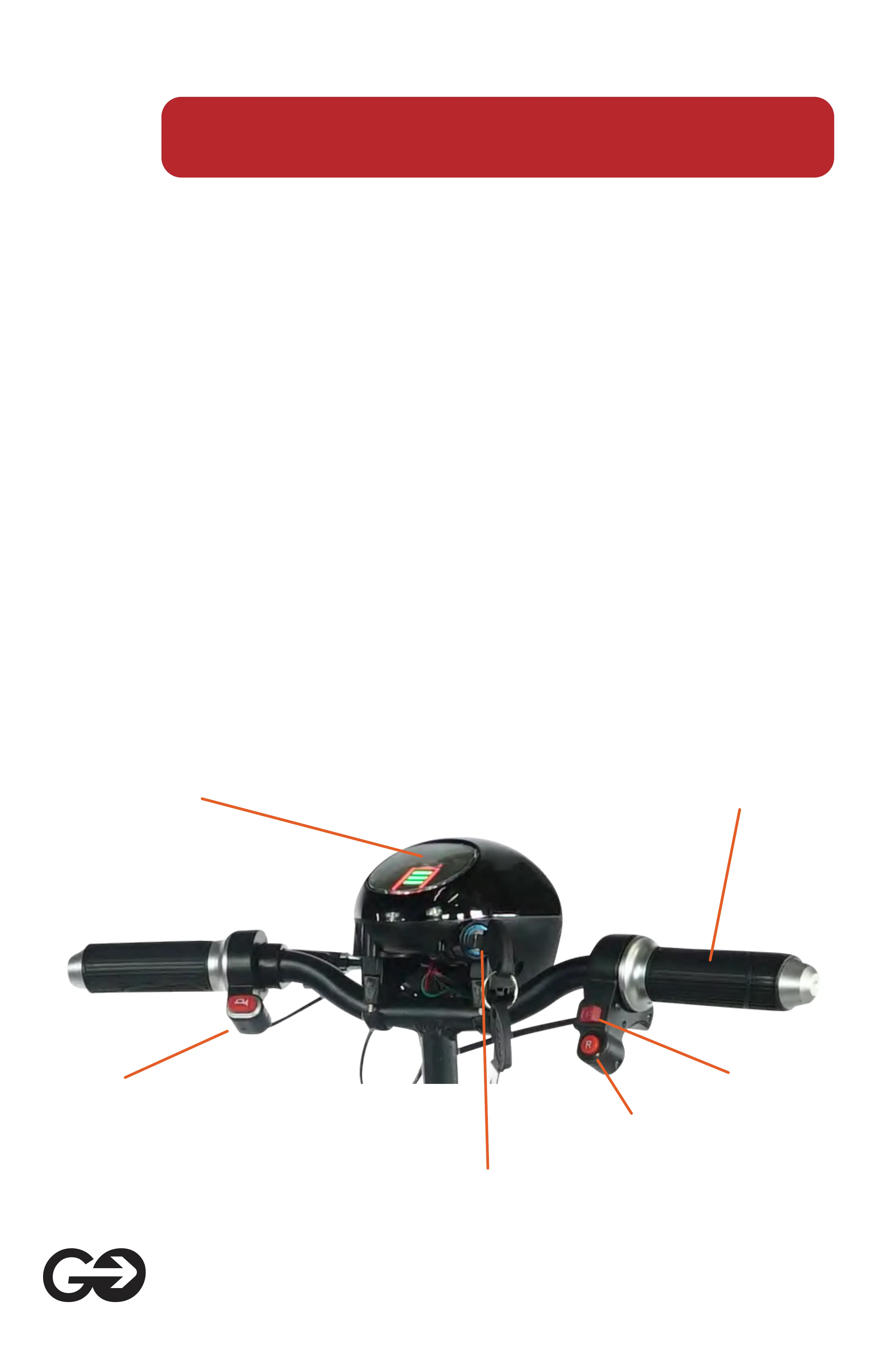
6. Controller
Speed Control
Gears Switch
Horn
Rear Gear Switch
LCD Display
Lock
- LCD instrument assembly, lock, LED headlights and power display.
Insert the key clockwise to turn on the power switch once, otherwise,
turn off the power switch, turn clockwise twice to turn on the LED
headlights.
- Horn switch, press the horn button to sound, to remind the passing
pedestrians and vehicles, to avoid some unnecessary traffic acci-
dents.
- Turn the speed control handle, tum the handle on the right hand, and
adjust the acceleration and deceleration according to the direction
shown in the f figure.
- Three-speed shift switch, I, II, III three gears respectively correspond
to 6/12/18km / h.
- The reverse switch "R", the pressed state is the reverse gear, and
then the rebound state is the forward gear.
- Parking system (two-speed adjustment of handbrake), parking in the
way to prevent uneven road slipping.


 To Next Page