Need help?
Do you have a question about the Comica RGB Umic and is the answer not in the manual?
Highlights the microphone's core component and professional studio-grade sound quality.
Details high-resolution audio recording capabilities and intelligent noise reduction.
Features a USB-C port for digital audio output, offering plug-and-play functionality.
Incorporates dynamic RGB lighting with seven distinct effect modes.
Includes an integrated sound card supporting three levels of reverb effects.
Allows for two-way monitoring, easy muting, and adjustable gain control.
Features a built-in lithium battery that allows operation while charging.
Equipped with a 1/4 threaded hole for flexible mounting and extension options.
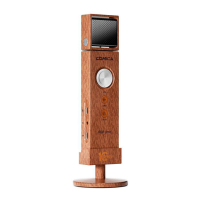
Comes with a detachable desktop stand and features a unique wood grain design.
Covers iPhone compatibility, charging, optimal aiming, environmental considerations, and handling advice.
Steps for connecting to a computer and configuring audio input/output devices.
Lists the main microphone unit and its accompanying accessories like cables and documentation.
Details the function of the gain/volume knob, reverb level switch, and RGB light controls.
Describes the 1/4 thread hole, desktop stand, USB-C ports, and monitoring port.
Explains microphone status indicators, RGB indicators, and the muting button.
Guidance on positioning the microphone for optimal sound capture.
Describes the screen's display of RGB effects and charging status.
Explains the meaning of indicator lights for recording and muting modes.
Instructions on how to use the muting button to toggle mute/unmute.
Details the color codes for battery status and different reverb levels.
Instructions for connecting the microphone to power sources for charging.
How to plug in headphones for real-time audio monitoring.
How to connect the microphone to computers or smartphones via USB-C.
Operation of the gain/volume control knob for mic input and headphone output.
How to switch between different reverb modes using the 'Effect' button.
Instructions for turning RGB lights on/off and changing effects with the 'Mode' button.
Instructions for setting up the microphone with the desktop stand and microphone arm stand.
Details on operating the RGB lighting and connecting the microphone for USB audio output.
 General
| Brand | Comica |
|---|---|
| Model | RGB Umic |
| Category | Microphone |
| Language | English |

 To Next Page