Subject to change V1.1
COMM-TEC GMBH SIEMENSSTRASSE 14 TEL: +49 7161-3000-0 WWW.COMM-TEC.DE
D-73066 UHINGEN FAX: +49 7161-3000-400
How To: Change EDID
DaisyNET II
Step 2: Write the EDID to an DaisyNET Port
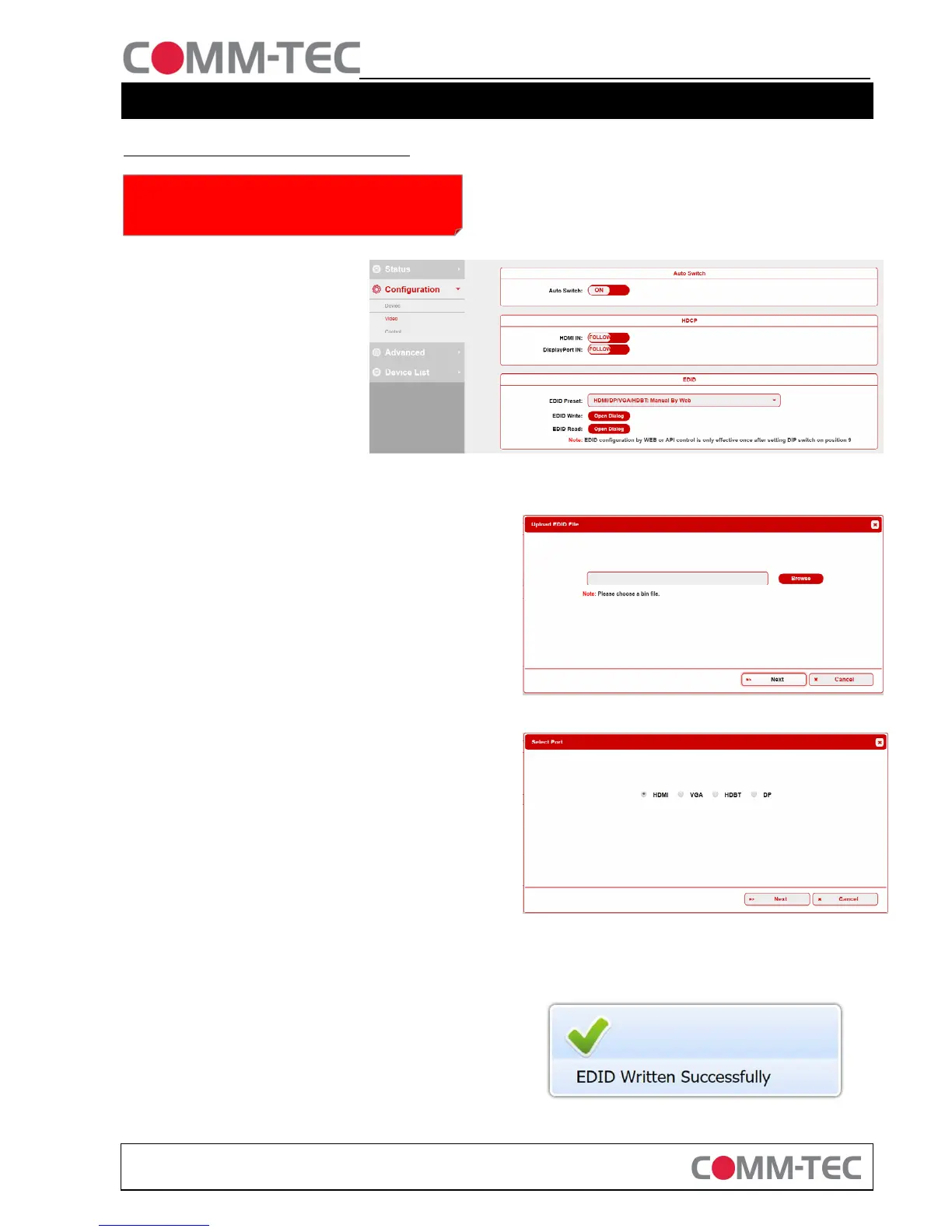
4. Open the webinterface of the
DaisyNET II device, where you
would like to change the EDID
Information. In our setup here it is
IP 192.168.1.121
Default password is: admin
Go to Configuration / Video
Klick on EDID Read: Open Dialog
5. Click on “EDID Read: Open Dialog”
6. Click on “Browse” and select the EDID file you have saved
before on your local harddrive.
7. A message “Upload file OK” will appear
8. Click on Next
9. Select the Port where you would like to write this EDID
Information to. In this case “HDMI”.
10. Click on Next
If you would like to write this EDID to all 4 Inputs you need
to repeat step 5-9 for each input.
11. If everything was successful you get a confirmation Message in
the top right corner


 To Previous Page