
 Need help?
Do you have a question about the Comm NEXGO N86 and is the answer not in the manual?
Expresses gratitude for choosing the terminal and outlines its features and benefits.
Emphasizes the importance of keeping the user guide for reference and troubleshooting.
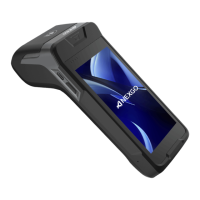
Provides a visual diagram labeling the key physical components of the NEXGO N86 terminal.
Instructions on how to turn the terminal on, off, and put it into sleep mode.
Explains how to use Contactless and Chip & PIN cards with the terminal.
Details the correct procedure for swiping a magnetic stripe card.
Step-by-step guide on how to process a sales transaction using the terminal.
Instructions on how to cancel a transaction that was made in error.
Guide on how to process a refund for a previously settled transaction.
Steps for processing Mail Order/Telephone Order transactions.
Procedure for settling the terminal's batch of transactions.
Instructions to access and navigate the terminal's Android settings.
Explains how to charge the terminal and check its battery status.
Step-by-step guide for connecting the terminal to a Wi-Fi network.
How to check Wi-Fi and SIM network connectivity status.
Instructions for powering off and restarting the terminal.
Overview of available reports like reprints and audits.
How to reprint the last invoice or a specific receipt by invoice number.
How to print daily, all, or date-range specific transaction audit summaries.
A list of common decline codes and their meanings for transaction errors.
Common questions and answers regarding terminal usage, setup, and issues.
Steps to resolve an unresponsive terminal.
Guidance on how changing broadband affects terminal connectivity.
Instructions on how to order new receipt paper rolls.
Advice on handling unauthorized access claims to the terminal.
How to identify potential tampering with the terminal device.
Explanation of Payment Card Industry Data Security Standards.
Information on PCI compliance requirements and how to achieve it.
How to access and use the quick settings panel for common adjustments.
Steps to access and navigate through the terminal's Android settings.
Overview of common Android settings like network and data usage.
How to adjust screen brightness, wallpaper, and font size.
How to manage battery settings, view percentage, and use battery saver.
How to set screen lock and manage privacy settings like location.
How to configure automatic date/time and 12/24 hour clock formats.
Step-by-step visual guide for replacing the receipt paper roll.
Guidance on how to properly tear off the receipt paper.
Information on using the charging base for convenient, all-day terminal power.
Contact details for customer support regarding the terminal.
Explains limitations of transaction authorization and potential chargebacks.
Details on automatic terminal settlement times and requirements.
Guidelines on prohibited transaction types to avoid chargebacks.
Warnings and advice for high-risk MOTO transactions.
Lists common reasons leading to transaction chargebacks.
Rules and restrictions for processing refunds on the terminal.
Contact details for customer support regarding fraud and chargebacks.
 General
| Display Size | 5.5 inches |
|---|---|
| RAM | 2 GB |
| Storage | 16 GB |
| Battery | 5200 mAh |
| Operating System | Android |
| Communication | 4G, 3G, 2G, WiFi, Bluetooth |
| Camera | 5 MP |
| Processor | Quad-core |
| Connectivity | USB |
| Payment Options | NFC, Magnetic Stripe, Chip Card |
| Security | PCI PTS 5.x |
| Card Reader | Magnetic stripe card, IC card, Contactless card |

 To Next Page